# @hyperfrontend/project-scope
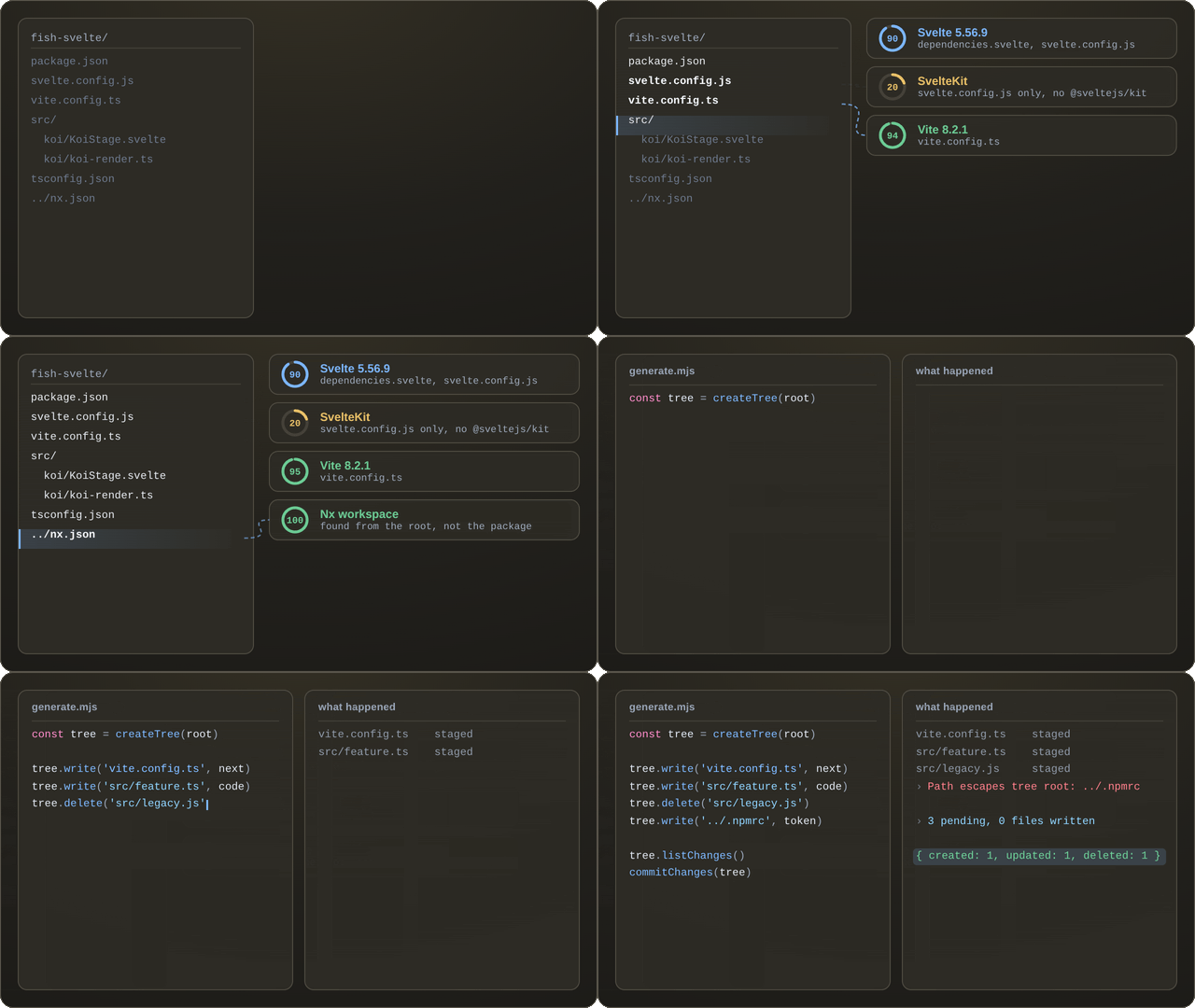
Comprehensive project analysis, technology stack detection, and transactional virtual file system for Node.js tooling.
## What is @hyperfrontend/project-scope?
@hyperfrontend/project-scope provides intelligent codebase analysis for JavaScript/TypeScript projects. It uses multi-signal heuristics to classify project types, detect frameworks and build tools, discover entry points, and map dependency graphs - all with confidence scoring and explainable evidence. The library also includes a virtual file system (VFS) for safe, atomic file modifications.
Designed for tooling authors building code generators, IDE extensions, CI/CD pipelines, and monorepo tooling. Built-in NX workspace detection reads `nx.json`, `workspace.json`, and `project.json` so tooling can adapt to NX-shaped repos with zero runtime peer dependencies.
### Key Features
- **[Project Classification](https://www.hyperfrontend.dev/docs/libraries/project-scope/heuristics/project-type.md)** - Detect application, library, e2e, tool, or plugin with confidence scoring and evidence tracking
- **[Technology Detection](https://www.hyperfrontend.dev/docs/libraries/project-scope/tech.md)** - Identify 20+ frameworks (React, Vue, Angular, Svelte), build tools (Vite, Webpack, esbuild), and testing frameworks (Jest, Vitest, Cypress)
- **[Virtual File System](https://www.hyperfrontend.dev/docs/libraries/project-scope/vfs.md)** - Transaction-aware file operations with atomic commit/rollback
- **[Monorepo Intelligence](https://www.hyperfrontend.dev/docs/libraries/project-scope/tech/monorepo.md)** - Detect NX, Turborepo, Lerna, pnpm/npm/Yarn workspaces; read project configurations
- **[Dependency Graph](https://www.hyperfrontend.dev/docs/libraries/project-scope/heuristics/dependencies.md)** - Build internal import graphs from source code with root/leaf node identification
- **[Entry Point Discovery](https://www.hyperfrontend.dev/docs/libraries/project-scope/heuristics/entry-points.md)** - Find application entries from package.json exports, bin fields, and convention patterns
- **[CLI Interface](https://www.hyperfrontend.dev/docs/libraries/project-scope/cli.md)** - Command-line access to all features with JSON/YAML output
- **Zero Runtime Dependencies** - All dependencies bundled for minimal footprint
### Architecture Highlights
Detector results are cached per function for 30 to 60 seconds, so back-to-back analyses of the same project return the same answer: pass [`skipCache`](https://www.hyperfrontend.dev/docs/libraries/project-scope/tech/#api-DetectAllOptions-prop-skipCache) for a fresh read, or call `clearAllCaches()` to drop every cache at once. The virtual file system buffers writes, deletes, and renames in memory until `commitChanges()`, rejects paths that escape the tree, and validates symlinks before following them, so nothing reaches disk until you say so.
The [architecture guide](https://www.hyperfrontend.dev/docs/libraries/project-scope/architecture.md) covers the module layers, the analysis pipeline, and the caching and security models.
## Why Use @hyperfrontend/project-scope?
### Accurate Framework Detection for Code Generators
Simple `package.json` parsing misses meta-frameworks, optional dependencies, and configuration-based setups. A project with [`next`](https://www.npmjs.com/package/next) installed might be Next.js, but could also be a library that exports Next.js components. This library's multi-signal heuristics analyze dependencies, directory structure (`pages/`, `app/`), and config files (`next.config.js`) together, returning confidence-scored results. Your generator knows _with certainty_ whether to scaffold Next.js pages or React components.
### Safe File Modifications with Rollback
Code generators that write directly to disk risk leaving projects in broken states when errors occur mid-generation. The VFS buffers all changes in memory - write 50 files, validate the result, then `commitChanges()` atomically or `rollbackChanges()` to discard everything. Path traversal attacks are blocked at the VFS layer, making generators safe to run on untrusted input.
### Adaptive Tooling in Heterogeneous Monorepos
Monorepos contain React apps, Vue libraries, Node.js services, and Cypress suites - each requiring different lint rules, build configs, and CI pipelines. Use `detectAll()` per project to get technology detection with version info, then conditionally apply configurations. Cached results (30-60s TTL) ensure repeated analysis during builds stays fast.
### IDE Extensions Without Manual Configuration
IDE features that adapt to frameworks typically require users to configure their project type manually. This library provides runtime detection - determine React vs Vue for component snippets, identify Jest vs Vitest for test runners, detect Vite vs Webpack for build task integration. The CLI enables integration with shell-based tooling and editor extensions.
### Migration Planning with Evidence
Modernizing legacy codebases requires understanding current technology stack before planning migrations. `analyzeProject()` detects legacy frameworks (jQuery, AngularJS, Backbone), maps internal dependency graphs, and provides confidence-scored evidence for each detection. Generate reports that explain _why_ each technology was detected, enabling data-driven migration decisions.
## Installation
```bash
npm install @hyperfrontend/project-scope
```
## Requirements
- **Node.js:** 18.0.0 or higher
- **npm:** 8.0.0 or higher
> **Note:** This library is designed for Node.js environments only (no browser support). All file system operations use synchronous Node.js APIs.
## Quick Start
### Project Analysis
```typescript
import { analyzeProject, detectAll } from '@hyperfrontend/project-scope'
// Full project analysis
const analysis = analyzeProject('./my-project')
console.log(analysis.projectType) // 'library' | 'application' | 'e2e' | 'tool'
console.log(analysis.frameworks.map((f) => `${f.name} (${f.confidence}%)`))
// Technology stack detection
const tech = detectAll('./my-project')
console.log(
'Frontend:',
tech.frontendFrameworks.map((f) => f.name)
)
console.log(
'Build:',
tech.buildTools.map((t) => t.name)
)
console.log(
'Testing:',
tech.testingFrameworks.map((t) => t.name)
)
```
### Virtual File System
```typescript
import { createTree, commitChanges, rollbackChanges } from '@hyperfrontend/project-scope'
const tree = createTree('./my-project')
tree.write('src/new-file.ts', 'export const hello = "world"')
tree.rename('src/old.ts', 'src/renamed.ts')
tree.delete('src/deprecated.ts')
commitChanges(tree) // Atomic commit, or rollbackChanges(tree) to discard
```
### CLI
The package declares no [`bin`](https://www.hyperfrontend.dev/docs/libraries/project-scope/project/package/#api-PackageJson-prop-bin), so nothing is installed onto your [`PATH`](). The commands are reached by calling `run()` with the argument list yourself, from a script or from your own tool's binary:
```typescript
import { run } from '@hyperfrontend/project-scope'
run(['analyze', './my-project', '--format', 'json'])
run(['config', './my-project', '--type', 'typescript,eslint'])
const result = run(['tree', './my-project', '--depth', '3'])
process.exit(result.exitCode)
```
## API Overview
The surface answers three questions about a directory on disk, and which one you are asking decides what you reach for.
**What is this repository?** `analyzeProject(dir)` answers the whole question in one call and returns an
[`AnalysisResult`](https://www.hyperfrontend.dev/docs/libraries/project-scope/models/#api-AnalysisResult): project type, workspace type, frameworks,
build tools, testing frameworks, entry points, config files and a dependency summary, all in one object. Nothing is installed, built or executed to
produce it.
Each detection carries a [`confidence`](https://www.hyperfrontend.dev/docs/libraries/project-scope/heuristics/project-type/#api-ProjectTypeDetection-prop-confidence) from 0 to 100 and the evidence that earned it, and that number is the useful part: a repository with a Svelte
dependency but no SvelteKit routing scores SvelteKit at 20, which is the signal a tool needs to ask rather than assume. When the whole report is more
than you want, [`detectProjectType`](https://www.hyperfrontend.dev/docs/libraries/project-scope/heuristics/#api-detectProjectType) classifies the
project alone and [`detectAll`](https://www.hyperfrontend.dev/docs/libraries/project-scope/tech/#api-detectAll) runs only the technology detectors.
Results are memoised for 30 to 60 seconds, so a loop over a monorepo does not re-read the same package twice.
**Where are its pieces?** [`discoverEntryPoints`](https://www.hyperfrontend.dev/docs/libraries/project-scope/heuristics/#api-discoverEntryPoints) works
out what the project actually starts from, reading [`exports`](https://www.hyperfrontend.dev/docs/libraries/project-scope/project/package/#api-PackageJson-prop-exports), [`main`](https://www.hyperfrontend.dev/docs/libraries/project-scope/project/package/#api-PackageJson-prop-main) and [`bin`](https://www.hyperfrontend.dev/docs/libraries/project-scope/project/package/#api-PackageJson-prop-bin) off the manifest and scoring convention and framework paths beside them, and
[`buildDependencyGraph`](https://www.hyperfrontend.dev/docs/libraries/project-scope/heuristics/#api-buildDependencyGraph) follows first-party imports
through the source to a graph with its roots and leaves marked. Root and workspace finders walk upwards from any nested path, so a tool handed one
file can still locate the repository it belongs to.
**How do I change it safely?** [`createTree(dir)`](https://www.hyperfrontend.dev/docs/libraries/project-scope/vfs/#api-createTree) returns a [`Tree`](https://www.hyperfrontend.dev/docs/libraries/project-scope/vfs/#api-Tree) that
buffers every write, delete, rename and permission change in memory; `exists()` and `read()` see those pending changes, so the tree reads as though the
edits had already landed. Committing is a free function rather than a method: `commitChanges(tree)` applies the batch to disk and reports what it did,
`commitChanges(tree, { dryRun: true })` reports the same without touching anything, and `rollbackChanges(tree)` discards it. Paths that escape the root
are rejected before any of that.
Subpath imports narrow the surface rather than adding to it. [`/heuristics`](https://www.hyperfrontend.dev/docs/libraries/project-scope/heuristics.md) is the inference layer above, [`/tech`](https://www.hyperfrontend.dev/docs/libraries/project-scope/tech.md) is the detector catalogue (with
[`/tech/frontend`](https://www.hyperfrontend.dev/docs/libraries/project-scope/tech/frontend.md), [`/tech/build`](https://www.hyperfrontend.dev/docs/libraries/project-scope/tech/build.md), [`/tech/testing`](https://www.hyperfrontend.dev/docs/libraries/project-scope/tech/testing.md) and their siblings splitting it by category), [`/project`](https://www.hyperfrontend.dev/docs/libraries/project-scope/project.md) reads package manifests, config files and
repository roots, [`/nx`](https://www.hyperfrontend.dev/docs/libraries/project-scope/nx.md) reads `nx.json` and `project.json` for Nx-shaped repos, [`/vfs`](https://www.hyperfrontend.dev/docs/libraries/project-scope/vfs.md) is the transactional tree, [`/models`](https://www.hyperfrontend.dev/docs/libraries/project-scope/models.md) is types only, and [`/core`](https://www.hyperfrontend.dev/docs/libraries/project-scope/core.md)
holds the filesystem, path, encoding and platform primitives everything else is built from. [`/cli`](https://www.hyperfrontend.dev/docs/libraries/project-scope/cli.md) is the command layer: the package declares no [`bin`](https://www.hyperfrontend.dev/docs/libraries/project-scope/project/package/#api-PackageJson-prop-bin),
so [`run(argv)`](https://www.hyperfrontend.dev/docs/libraries/project-scope/cli/#api-run) is how [`analyze`](https://www.hyperfrontend.dev/docs/libraries/project-scope/cli/#api-analyzeCommandDef), [`config`](https://www.hyperfrontend.dev/docs/libraries/project-scope/cli/#api-configCommandDef), [`deps`](https://www.hyperfrontend.dev/docs/libraries/project-scope/cli/#api-depsCommandDef) and [`tree`](https://www.hyperfrontend.dev/docs/libraries/project-scope/cli/#api-treeCommandDef) are invoked,
from your own binary rather than from a shell.
Every export, option and return type is in the [API reference](https://www.hyperfrontend.dev/docs/libraries/project-scope/#api-reference).
## Compatibility
| Environment | Supported |
| --------------- | :-------: |
| Node.js >= 18 | ✅ |
| Modern Browsers | ❌ |
| Web Workers | ❌ |
### Output Formats
| Format | File | Tree-Shakeable |
| ------ | -------------- | :------------: |
| ESM | `index.esm.js` | ✅ |
| CJS | `index.cjs.js` | ❌ |
## Part of hyperfrontend
This library is part of the [hyperfrontend](https://github.com/AndrewRedican/hyperfrontend) monorepo.
**📖 [Full documentation](https://www.hyperfrontend.dev/docs/libraries/project-scope.md)**
- Works seamlessly with [@hyperfrontend/nexus](https://github.com/AndrewRedican/hyperfrontend/tree/main/libs/nexus) for cross-window communication tooling
- Looking for cryptographic utilities? See [@hyperfrontend/cryptography](https://github.com/AndrewRedican/hyperfrontend/tree/main/libs/cryptography)
## License
[MIT](https://github.com/AndrewRedican/hyperfrontend/blob/main/LICENSE.md)
---
Canonical page: https://www.hyperfrontend.dev/docs/libraries/project-scope/
This file: https://www.hyperfrontend.dev/docs/libraries/project-scope.md
Documentation index: https://www.hyperfrontend.dev/llms.txt