

@hyperfrontend/
A linter for TypeScript, JavaScript, JSX, JSON and Markdown with its own parsers and no external runtime packages.
What is @hyperfrontend/linter?
@hyperfrontend/linter checks TypeScript, JavaScript, JSX, JSON and Markdown against rules you choose, and fixes what the rules know how to fix. It parses every file with parsers of its own and installs no dependencies.
It is not a drop-in ESLint. It reimplements a selection of rules from ESLint and well-known plugins, under a configuration that reads like ESLint's flat config, and it does not load ESLint plugins, parsers or shareable configs.
Key Features
Core JavaScript, TypeScript, JSDoc, React, React hooks and package.json rules, and a set of conventions
The rules the upstream recommended configurations turn on, as plain objects you spread into a block
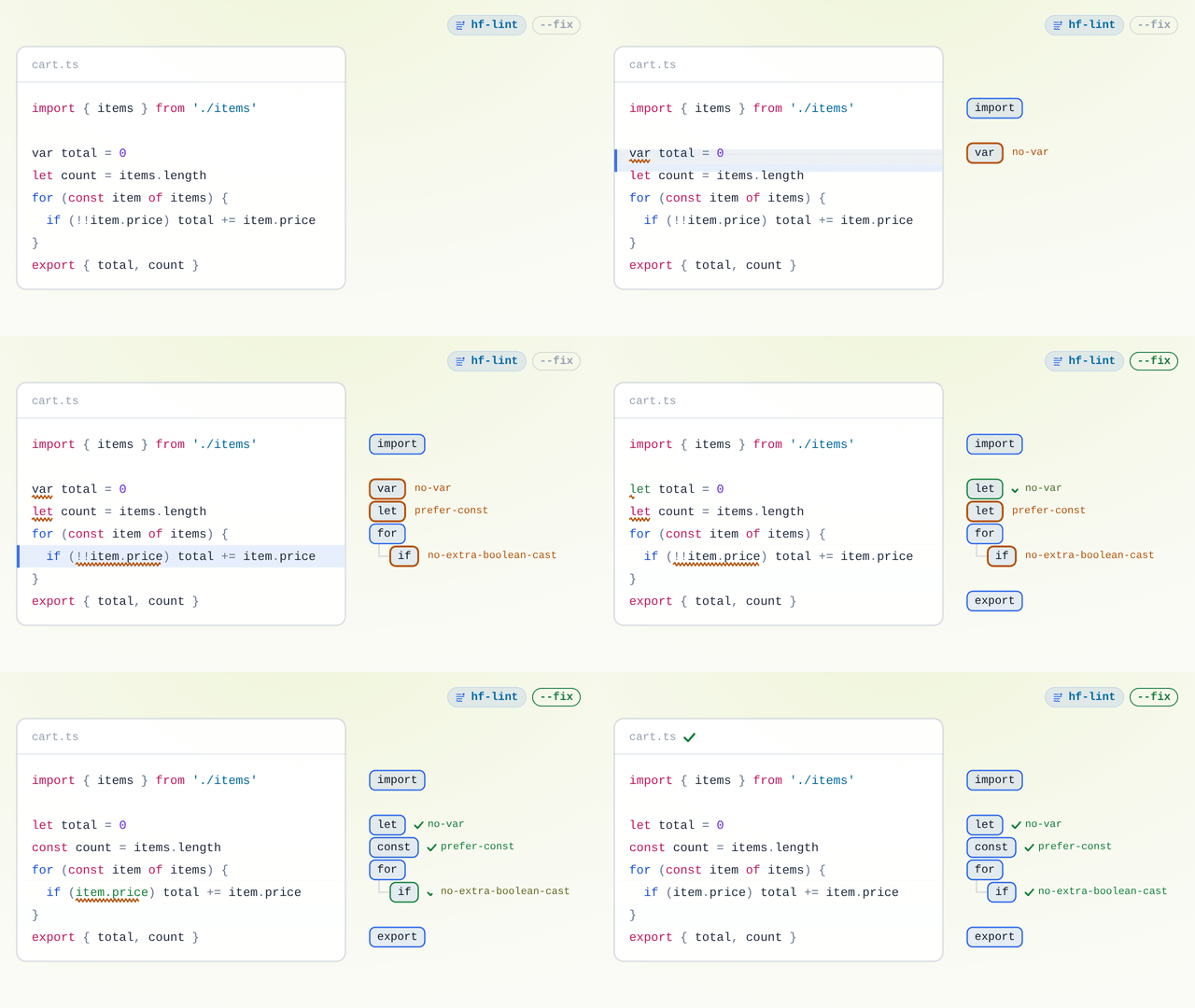
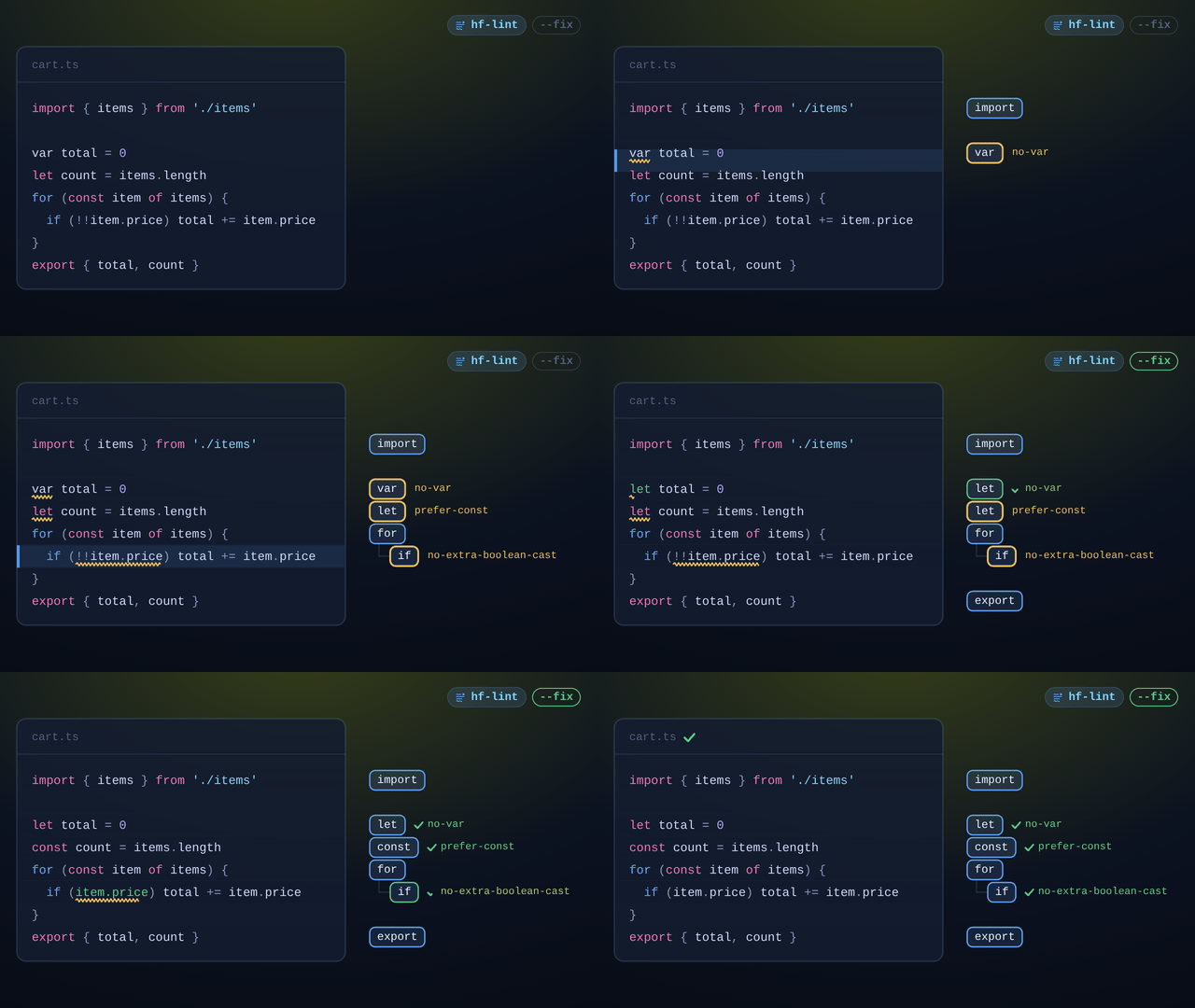
One parse, one traversal
The listeners of every rule in effect for a file run in a single walk of its tree
Register them under a prefix with
familiesand test them withtestRuleFixes and suggestions
--fixapplies fixes; suggestions, for changes that need your judgement, appear in the JSON reportNo dependencies
The package is self-contained; linting loads nothing from npm
Why Use @hyperfrontend/linter?
Fewer packages in the toolchain
A linting setup built on ESLint brings a parser, plugins and their dependencies into every install. This package is one dependency with nothing beneath it, for a project whose checks fit its rules.
Rules you can read and own
Each rule is one module with its specification beside it. When the packaged rules stop short, write and test a rule of your own with the same API they use.
Installation
npm install --save-dev @hyperfrontend/linterRequires Node.js 24 or later, which loads the TypeScript configuration file without a compiler.
Quick Start
Create lint.config.ts at the project root:
import { CODE, CODE_RULES, on } from '@hyperfrontend/linter'

export default [
  { ignores: ['dist/', 'coverage/'] },
  { files: CODE, rules: CODE_RULES },
  { files: ['src/**/*.ts'], rules: on('no-enum import-order') },
]
Then lint and fix from the project root:
npx hf-lint
npx hf-lint src --fix
Lint a project with @hyperfrontend/linter covers configuration, directives, exit codes, CI and linting from code with lint.
API Overview
| Entry | What it is |
|---|---|
@hyperfrontend/linter | Running, configuration types and presets, defineRule and the rule types |
/helpers | Tokens, scopes, JSON properties and positions, for rules of your own |
/testing | testRule, which turns a rule's cases into node:test tests |
hf-lint | The command line |
Every rule, with its options and examples, is in the rule catalogue. Moving from ESLint? Replace ESLint with @hyperfrontend/linter starts with what does and does not carry over.
Limitations
- No rule uses type information, and every packaged rule reads only the file it lints.
- No editor integration: run it from the terminal, a hook or CI.
- No result cache between runs.
- YAML files are read as plain lines for rules of your own; no packaged rule reads them.
Acknowledgements
The packaged rules reimplement rules from ESLint, typescript-eslint, eslint-plugin-jsdoc, eslint-plugin-react, eslint-plugin-react-hooks and eslint-plugin-package-json, whose messages, options and test cases they follow. Their licences and the details are in NOTICE.md. How the linter came to be written is told in I Replaced ESLint. The First Attempt Worked. I Threw It Away.
Compatibility
Runs on
- Node.js>=24.0.0supported
- Browsersnot supported
- Web Workersnot supported
Needs Node.js 24 or later: configurations are TypeScript modules loaded through Node's own type stripping.
Ships as
- ESMTree-shakeable
- CJSNode and older bundlers
- CLIhf-lint
Architecture Highlights§
Every file is parsed once and every rule's listeners run in one traversal of it; the services rules share, such as scopes and code paths, are computed once per file and never rebuilt. The architecture guide covers the parsers, the shared services and the fix loop.
API Reference§
Module Structure
3 modules · 99 total exports
Lint from the command line or as a function, configure with ordered blocks in `lint.config.ts`, select the packaged rules and presets, and define rules of your own.
ƒ Functions
Parameters
| Name | Type | Description |
|---|---|---|
§rule | RuleModule< | The id, language, fixability and listener factory |
Returns
RuleModule<Example
Define a rule that reports debugger statements
import { defineRule } from '@hyperfrontend/linter'

export default defineRule({
  id: 'local/no-debugger',
  language: 'code',
  fixable: false,
  create: (context) => ({
    DebuggerStatement(node) {
      context.report({ start: node.start, end: node.end, message: 'Remove the debugger statement.' })
    },
  }),
})Parameters
| Name | Type | Description |
|---|---|---|
§results | unknown | One result per file |
Returns
stringExample
Print a report for another tool to read
import { formatJson, lint } from '@hyperfrontend/linter'

const { results } = await lint({ cwd: process.cwd() })
process.stdout.write(`${formatJson(results)}\n`)Parameters
| Name | Type | Description |
|---|---|---|
§results | unknown | One result per file, in the order to print |
Returns
stringExample
Print a report for a person to read
import { formatStylish, lint } from '@hyperfrontend/linter'

const { results } = await lint({ cwd: process.cwd(), patterns: ['src'] })
process.stdout.write(formatStylish(results))Parameters
| Name | Type | Description |
|---|---|---|
§request | LintRequest | The working directory, what to lint and how |
Returns
Promise<Example
Lint a project and count its errors
import { lint } from '@hyperfrontend/linter'

const report = await lint({ cwd: process.cwd(), patterns: ['src'] })
console.log(`${report.errorCount} errors, ${report.warningCount} warnings`)Parameters
Returns
Record<Example
Turn several rules on in one block
import { on } from '@hyperfrontend/linter'

export default [
  { files: ['src/**'], rules: on('no-var prefer-const typescript/no-namespace') },
  { files: ['src/**'], rules: on('no-todo-comments', 'warn') },
]Parameters
| Name | Type | Description |
|---|---|---|
§argv | unknown | The arguments after the command |
§environment | RunEnvironment | The working directory and streams |
Returns
Promise<Example
Run the command inside another program
import { run } from '@hyperfrontend/linter'

process.exitCode = await run(['src', '--max-warnings', '0'], {
  cwd: process.cwd(),
  readStdin: () => '',
  write: (text) => process.stdout.write(text),
  writeError: (text) => process.stderr.write(text),
})◈ Interfaces
Properties
readonly files?:unknownGlobs, relative to the configuration file's directory, of the files the block applies to; absent means every file the other blocks select.readonly ignores?:unknownGlobs of files the block does not apply to; in a block without files, globs no block applies to.readonly settings?:Readonly<Settings every rule of the block's files may read.readonly language?:Partial<How the code files the block selects are read; what is left out keeps the earlier blocks' value.readonly families?:Readonly<Rules beyond the packaged ones, by family prefix; a family is registered for the whole configuration, whatever the block's files.Properties
Properties
Properties
Properties
Properties
Properties
"key": value pair of an object.Properties
Properties
Properties
readonly sourceType:"module" | "script" | "commonjs"module for an ES module, script for a classic script, commonjs for a CommonJS module.readonly globals:Readonly<The global names beyond the language's own, each writable or read-only.readonly jsxPragma:stringThe identifier every JSX element references, or null when JSX references none.readonly jsxFragmentName:stringThe identifier a JSX fragment references in place of the pragma, or null for the pragma.Properties
Properties
Properties
readonly cwd:stringThe working directory: the project root the files are linted under, where the configuration search starts and what relative paths are resolved against.readonly patterns?:unknownFiles, directories or globs to lint, relative to cwd; absent or empty, cwd itself. Ignored when text is given.readonly config?:stringA configuration module to load, relative to cwd, in place of the nearest lint.config.ts; its globs are then relative to cwd.readonly fix?:booleanWhether to apply fixes; each result's output then holds the fixed text, or null when nothing changed. Nothing is written.readonly errorOnUnmatchedPattern?:booleanWhether a pattern that names no file is an error; true when absent.--stdin reads it.Properties
Properties
Properties
Properties
Properties
Properties
Properties
body?:Node | unknownA program's statements, a block's statements, a class body's members, a function's body, a loop's body, a labelled statement's body, a module block's statements.expression?:boolean | NodeThe expression of an expression statement, a decorator, a spread, an assertion, a chain, a container or an export assignment.argument?:NodeThe argument of a return, throw, spread, rest, unary, update, yield, await or import type.left?:NodeThe left side of a for-in, for-of, binary, logical, assignment, assignment pattern or qualified name.right?:NodeThe right side of a for-in, for-of, binary, logical, assignment, assignment pattern or qualified name.id?:NodeThe identifier of a declaration, declarator, enum, module, interface, type alias or import equals.value?:string | number | bigint | boolean | RegExp | RegexValue | TemplateValue | NodeThe value of a member, property, literal, template element or import attribute.typeAnnotation?:NodeThe type annotation of an identifier, pattern, member, signature or mapped type.Properties
readonly start:numberThe offset where the problem starts; what the directives and the ordering go by.readonly end?:numberThe offset where it ends; absent when the rule names a point rather than a range.readonly at?:LocationThe position printed instead of the one the offsets give, when the rule names it.readonly suggestions?:unknownSuggestions, when the rule offers any; they are reported, not applied.Properties
Properties
readonly settings:Readonly<The settings of the blocks that matched the file.readonly language:LanguageSettingsHow the file's text is read: module kind, globals and JSX pragma.Properties
Properties
Methods
create(Parameters
| Name | Type | Description |
|---|---|---|
§context | RuleContext< | The file, its tree, the rule's options and the report function |
Returns
Listeners<import() returns it.Properties
Properties
Properties
Properties
Properties
Properties
Properties
◆ Types
type JsonNode = JsonObjectNode | JsonArrayNode | JsonLiteralNodetype JsonTreeNode = JsonDocument | JsonNode | JsonPropertyNodetype Kind = "Program" | "ExpressionStatement" | "BlockStatement" | "EmptyStatement" | "DebuggerStatement" | "WithStatement" | "ReturnStatement" | "LabeledStatement" | "BreakStatement" | "ContinueStatement" | "IfStatement" | "SwitchStatement" | "SwitchCase" | "ThrowStatement" | "TryStatement" | "CatchClause" | "WhileStatement" | "DoWhileStatement" | "ForStatement" | "ForInStatement" | "ForOfStatement" | "FunctionDeclaration" | "TSDeclareFunction" | "VariableDeclaration" | "VariableDeclarator" | "ClassDeclaration" | "ClassExpression" | "ClassBody" | "MethodDefinition" | "PropertyDefinition" | "TSAbstractMethodDefinition" | "TSAbstractPropertyDefinition" | "AccessorProperty" | "StaticBlock" | "TSIndexSignature" | "Decorator" | "ImportDeclaration" | "ImportSpecifier" | "ImportDefaultSpecifier" | "ImportNamespaceSpecifier" | "ImportAttribute" | "ExportNamedDeclaration" | "ExportSpecifier" | "ExportDefaultDeclaration" | "ExportAllDeclaration" | "TSExportAssignment" | "TSImportEqualsDeclaration" | "TSExternalModuleReference" | "TSNamespaceExportDeclaration" | "Identifier" | "PrivateIdentifier" | "Literal" | "TemplateLiteral" | "TemplateElement" | "TaggedTemplateExpression" | "ThisExpression" | "Super" | "ArrayExpression" | "ObjectExpression" | "Property" | "FunctionExpression" | "TSEmptyBodyFunctionExpression" | "ArrowFunctionExpression" | "UnaryExpression" | "UpdateExpression" | "BinaryExpression" | "LogicalExpression" | "AssignmentExpression" | "ConditionalExpression" | "CallExpression" | "NewExpression" | "MemberExpression" | "ChainExpression" | "SequenceExpression" | "YieldExpression" | "AwaitExpression" | "ImportExpression" | "MetaProperty" | "SpreadElement" | "ArrayPattern" | "ObjectPattern" | "RestElement" | "AssignmentPattern" | "TSAsExpression" | "TSSatisfiesExpression" | "TSNonNullExpression" | "TSTypeAssertion" | "TSInstantiationExpression" | "TSParameterProperty" | "JSXElement" | "JSXFragment" | "JSXOpeningElement" | "JSXClosingElement" | "JSXOpeningFragment" | "JSXClosingFragment" | "JSXAttribute" | "JSXSpreadAttribute" | "JSXIdentifier" | "JSXNamespacedName" | "JSXMemberExpression" | "JSXText" | "JSXExpressionContainer" | "JSXEmptyExpression" | "JSXSpreadChild" | "TSTypeAnnotation" | "TSTypeParameterDeclaration" | "TSTypeParameter" | "TSTypeParameterInstantiation" | "TSInterfaceDeclaration" | "TSInterfaceBody" | "TSInterfaceHeritage" | "TSClassImplements" | "TSTypeAliasDeclaration" | "TSEnumDeclaration" | "TSEnumBody" | "TSEnumMember" | "TSModuleDeclaration" | "TSModuleBlock" | "TSPropertySignature" | "TSMethodSignature" | "TSCallSignatureDeclaration" | "TSConstructSignatureDeclaration" | "TSTypeLiteral" | "TSTypeReference" | "TSQualifiedName" | "TSUnionType" | "TSIntersectionType" | "TSArrayType" | "TSTupleType" | "TSNamedTupleMember" | "TSOptionalType" | "TSRestType" | "TSFunctionType" | "TSConstructorType" | "TSConditionalType" | "TSInferType" | "TSMappedType" | "TSIndexedAccessType" | "TSTypeOperator" | "TSTypeQuery" | "TSImportType" | "TSLiteralType" | "TSTemplateLiteralType" | "TSTypePredicate" | "TSThisType" | "TSAnyKeyword" | "TSUnknownKeyword" | "TSNeverKeyword" | "TSVoidKeyword" | "TSUndefinedKeyword" | "TSNullKeyword" | "TSStringKeyword" | "TSNumberKeyword" | "TSBooleanKeyword" | "TSBigIntKeyword" | "TSSymbolKeyword" | "TSObjectKeyword" | "TSIntrinsicKeyword"type Language = "code" | "json" | "markdown" | "text"type Listener = (kind:exit for the way out.type MarkdownAlign = "left" | "right" | "center" | nulltype MarkdownKind = "root" | "heading" | "paragraph" | "text" | "inlineCode" | "code" | "html" | "thematicBreak" | "blockquote" | "list" | "listItem" | "table" | "tableRow" | "tableCell" | "link" | "linkReference" | "image" | "imageReference" | "definition" | "footnoteDefinition" | "footnoteReference" | "emphasis" | "strong" | "delete" | "break"type RuleFamily = Readonly<type RuleSetting = "off" | "warn" | "error" | unknowntype RuleSource = RuleModule | (● Variables
What rules ask beyond the tree: tokens and comments around a node, children, scopes and variables, JSON properties, positions, globs, merged fixes, and parsing another file.
ƒ Functions
Returns
Node[Example
List an if statement's children
const { tree } = parseCode('if (ready) start()', '.ts')
childrenOf(tree.body[0]).map((child) => child.kind)
// => ['Identifier', 'ExpressionStatement'] (the null alternate is skipped)Parameters
Returns
SourceComment[Example
Find the comments inside a range
// file.text: 'const total = price * 2 // doubled'
commentsBetween(file, 0, file.text.length)
// => [{ start: 24, end: 34, text: ' doubled', ... }]Parameters
| Name | Type | Description |
|---|---|---|
§pattern | string | The text as a configuration wrote it |
Returns
GlobExample
Match alternatives, everything below, or a whole directory
const entries = compileGlob('src/index.{ts,tsx}')
entries.test('src/index.tsx') // => true
entries.test('src/index.js') // => false

compileGlob('src/**').test('src/ui/button.tsx') // => true

const dist = compileGlob('dist/')
dist.test('dist/index.js') // => true
dist.test('distance.ts') // => falseReturns
VariableExample
Resolve a name outward from a function's scope
const count = findVariable(scopeOf(analysis, step), 'count')
count.scope.kind // => 'module'
count.references.map((reference) => reference.direction)
// => ['write', 'read-write']
findVariable(scopeOf(analysis, step), 'missing') // => nullReturns
stringExample
Match a property's indentation in a fix
const text = '{\n  "files": ["dist"]\n}'
indentationAt(text, 4) // => ' 'Parameters
| Name | Type | Description |
|---|---|---|
§analysis | ScopeAnalysis | The program's scope analysis |
§identifier | Node | The identifier tested |
Returns
booleanExample
Tell the language's undefined from a parameter named undefined
// program: limit + undefined
//          function read(undefined) { return undefined }
isGlobalReference(analysis, undefinedInSum) // => true
isGlobalReference(analysis, undefinedInRead) // => false (the parameter)Parameters
Returns
booleanExample
Tell a wrapped operand from its expression
// file.text: 'const total = (price) * 2'
isParenthesised(program, file, price) // => true
isParenthesised(program, file, init) // => false (the whole BinaryExpression)Returns
unknownExample
Narrow a property value to a string
// { "name": "@acme/ui", "private": true }
isString(propertyOf(manifest, 'name').value) // => true
isString(propertyOf(manifest, 'private').value) // => falseParameters
Returns
stringExample
Read a line without its break
const map = lineMap('first\r\nsecond\n')
lineText(map, 1) // => 'first'
lineText(map, 3) // => '' (the empty line after the last break)Parameters
Returns
booleanExample
Check a path against ignore patterns
const ignores = [compileGlob('dist/'), compileGlob('*.config.ts')]
matchesAny(ignores, 'jest.config.ts') // => true
matchesAny(ignores, 'src/app.ts') // => falseParameters
Returns
FixExample
Fold a keyword change and an annotation removal into one fix
const text = 'let total: any = 0'
mergeEdits(text, [{ start: 9, end: 14, text: '' }, { start: 0, end: 3, text: 'const' }])
// => { start: 0, end: 14, text: 'const total' }parseCode(
Parameters
| Name | Type | Description |
|---|---|---|
§text | string | The source text |
§extension | string | The file's extension with its dot |
§sourceType | "module" | "script" | "commonjs" | Whether the text is a module, a script or a CommonJS module; a script's strings may hold legacy escapes(default: 'module') |
§declaration | boolean | Whether the text is a declaration file, where declarations need no initialiser or body(default: false) |
Returns
ParsedCodeExample
Parse a file, or read why it did not parse
const parsed = parseCode('const total = price * 2 // doubled', '.ts')
parsed.tree.kind // => 'Program'
parsed.comments[0].text // => ' doubled'

parseCode('const = 1', '.ts').error
// => { message: 'Identifier expected.', offset: 6 }Parameters
Returns
PositionExample
Turn an offset into a 1-based position
const map = lineMap('const a = 1\nconst b = 2')
positionAt(map, 0) // => { line: 1, column: 1 }
positionAt(map, 18) // => { line: 2, column: 7 }Parameters
| Name | Type | Description |
|---|---|---|
§object | JsonObjectNode | The node whose properties are searched |
§name | string | The key to look for |
Returns
JsonPropertyNodeExample
Look up a field of package.json
// { "name": "@acme/ui", "files": ["dist"] }
propertyOf(manifest, 'files')?.value.kind // => 'array'
propertyOf(manifest, 'version') // => nullParameters
| Name | Type | Description |
|---|---|---|
§analysis | ScopeAnalysis | The program's scope analysis |
§identifier | Node | The identifier looked up |
Returns
ReferenceExample
Follow a use of a name back to its variable
// program: const limit = 10 / limit + 1 / function check() {}
referenceOf(analysis, limitInSum)?.resolved?.name // => 'limit'
referenceOf(analysis, checkDeclaration.id) // => null (a declaration, not a use)Parameters
| Name | Type | Description |
|---|---|---|
§node | JsonTreeNode | The node a document listener received |
Returns
JsonObjectNodeExample
Start a rule from the document's root object
document(node) {
  const manifest = rootObject(node)
  if (manifest === null) return // the document is an array or a literal
}Parameters
| Name | Type | Description |
|---|---|---|
§context | RuleContext< | The rule's context |
Returns
ScopeAnalysisExample
Share one analysis across a rule's handlers
const analysis = scopeAnalysisOf(context)
scopeAnalysisOf(context) === analysis // => true, built once per programParameters
| Name | Type | Description |
|---|---|---|
§analysis | ScopeAnalysis | The program's analysis |
§node | Node | The node whose scope is wanted |
Returns
ScopeExample
Find the scope an identifier sits in
// program: 'let count = 0\nfunction bump(step) {\n  count += step\n}'
// step: the Identifier read inside bump
scopeOf(analysis, step).kind // => 'function'
scopeOf(analysis, program).kind // => 'global'Returns
JsonStringNode[Example
Collect the strings of a nested value
// "files": ["dist", { "glob": "src" }, 3]
stringsUnder(files.value).map((node) => node.value) // => ['dist', 'src']Parameters
Returns
SourceTokenExample
Find the token after a node
// file.text: 'const total = (price) * 2', price: its Identifier node
tokenText(file, tokenAfter(program, price.end)) // => ')'
tokenAfter(program, file.text.length) // => nullParameters
Returns
SourceTokenExample
Find the token before a node
// file.text: 'const total = (price) * 2', price: its Identifier node
const open = tokenBefore(program, price.start)
tokenText(file, open) // => '('
tokenBefore(program, 0) // => nullParameters
Returns
SourceToken[Example
List the tokens a node spans
// file.text: 'const total = (price) * 2', init: the BinaryExpression
const tokens = tokensBetween(program, init.start, init.end)
tokens.map((token) => tokenText(file, token))
// => ['(', 'price', ')', '*', '2']Parameters
| Name | Type | Description |
|---|---|---|
§file | RuleFile | The file linted |
§token | SourceToken | The token read |
Returns
stringExample
Read a token's characters
// file.text: 'const total = 2'
tokenText(file, program.tokens[1]) // => 'total'Returns
JsonSpanExample
Report a fact about the whole file
context.report({ ...wholeDocument(context.file), message: 'Missing "license" field.' })
// wholeDocument(file) for an 86-character file => { start: 0, end: 86 }◈ Interfaces
Properties
Properties
Properties
Properties
Properties
Methods
Example
A read keeps no write expression
const reference = new Reference(
  identifier, scope, 'read', 'value', initialiser, true
)
reference.writeExpr // => null
reference.init // => false
reference.isRead() // => trueProperties
Example
A block scope's var declarations land in the module scope
const global = new Scope('global', program, null, false)
const module = new Scope('module', program, global, true)
const block = new Scope('block', statement, module, true)
global.children.length // => 1
block.variableScope === module // => trueProperties
readonly globalKind:ReferenceKindFor a global: the positions it is valid in; null for a declared variable.get isType:booleanWhether the variable is valid in a type position; a global with fixed positions keeps them whatever a script declares.get isValue:booleanWhether the variable is valid in a value position; a global with fixed positions keeps them whatever a script declares.Example
A global's positions are fixed, a declared variable's follow its definitions
const options = { kind: 'value', writable: false }
const window = new Variable('window', globalScope, options)
window.isType // => false
window.writable // => false

const total = new Variable('total', moduleScope, null)
total.writable // => null (not a global)
total.isType // => true until a definition says otherwise◆ Types
type SourceType = indexedAccessSpecifying a rule: valid texts that must report nothing and invalid texts with the messages, positions and fixed text they must produce, each case one `node:test` test.
ƒ Functions
Parameters
| Name | Type | Description |
|---|---|---|
§rule | RuleModule | The rule under test |
§cases | RuleCases | Its valid and invalid cases |
Example
Specify a rule with one valid and one invalid case
import { testRule } from '@hyperfrontend/linter/testing'
import rule from './no-debugger'

testRule(rule, {
  valid: [{ name: 'a plain call', path: '/project/a.ts', text: 'run()\n' }],
  invalid: [
    {
      name: 'a debugger statement',
      path: '/project/a.ts',
      text: 'debugger\n',
      errors: [{ message: "Unexpected 'debugger' statement.", line: 1, column: 1 }],
    },
  ],
})◈ Interfaces
Properties
readonly endColumn?:numberThe 1-based end column, when checked; null for a problem without a range.Properties
readonly path:stringThe absolute path the text is linted as; its directory is the project root unless root says otherwise.readonly language?:Partial<How the text is read, where it differs from the default.readonly output?:stringThe text after the rule's fixes when it fixes, null when it must offer no fix; unchecked when absent.Properties
readonly path:stringThe absolute path the text is linted as; its directory is the project root unless root says otherwise.readonly language?:Partial<How the text is read, where it differs from the default.Properties
Related reading§
- Architecture
Architecture
How @hyperfrontend/linter is put together, and why.
- How-to
How to lint a project with @hyperfrontend/linter
A project needs its code checked and fixed against agreed rules, without bringing a parser, plugins and their dependency trees into every install.
- How-to
How to replace ESLint with @hyperfrontend/linter
ESLint, its parser and its plugins put dozens of packages into every install of a project whose checks fit a smaller set of rules, and removing them must not quietly drop a check the project depends on.
- How-to
How to write and test a custom lint rule
A team needs a check the packaged lint rules do not make, with a fix where one is safe, and needs it to keep behaving as intended as the code around it changes.
- Getting started
Getting Started
Set HyperFrontend up and embed a first feature.
- Architecture
Architecture Guide
How the packages fit together.