

@hyperfrontend/
SDK, CLI, and dev server for building, embedding, and orchestrating hyperfrontend micro-frontend features.
What is @hyperfrontend/features?
Embedding another team's app inside your page usually means an iframe, a pile of postMessage conventions nobody wrote down, and a frame that never quite fits the space you gave it. @hyperfrontend/features turns that into a contract: the feature app declares what it sends, what it accepts, and which display modes it supports; the host picks a mode and gets a typed handle back. The messaging protocol underneath is @hyperfrontend/nexus, and this package adds everything around it: iframe management, display modes and sizing, the open/close lifecycle, and a CLI that packages a feature app into an installable shell.
// In the feature app, from '@hyperfrontend/features/hostee'
const feature = createFeature({ name: 'checkout', contract })
await feature.ready()
feature.send('order-placed', { id: 'A-1094' })

// In the host app, from '@hyperfrontend/features/host'
const checkout = createShell({ modes: { dialog: mountDialog }, url: 'https://checkout.example.com' })
checkout.on('order-placed', (order) => showReceipt(order))
checkout.open({ displayMode: DisplayMode.Dialog })
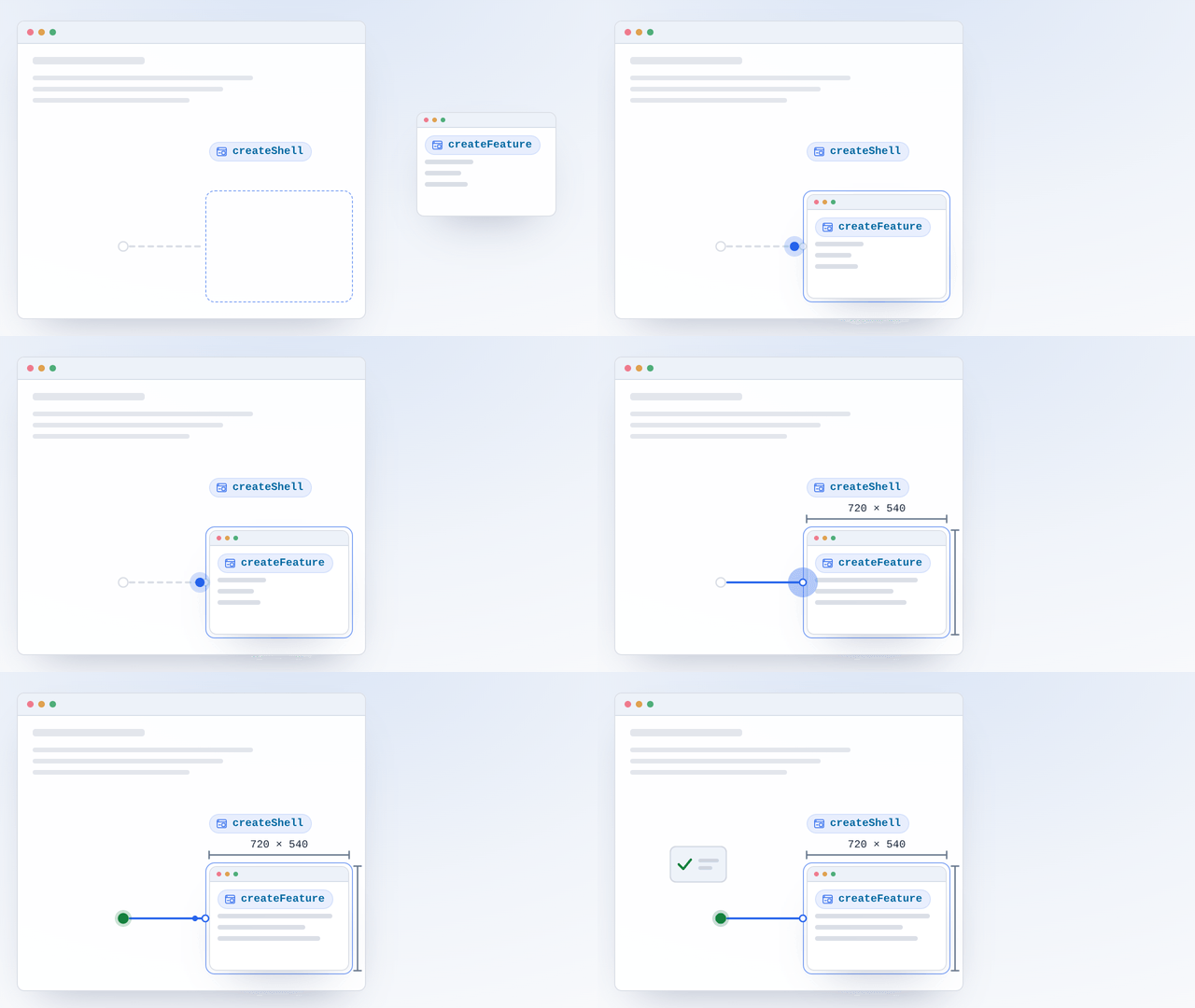
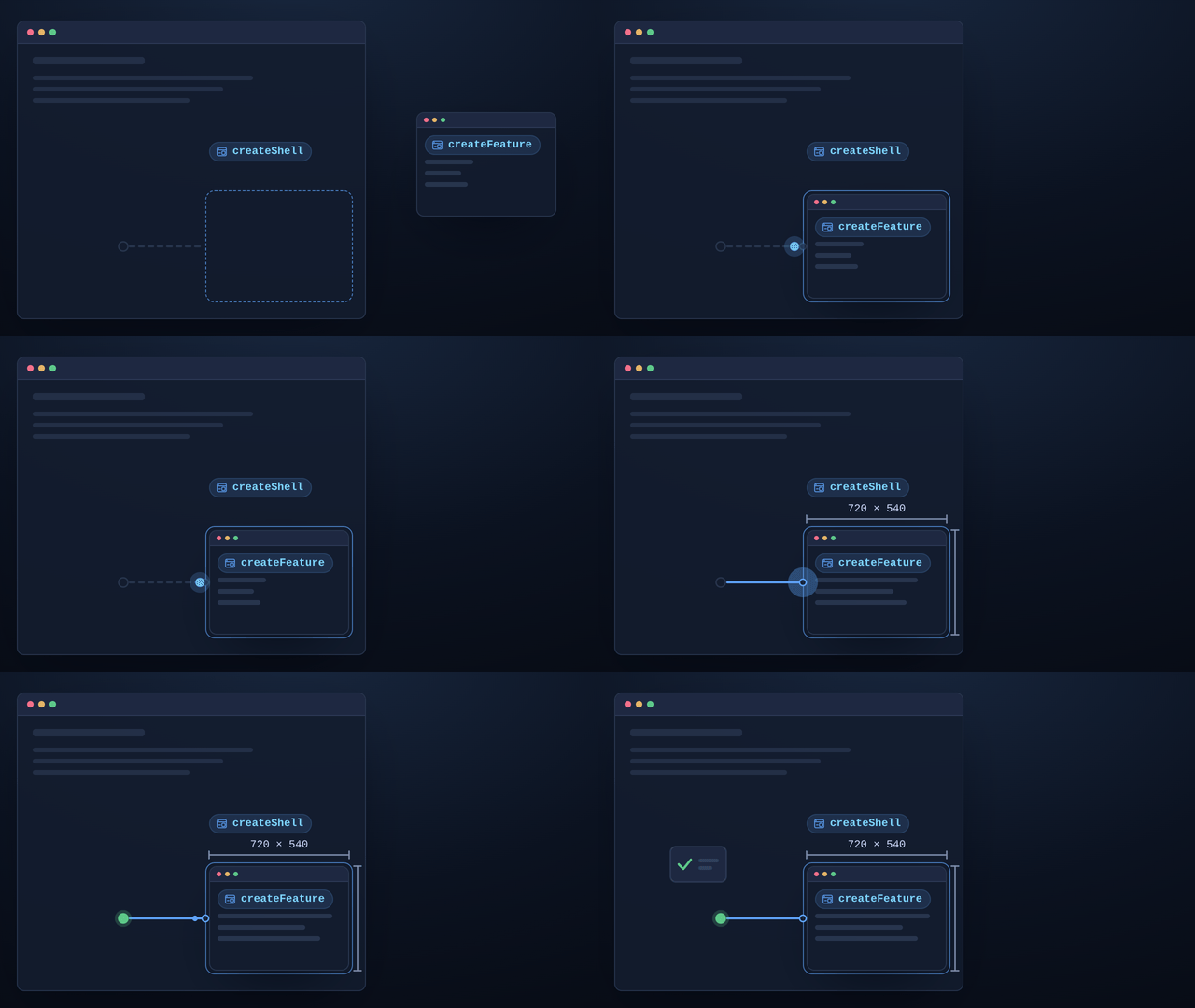
It is organized into independent subpath entry points so consumers import only the surface they need.
Key Features
Embed features with a shell factory, display modes (embedded, dialog, popup, standalone), and open/close lifecycle.
Initialize a feature app, declare its contract, and manage its lifecycle.
init,build, anddevcommands driven byfeature.config.*, plusservefor production static hosting.Static file server plus a debug UI for inspecting host/hostee message traffic; the same core backs the
hf serveproduction server.Direct dependencies are bundled by
@hyperfrontend/builder, so generated shells stay self-contained.
Why Use @hyperfrontend/features?
You get typed host and hostee SDKs, a CLI, and a dev server for composing micro-frontend features, and it works with any framework (React, Vue, Angular, vanilla JS) and build tool. Features build into self-contained shell packages with their dependencies bundled in, so a host installs one package and inherits no transitive install burden.
Installation
npm install @hyperfrontend/featuresQuick Start
In a feature app (the hostee), declare a contract and connect to whatever host embeds it:
import { createFeature } from '@hyperfrontend/features/hostee'

const feature = createFeature({
  name: 'clock',
  contract: { emitted: [{ type: 'tick' }], accepted: [{ type: 'set-timezone' }] },
})

await feature.ready()
feature.on('set-timezone', ({ tz }) => render(tz))
setInterval(() => feature.send('tick', Date.now()), 1000)
In a host app, build a shell and surface the feature in any display mode:
import { builtInDisplayModes, createShell, DisplayMode } from '@hyperfrontend/features/host'

const shell = createShell({
  modes: builtInDisplayModes,
  url: 'https://features.example.com/clock',
  container: '#clock-slot',
  displayMode: DisplayMode.Embedded,
})

shell.on('tick', (time) => console.log('feature said', time))
shell.open()
shell.send('set-timezone', { tz: 'UTC' })
Presentation is host-controlled and contract-preconfigured: a feature declares the display modes it supports (display.modes in feature.config.*, plus per-mode defaults like fixed embedded dimensions or the dialog box footprint and position), the generated shell builds in exactly those modes, and the host picks one per open.
At runtime the SDK measures the host-side space and reports it to the feature as exact pixels (the initial size travels with the mode announcement itself), and frames stay hidden until the session opens. In dialog mode the feature draws its own dialog box inside a transparent full-viewport pane and backdrop/Escape dismissal is coordinated for you. The host SDK docs cover the modes one by one.
Contract actions may carry a required: true flag on accepted entries, which denies the connection unless the counterpart emits that type. Unflagged actions never gate the connection, so adding actions to a contract stays backward compatible.
The SDK's own traffic (the heartbeat, the presentation announcements, dismiss signals, dirty state, and the request/response envelopes) rides the same channel under a reserved __hf: prefix and is filtered out before your handlers run. Your contract must not declare action types beginning with __hf:; everything the plane carries is listed in the architecture guide.
Both sides can opt into a sealed envelope: pass protocol (and, for v4, a sharedKey) to createShell and createFeature, and the two sides negotiate it during the connection handshake.
protocol | Session keys | sharedKey | Defeats |
|---|---|---|---|
'none' (default) | None: product messages cross in plaintext | Rejected: passing one throws | Nothing |
'v3' | Agreed fresh over the wire, once per session | Rejected: passing one throws | Scripts that listen |
'v4' | Agreed fresh per session, bound to the pre-shared key | Required, 16 characters or more: selecting v4 without one throws | Scripts that listen, and scripts that could speak to the counterpart |
Handshake frames stay plaintext while product messages (including sends queued before the handshake) leave sealed, and a plaintext product message arriving on a secured channel is dropped. Key agreement is paid once per session; each message then costs one AES-GCM operation, so many secured channels can run at once on one page.
Security is fail-closed: a counterpart that cannot run the selected protocol is denied, and a session the counterpart never confirms (a mismatched v4 key, for instance) closes with reason: 'security-unconfirmed' after the connect timeout. A packet the envelope cannot protect or unwrap is discarded and surfaced on that side as an error event shaped { reason: 'security-error', message, code }, so a message one side sent and the other never received is never silent.
A contract may carry a semver version, or createFeature can receive a version option that takes precedence over contract.version. Each side presents its version during the handshake, and incompatible cuts (a different major, or a different minor below 1.0.0) are denied before the channel opens, surfacing as an error on both handles. A side without a version always passes the check, so unversioned peers keep connecting.
A refused handshake ends at once. Whichever gate refuses (contract, policy, version, or fail-closed security), the host destroys the mount and the feature's pending ready() rejects: a deny surfaces as an error carrying the gate's reason, and a cancel the counterpart sent after aborting at its own gates surfaces on the host as error with reason: 'handshake-cancelled'.
Contract entries with a schema are enforced on both ends: send validates the payload against the sender's own emitted schema and throws in the sender's frame before anything crosses the wire, while incoming messages are validated against the receiver's own accepted schema. An invalid payload is dropped and surfaced as an error event shaped { reason: 'invalid-payload', type, errors }. Schema-less actions pass through unchanged.
What each of these controls is actually worth, and which parts of an integration's security remain the operator's job rather than the SDK's, is stated once, in the Security Model.
From the command line, scaffold, build, and serve features with the bundled hf CLI:
# scaffold the hostee glue into an app
npx @hyperfrontend/features init
# generate and bundle a publishable shell package
npx @hyperfrontend/features build --protocol v4
# serve apps with the debug UI
npx @hyperfrontend/features dev
# serve a built site for production
npx @hyperfrontend/features serve --root dist
build requires --protocol v3 or --protocol v4; an explicit --protocol none produces an open, unauthenticated shell and builds only together with --allow-open.
API Overview
Two of the entry points are runtimes, one per side of the frame, and an app imports exactly one. /host gives a host page
createShell: hand it a feature URL and a map of display modes, get back a
ShellHandle to open, send to, listen on and close. /hostee gives a feature app
createFeature: hand it the contract that app will speak, get back a
FeatureHandle of the same shape. Both return synchronously; the feature awaits ready(), and the host watches its shell's open, close and error events.
The root entry is the DOM-free one: the contract, config and payload types both runtimes share, the defineConfig helper a feature.config.* file exports, and
validateContract for checking one before it ever reaches a wire. Import it from build scripts, config files and Node tests, where reaching for /host or
/hostee would drag a browser runtime along.
The last two entry points are Node tooling, importable as modules because the hf bin is only a thin argv wrapper over them. /cli is init, build, dev and
serve as functions, for when a shell invocation will not do. /server is the machinery under two of those:
startDevServer for the multi-app dev server and its traffic-inspecting debug
UI, and startStaticServer for production hosting.
What build emits is the part worth knowing: a feature becomes a self-contained shell package with its direct dependencies bundled in, so a host installs that one
package and inherits no transitive install burden. Nx workspaces reach the same tooling as plugin targets, through init and feature generators and build and
serve executors under the nx/generators and nx/executors subpaths; nx add @hyperfrontend/features installs the package and runs the init one for you.
Every option, handle, contract and payload type is in the API reference.
Compatibility
Runs on
- Node.js>=18.0.0supported
- Browserssupported
- Web Workerspartially supported
Support is per entry point: /host and /hostee are browser runtimes, /cli, /server, and /generators are Node-only, and the root entry is DOM-free and runs anywhere.
Ships as
- ESMTree-shakeable
- CJSNode and older bundlers
- IIFE3 bundles
- UMD2 bundles
- CLIhf
Architecture Highlights§
The package separates the host and hostee surfaces behind independent subpath exports and builds them on top of the Nexus messaging layer. The architecture guide diagrams the host/hostee handshake, the display modes, and how a shell is generated.
API Reference§
Module Structure
12 modules · 195 total exports
SDK, CLI, and dev server for building and embedding hyperfrontend micro-frontend features.
ƒ Functions
feature.config.* files type-checked authoring: a pure inference-only function that returns its argument unchanged. The declared
isolation is inferred, so display.modes is checked against what that isolation can actually serve: a cross-origin isolated origin severs the opener of any window a host opens onto it, so declaring one of the windowed modes alongside it does not typecheck.Parameters
| Name | Type | Description |
|---|---|---|
§config | FeatureConfig< | The feature configuration object. |
Returns
FeatureConfig<Examples
Authoring a typed `feature.config.ts`
export default defineConfig({ name: 'clock', version: '1.0.0', contract: './clock.contract.json' })Declaring isolation, which withdraws the windowed display modes
export default defineConfig({
  name: 'pond',
  version: '1.0.0',
  contract: './pond.contract.json',
  isolation: 'require-corp',
  display: { modes: ['embedded', 'dialog'] },
})hf-dev.config.* files type-checked authoring.Returns
DevConfigExample
Authoring a typed `hf-dev.config.ts`
export default defineDevConfig({ apps: [{ name: 'clock', outputDir: 'dist/clock', port: 4200 }] })hf-serve.config.* files type-checked authoring.Parameters
| Name | Type | Description |
|---|---|---|
§config | ServeConfig | The static-server configuration object. |
Returns
ServeConfigExample
Authoring a typed `hf-serve.config.ts`
export default defineServeConfig({ root: 'dist/site', headers: [{ headers: { 'X-Content-Type-Options': 'nosniff' } }] })Reports every malformed action at once rather than stopping at the first, so a single error message lists all the problems to fix.
Parameters
| Name | Type | Description |
|---|---|---|
§contract | unknown | The candidate contract, typically parsed from disk. |
Returns
FeatureContractExample
Validating a parsed contract file
const contract = validateContract(parse(readFileSync('clock.contract.json', 'utf8')))
contract.emitted.forEach((action) => console.log(action.type))Parameters
| Name | Type | Description |
|---|---|---|
§config | unknown | The candidate config object, typically from a loader or flags. |
Returns
FeatureConfigExample
Validating a resolved config object
const config = validateFeatureConfig({ name: 'clock', version: '1.0.0', contract: './clock.contract.json' })
console.log(config.name)This check runs on both ends of the feature channel — in the host shell (and therefore in every generated shell, which bundles it) and in the hostee feature handle — with each side judging by its own contract: an outgoing payload is validated against the sender's
emitted schemas and an invalid send throws in the sender's frame before anything crosses the wire; an incoming payload is validated against the receiver's accepted schemas and an invalid message is dropped and surfaced as an error event with reason 'invalid-payload'. Type-only actions (those without a schema) always pass.Parameters
| Name | Type | Description |
|---|---|---|
§action | ActionDescription | The contract action whose schema the payload must satisfy. |
§payload | unknown | The candidate message payload. |
Returns
ValidationResultvalid and any schema errors.Example
Validating a `setTimezone` payload
const result = validatePayload({ type: 'setTimezone', schema: { type: 'object' } }, { tz: 'UTC' })
if (!result.valid) throw createError(result.errors[0].message)◈ Interfaces
Structurally compatible with nexus's channel contract action shape so the same contract can drive both messaging and the shell type generator.
Properties
required?:booleanMarks an accepted action as essential for correct operation: the connection is denied at handshake time unless the counterpart emits this type. Only meaningful on accepted entries. Unflagged actions never gate the connection, so additive contract evolution stays non-breaking.respondsWith?:stringWhen this action is used as a request, the type of the action in the other direction that answers it.Properties
hf-dev.config.* file.Properties
Properties
feature.config.* display key: the display modes it supports and the per-mode defaults. Builds bake this into the generated shell: the shell composes exactly the declared modes (undeclared modes ship no code and are excluded from the generated types) and merges the per-mode defaults under host-supplied options, so the host still controls presentation within the declared set.
Properties
embedded?:FixedEmbedSizeFixed embedded dimensions; when absent, the embedded iframe fills its container.modes?:DisplayMode[Display modes the feature supports; defaults to all four. The first declared mode is the feature's default presentation: the one an open() call without an explicit displayMode uses.Register plugins through ShellOptions.plugins. After each successful mount the shell calls
onMount on every plugin in registration order; before each unmount it calls onUnmount one plugin at a time in reverse registration order, awaiting any returned promise, then runs the teardowns returned by onMount (also in reverse registration order) and finally removes the feature. The SDK ships no built-in plugins.Properties
Properties
element:HTMLElementThe in-document root the display mode mounted: the iframe for embedded, the dialog container for dialog, and null for popup and standalone, which open a separate window with no in-document element.feature.config.* file. The tiered loader and CLI flag parity live in the CLI; the SDK only exports the type and the defineConfig identity helper. Beyond the three identity keys, the build also reads the optional
url, protocol, isolation, display, and permissions keys declared here. The
isolation key parameterises display: declaring isolation without same-origin reach withdraws the windowed display modes, so a configuration the browser could never connect does not typecheck.Properties
display?:AuthoredDisplayConfig<Display modes and per-mode defaults baked into the generated shell, narrowed to what the declared isolation can serve.isolation?:ICross-origin isolation this feature's origin needs; the bare COEP value also declares cross-origin reach, which withdraws the windowed display modes.permissions?:FeaturePermission[Permissions-Policy features the shell delegates to the feature frame.protocol?:SecurityProtocolSecurity envelope baked into the generated shell; hf build requires an explicit choice.This is the same shape the on-disk
*.contract.json files and the shell generator consume.Properties
version?:stringOptional semver version announcing the contract cut this side holds. Builds canonicalize and bake it into the generated shell; the two sides compare their announcements during the connection handshake and incompatible cuts are denied before the channel opens. Absent on either side, the check passes, so unversioned peers keep connecting.metadata.json sidecar staged beside every built shell. Describes the feature so humans and registries can inspect it without unpacking the bundle: identity, canonical version, feature URL, the full contract, the baked security protocol, the declared browser permissions, and the toolchain that produced it.
Properties
isolation?:FeatureIsolationCross-origin isolation the feature's origin declared, when it declared any; explains why the windowed modes are absent.modes:DisplayMode[Display modes the generated shell composes; reviewable without unpacking the bundle.permissions?:FeaturePermission[Permissions-Policy features the feature declared it needs, when any; reviewable without unpacking the bundle.Properties
readyTimeoutMs?:numberMilliseconds the feature waits for the host to complete the connection handshake before ready() rejects and an error with reason: 'ready-timeout' is emitted; defaults to 10000.resetBody?:booleanWhether to neutralize the feature page's html/body; defaults to true. Zeroes margin and padding, forces background: transparent, and pins color-scheme: normal; on a standalone visit too, and injected late enough to outrank the page's own body rules, so paint the feature's background on its root layout element instead.root?:string | HTMLElementThe feature's root layout element (or a CSS selector for it); defaults to the body's first element child. In dialog mode the hostee SDK centers this element inside the full-viewport pane and applies the agreed inner dialog box dimensions to it; the area around it is the backdrop.version?:stringSemver version of the contract cut this feature holds; takes precedence over contract.version.Such an origin severs the opener of every window a cross-origin host opens onto it, so the windowed modes are absent and the popup section that would configure one of them goes with it.
Properties
embedded?:FixedEmbedSizeFixed embedded dimensions; when absent, the embedded iframe fills its container.modes?:FramedDisplayMode[Display modes the feature supports; an isolated origin serves only these to cross-origin hosts.popup?:neverWithdrawn: an isolated origin cannot serve popup to a cross-origin host, so its defaults would configure nothing.Properties
dialog.Properties
viewport?:ViewportPayloadThe frame's usable space at mount time, in exact pixels (iframe modes only), so the feature can lay itself out without waiting for the first viewport report; later changes arrive as viewport reports.reopen UnresponsivePolicy: how patiently, how often, and how many times the shell brings back a feature whose frame went silent. One episode starts at the first verdict and keeps counting while the feature keeps dying; a reopened session that stays open for
stableMs ends the episode and restores the full budget.Properties
attempts?:numberReopens one episode may spend; a positive integer, defaults to 3. A feature still silent after the last one is torn down and an error with reason: 'reopen-exhausted' is emitted.graceMs?:numberMilliseconds a verdict must stand before the first reopen; defaults to - A frame that beats again within the grace was stalled, not dead, and
backoff times longer than the one before.stableMs?:numberMilliseconds a reopened session must stay open before the episode ends and the budget is restored; defaults to 60000.reopen UnresponsivePolicy.Properties
request.Properties
The CLI resolves this from the config file and flags; the generators receive it ready to use and never read it from disk.
Properties
isolation?:FeatureIsolationCross-origin isolation the build resolved from the config, when the feature declared any.permissions?:FeaturePermission[Permissions-Policy features the feature declared it needs; baked into the generated shell as its default permissions.protocol?:SecurityProtocolSecurity envelope the build resolved; baked into the generated shell as its default.That is the one pairing a
Cross-Origin-Opener-Policy: same-origin document keeps its opener across, so it is the one declaration under which an isolated feature may still offer the windowed display modes.Properties
Enabling ShellOptions.sandbox starts the frame from the browser's deny-all sandbox and returns capabilities selectively. Two tokens are managed by the SDK and are not configurable:
allow-scripts is always present (the feature runtime is JavaScript, so a script-less frame can never connect), and allow-same-origin is granted only when the feature URL resolves to a different origin than the host page: a same-origin frame holding both tokens could remove its own sandbox, so that pairing cannot be expressed. A sandboxed same-origin feature therefore runs with an opaque origin (no cookies or storage); the messaging protocol still connects. Every opt-in below defaults to false (denied).Properties
hf-serve.config.* file.Properties
isolation?:"require-corp" | "credentialless"Cross-origin isolation applied to every response, expanded into Cross-Origin-Opener-Policy: same-origin, the matching Cross-Origin-Embedder-Policy, and Cross-Origin-Resource-Policy: cross-origin. Declaring it here rather than spelling the headers by hand keeps the intent legible and reviewable. The expansion is placed before the
headers rules, so an explicit rule still overrides any of the three. An isolated origin severs the opener of any window opened onto it unless that opener is both same-origin and itself isolated, so a feature served this way reaches the
popup and standalone display modes from same-origin isolated hosts only.A rule matches when the path starts with
prefix (when given) and ends with suffix (when given); a rule with neither matches everything. Rules are applied in order and later rules override earlier ones one header at a time.Properties
Properties
closeOnEscape?:booleanWhether Escape closes the dialog; defaults to true. Enforced on both sides of the boundary: the host listens in its own document, and the feature reports an Escape pressed inside its frame as a dismiss signal the host acts on (dialog mode only).concealUnresponsive?:booleanWhether the shell hides the feature's frame on the unresponsive verdict; defaults to false. The frame stays mounted with its session open, and its next beat or the next session to open shows it again. This keeps the browser's crash placeholder for a dead frame off your page, but a frame that merely stalls past the miss budget also disappears until it beats again. Applies to the iframe modes (embedded, dialog) with any UnresponsivePolicy.container?:string | HTMLElementAnchor element (or CSS selector) the embedded feature mounts into; required by (and only meaningful for) embedded mode.contract?:FeatureContractThe feature's contract exactly as the feature authored it (emitted = what the feature sends, accepted = what the feature handles). The shell derives the host-side orientation itself: hand it the feature's contract, never a pre-swapped copy. Replaces the generic default when provided.dialogBackdrop?:BackdropBehaviorHow the host reacts to a pointer interaction on the dialog backdrop, the transparent area around the feature's dialog box; defaults to close. See BackdropBehavior.dialogHeight?:numberHeight in pixels of the feature's inner dialog box; see ShellOptions.dialogWidth.dialogPosition?:BoxPositionWhere the inner dialog box sits inside the pane (dialog mode only); defaults to center.dialogWidth?:numberWidth in pixels of the feature's inner dialog box (dialog mode only). Crosses the boundary at open and is applied by the hostee SDK inside the full-viewport dialog pane; when absent, the hostee derives a size from the viewport and its aspect ratio.embedWidth?:numberFixed embedded width in pixels. When both embedWidth and embedHeight are set, the embedded iframe receives exactly those dimensions instead of filling its container, and the host application is responsible for placing the container somewhere the feature fits: the SDK never distorts or reinterprets fixed dimensions. Setting only one of the pair throws.onUnresponsive?:UnresponsivePolicyHow the host reacts when the feature stops responding; defaults to emit.openTimeoutMs?:numberMilliseconds the shell waits for the feature to complete the connection handshake before emitting an error with reason: 'open-timeout' and tearing the mount down; defaults to 10000. Opening is asynchronous:
isOpen stays false and the open event fires only once the wire handshake completes. send/request calls issued in between queue on the channel and flush on open.permissions?:unknownPermissions-Policy features delegated to the feature frame, applied as the iframe allow attribute scoped to the frame's own origin. Shell builds bake the feature's declared needs here; a host-supplied list replaces the baked one entirely. Only the iframe modes (embedded, dialog) apply it: popup and standalone open top-level windows, which request these permissions from the user directly.plugins?:unknownExperience plugins wrapped around each mount/unmount; onMount runs in registration order, onUnmount in reverse.popupHeight?:numberPopup window height in pixels (popup mode only); when absent, derived from the viewport.popupPosition?:BoxPositionWhere the popup window sits on the screen (popup mode only); defaults to center.popupWidth?:numberPopup window width in pixels (popup mode only); when absent, derived from the viewport.sandbox?:boolean | SandboxOptionsContainment posture for the feature frame. true (or an opt-in object) starts the frame from the browser's deny-all sandbox; the SDK always returns allow-scripts, grants allow-same-origin only to cross-origin feature URLs, and denies everything else unless opted in; see SandboxOptions for the managed tokens and why. Host-decreed and never baked by a shell build. Only meaningful for the iframe modes: opening popup or standalone with a sandbox set throws, because no containment can apply to a top-level window.Nx passes the concrete implementation to every generator factory; only the members read here are mirrored.
Properties
Properties
◆ Types
type AsyncIteratorExecutor = (display shape available to a feature that declared isolation I. Identical to DisplayConfig wherever the windowed modes are reachable, and FramedDisplayConfig where they are not.
type AuthoredDisplayConfig = conditionalclose (the default) treats the interaction as a close request and starts the polite teardown; event surfaces it as a dismiss event for the host consumer to handle; none ignores it.type BackdropBehavior = "close" | "event" | "none"center (the default) centers on both axes; the compound values anchor to an edge or corner of the area.type BoxPosition = "center" | "top-left" | "top-center" | "top-right" | "center-left" | "center-right" | "bottom-left" | "bottom-center" | "bottom-right"type DismissSource = "backdrop" | "escape"type DisplayMode = indexedAccesstype EventHandler = (Cross-Origin-Opener-Policy: same-origin to become cross-origin isolated. require-corp demands an explicit opt-in header from every cross-origin subresource; credentialless instead strips credentials from those requests, which is easier to adopt for a feature that loads third-party assets.type FeatureCoep = "require-corp" | "credentialless"Isolation unlocks
SharedArrayBuffer and performance.measureUserAgentSpecificMemory, and it requires Cross-Origin-Opener-Policy: same-origin. That header severs the opener of any window opened onto this origin unless the opener is both same-origin and itself isolated, and a severed opener can never complete the session handshake. The bare COEP value declares the ordinary case, a feature served to hosts on other origins, which therefore supports only the framed display modes. The object form declares that this feature is served exclusively to same-origin isolated hosts, the one pairing the browser leaves intact, and keeps the windowed modes available.
type FeatureIsolation = FeatureCoep | SameOriginIsolationBrowsers deny powerful features (camera, fullscreen, clipboard, …) to cross-origin frames by default, so a feature that needs one only works when the host delegates it. The union lists the common names for editor completion; any string the browser understands is accepted.
type FeaturePermission = "accelerometer" | "autoplay" | "camera" | "clipboard-read" | "clipboard-write" | "display-capture" | "encrypted-media" | "fullscreen" | "gamepad" | "geolocation" | "gyroscope" | "magnetometer" | "microphone" | "midi" | "payment" | "picture-in-picture" | "publickey-credentials-get" | "screen-wake-lock" | "usb" | "web-share" | "xr-spatial-tracking" | string & { }A nested browsing context is unaffected by the opener policy of the origin it loads, so these modes stay available to a cross-origin isolated feature.
type FramedDisplayMode = Extract<type GeneratorCallback = (@nx/devkit's PromiseExecutor.type PromiseExecutor = (type RequestHandler = (none is the local default (opt-in security); production builds must pick v3 (ephemeral session keys) or v4 (session keys bound to a pre-shared key).type SecurityProtocol = "none" | "v3" | "v4"gone: the frame provably no longer exists: its iframe was taken out of
present: the frame is still there, so the silence is either a stall that
present, because no web API reports that to the embedding page; only time tells the two apart.type UnresponsiveFrame = "present" | "gone"emit (the default) emits an error carrying { reason: 'unresponsive', missedBeats, lastBeatAt, displayMode, frame }; unmount also tears the feature down after emitting the same error; a callback takes over handling entirely with the UnresponsiveInfo. The policy runs once per suspect episode: a recovering beat returns the feature to healthy and re-arms it. Hidden pages and freshly resumed watching both read unobservable: silence is weak evidence until a beat earns healthy. reopen (or a ReopenPolicy to tune it) emits the same error, then brings the feature back if its silence outlasts a grace period: the mount, crash placeholder included, is replaced by a fresh one opened with the same options, and a reopen event carrying { attempt, attempts, displayMode } announces each attempt. Nothing is reopened into a hidden page; the attempt waits for the page to be watched again, then allows a fresh grace. A reopened session that never completes its handshake counts as another death in the same episode. The policy stands down when the frame is gone (the feature is torn down instead, since the page or the visitor removed it), when the host calls close, destroy, or open itself, when the feature closes the session, and when a reopen fails in a way another attempt cannot mend (a refused window, a denied handshake, or a mount that throws).type UnresponsivePolicy = "emit" | "unmount" | "reopen" | ReopenPolicy | (These depend on the opener relationship surviving the feature document's load, which a cross-origin isolated origin severs for every opener that is not both same-origin and itself isolated.
type WindowedDisplayMode = Extract<● Variables
The host selects the mode; a feature declares which modes it supports in its
feature.config.* display.modes, and the generated shell composes exactly those.The `hf` command surface as a library: the argv dispatcher behind the bin, the `init`, `build`, `dev` and `serve` runners, the tiered config loader, and the build-config resolver.
ƒ Functions
<baseName>.<ext> config file directly under a directory. Extensions are probed in the loader's documented order (JSON, then JS, then TS) so a single project never has its format silently chosen at random.
Parameters
Returns
stringnull when none exists.Example
Discovering a feature config in the current directory
const path = discoverConfigFile(process.cwd(), FEATURE_CONFIG_BASENAME)feature.config. / hf-dev.config. / .contract. file regardless of source format. JSON files parse through
@hyperfrontend/project-scope; .js/.cjs/.mjs and .ts/.cts/.mts resolve through native await import() (Node strips TypeScript types on supported runtimes), returning the module's default export when present. The caller is responsible for validating the shape.Parameters
| Name | Type | Description |
|---|---|---|
§absolutePath | string | Absolute path to the config or contract file. |
Returns
Promise<Example
Loading a TypeScript feature config
const config = await loadModuleFile('/abs/feature.config.ts')Parameters
| Name | Type | Description |
|---|---|---|
§argv | unknown | Argument list following the bin name (usually process.argv.slice(2)). |
Returns
ParsedArgsExample
Parsing a build invocation
parseCliArgs(['build', '--protocol', 'v4', '--out', './dist'])
// => { command: 'build', flags: { protocol: 'v4', out: './dist', ci: false, ... } }feature.config.* into a ResolvedFeatureConfig and its contract, applying defaults < config file < flags precedence where a flag replaces its whole top-level key (no deep merge).Parameters
| Name | Type | Description |
|---|---|---|
§options | ResolveBuildConfigOptions | The working directory and parsed flags. |
Returns
Promise<Example
Resolving from a discovered config plus a flag override
const { config, contract } = await resolveBuildConfig({ cwd: process.cwd(), flags })--out. A v3/v4 security protocol is required for production output; an explicit --protocol none builds only when paired with --allow-open, acknowledging the open channel. The staging dir is always removed.Parameters
| Name | Type | Description |
|---|---|---|
§options | RunBuildOptions | Flags, working directory, output sinks, and injectable deps. |
Returns
Promise<Example
Building a feature into ./dist
const code = await runBuild({ flags, cwd: process.cwd(), stdout: process.stdout, stderr: process.stderr })hf-dev.config.* through the shared tiered loader and starts the dev server: one static server per app plus the debug UI. After printing the server URLs the returned promise stays pending while the servers run; it resolves with the success code once a shutdown signal (SIGINT/SIGTERM, e.g. Ctrl-C) arrives and every server has closed cleanly.Parameters
| Name | Type | Description |
|---|---|---|
§options | RunDevOptions | Flags, working directory, output sinks, and injectable deps. |
Returns
Promise<Example
Starting the dev server in the current directory
const code = await runDev({ flags, cwd: process.cwd(), stdout: process.stdout, stderr: process.stderr })init, build, dev, or serve. --help (and a missing command) print usage; an unknown command or flag fails with usage. The returned exit code is mapped to process.exit by the bin bootstrap.Parameters
| Name | Type | Description |
|---|---|---|
§options | RunFeaturesCliOptions | argv, working directory, and output sinks. |
Returns
Promise<Example
Running the build command programmatically
const code = await runFeaturesCli({ argv: ['build', '--protocol', 'v4'], cwd: process.cwd(), stdout: process.stdout, stderr: process.stderr })feature.config.json (plus a .d.ts bridge beside a JSON contract), and wires a marker-guarded import into the resolved entry file. Re-runs are idempotent and partial-apply-safe: machine-owned content (config, declaration bridge, marker block) is regenerated from merged inputs (defaults < existing config < flags), pristine glue is regenerated when the merged config changes while the contract content is unchanged, author-edited content is never clobbered, missing pieces are recreated, and the summary reports created, updated, and kept counts truthfully. Everything stages into one tree committed once, so failures before commit leave the workspace untouched. Honors --dry-run, and --ci/--yes require every value to come from flags.Parameters
| Name | Type | Description |
|---|---|---|
§options | RunInitOptions | Flags, working directory, output sinks, and injectable deps. |
Returns
Promise<Example
Scaffolding a feature non-interactively
const code = await runInit({
  flags: { name: 'clock', contract: './clock.contract.json', entry: './src/main.ts', ci: true, yes: false, dryRun: false, help: false },
  cwd: process.cwd(),
  stdout: process.stdout,
  stderr: process.stderr,
})hf-serve.config.* through the shared tiered loader and starts the production static server. After printing the serving line the returned promise stays pending while the server runs; it resolves with the success code once a shutdown signal (SIGINT/SIGTERM, e.g. Ctrl-C or a platform redeploy) arrives and the server has closed cleanly.Parameters
| Name | Type | Description |
|---|---|---|
§options | RunServeOptions | Flags, working directory, output sinks, and injectable deps. |
Returns
Promise<Example
Serving a built site from the current directory
const code = await runServe({ flags, cwd: process.cwd(), stdout: process.stdout, stderr: process.stderr })◈ Interfaces
runBuild, defaulted for production and overridden in tests.Properties
readonly packTarball?:(Packs the built package into a tarball and returns its filename.readonly resolveConfig?:(Resolves the feature config and contract.Properties
--ci/--yes and --dry-run are the headless and preview toggles.Properties
readonly allowOpen?:booleanAcknowledge an explicit --protocol none build and produce an open shell (--allow-open).readonly config?:stringPath to the whole config object (--config); the path-flag for the config itself.readonly port?:stringPort the dev server's debug UI (dev) or the static server (serve) listens on (--port).runDev, defaulted for production and overridden in tests.Properties
readonly resolveConfig?:(Resolves the dev-server config and CLI flags into concrete app servers.readonly startServer?:(Starts the resolved dev server.readonly waitForClose?:(Holds the command open while the servers run; receives the running handle and resolves once serving should end. Defaults to waiting for SIGINT/SIGTERM, then closing every server.runInit, defaulted for production and overridden in tests.Properties
readonly commit?:(Commits the staged tree to disk.readonly createTreeFn?:(Creates the VFS tree the scaffold is staged into.readonly discoverEntries?:(Discovers candidate entry files under a directory (cwd-relative paths).readonly loadContract?:(Loads and validates a contract from an absolute path.Properties
Properties
Properties
readonly contract:FeatureContractThe validated contract loaded from ResolvedFeatureConfig.contract.readonly protocolExplicit:booleanWhether the protocol came from a flag or the config file rather than the default.build invocation.Properties
readonly packTarball?:(Packs the built package into a tarball and returns its filename.readonly resolveConfig?:(Resolves the feature config and contract.dev invocation.Properties
readonly resolveConfig?:(Resolves the dev-server config and CLI flags into concrete app servers.readonly startServer?:(Starts the resolved dev server.readonly waitForClose?:(Holds the command open while the servers run; receives the running handle and resolves once serving should end. Defaults to waiting for SIGINT/SIGTERM, then closing every server.Properties
init invocation.Properties
readonly commit?:(Commits the staged tree to disk.readonly createTreeFn?:(Creates the VFS tree the scaffold is staged into.readonly discoverEntries?:(Discovers candidate entry files under a directory (cwd-relative paths).readonly loadContract?:(Loads and validates a contract from an absolute path.serve invocation.Properties
readonly resolveConfig?:(Resolves the static-server config and CLI flags into a concrete serving plan.readonly startServer?:(Starts the resolved static server.readonly waitForClose?:(Holds the command open while the server runs; receives the running handle and resolves once serving should end. Defaults to waiting for SIGINT/SIGTERM, then closing the server.runServe, defaulted for production and overridden in tests.Properties
readonly resolveConfig?:(Resolves the static-server config and CLI flags into a concrete serving plan.readonly startServer?:(Starts the resolved static server.readonly waitForClose?:(Holds the command open while the server runs; receives the running handle and resolves once serving should end. Defaults to waiting for SIGINT/SIGTERM, then closing the server.● Variables
--help and on an unknown command. Documents the four commands and the shared flag surface so the headless (
--ci) path is discoverable without reading the docs.Pure generators that turn a resolved config + contract into staged output.
ƒ Functions
generateContractTypes(
.d.ts of literal-type declarations beside a JSON contract. Only
.json contracts need this bridge; .ts as const contracts derive types via typeof and are skipped (no file is staged). The declaration file is machine-owned: a stale one is regenerated, and an identical one is left unstaged so re-runs stay no-ops. Pure: stages only into tree.Parameters
| Name | Type | Description |
|---|---|---|
§config | ResolvedFeatureConfig | The resolved feature config naming the feature and contract path. |
§contract | FeatureContract | The validated contract whose literals are preserved. |
§tree | Tree | The VFS tree the declaration file is staged into. |
Returns
ContractTypesOutcomeExample
Bridging a JSON contract to literal types
const outcome = generateContractTypes({ name: 'clock', version: '1.0.0', contract: './clock.contract.json', url: '/clock' }, contract, tree)generateFeatureModule(
Emits
src/hyperfrontend.feature.ts with one feature.on stub per accepted action and a commented feature.send example per emitted action. The module is machine-owned only while pristine: a missing module is created, a module still byte-identical to its previous machine render (reconstructed from previousConfig and the current contract) is regenerated, and a module the author has edited is always kept untouched. The CLI owns inserting the marker-guarded import into the entry file.Parameters
| Name | Type | Description |
|---|---|---|
§config | ResolvedFeatureConfig | The resolved feature config. |
§contract | FeatureContract | The validated feature contract driving the scaffolded stubs. |
§tree | Tree | The VFS tree the integration module is staged into. |
§previousConfig? | ResolvedFeatureConfig | Prior resolved config used to recognize a pristine module; omit to never overwrite an existing module. |
Returns
FeatureModuleOutcomeExample
Scaffolding the integration module for the clock feature
const outcome = generateFeatureModule({ name: 'clock', version: '1.0.0', contract: './clock.contract.json', url: '/clock' }, contract, tree)generateMetadata(
metadata.json describing the feature and its contract. Stamps a canonical version string via
@hyperfrontend/versioning and embeds the contract, the baked security protocol, any declared browser permissions, and the version of the SDK that ran the build, so humans and the registry can inspect the feature without unpacking the bundle. The staged file matches FeatureDescriptor.Parameters
| Name | Type | Description |
|---|---|---|
§config | ResolvedFeatureConfig | The resolved feature config supplying name, version, URL, and protocol. |
§contract | FeatureContract | The validated contract embedded for inspection. |
§tree | Tree | The VFS tree the metadata file is staged into. |
Example
Staging metadata for the clock feature
generateMetadata({ name: 'clock', version: '1.0.0', contract: './clock.contract.json', url: '/clock', protocol: 'v4' }, contract, tree)Emits the entry source (with contract-projected types), source-level
package.json, README.md, and (via generateMetadata) metadata.json. Pure: stages only into tree; the CLI owns temp-dir creation, bundling, and commit.Parameters
| Name | Type | Description |
|---|---|---|
§config | ResolvedFeatureConfig | The resolved feature config. |
§contract | FeatureContract | The validated feature contract, inlined into the shell. |
§tree | Tree | The VFS tree the shell files are staged into. |
Example
Staging a shell for the clock feature
generateShell({ name: 'clock', version: '1.0.0', contract: './clock.contract.json', url: '/clock', protocol: 'v4' }, contract, tree)Host-side SDK for embedding hyperfrontend features (shell factory, display modes, lifecycle).
ƒ Functions
Provisions a nexus broker and returns a handle whose
open mounts the feature in the requested display mode. The shell is built from an explicit modes map: pass the mounts this host supports (which is how generated shells exclude undeclared modes from their bundles) or builtInDisplayModes for all of them; opening a mode outside the map throws, naming the supported set. The contract option takes the feature's contract exactly as the feature authored it; the shell derives the host-side orientation itself, so the handle sends what the feature accepts and receives what the feature emits.Parameters
| Name | Type | Description |
|---|---|---|
§options | CreateShellOptions | Create-time options including the modes map; overridable per open call. |
Returns
ShellHandleopen, close, destroy, send, on, and isOpen.Example
Embedding a clock feature with every built-in mode available
const clock = createShell({ modes: builtInDisplayModes, container: '#clock', url: 'https://clock.example.com' })
clock.open({ displayMode: DisplayMode.Dialog, dialogWidth: 530 })
clock.on('timeUpdated', (data) => console.log(data))◈ Interfaces
Properties
closeOnEscape?:booleanWhether Escape closes the dialog; defaults to true. Enforced on both sides of the boundary: the host listens in its own document, and the feature reports an Escape pressed inside its frame as a dismiss signal the host acts on (dialog mode only).concealUnresponsive?:booleanWhether the shell hides the feature's frame on the unresponsive verdict; defaults to false. The frame stays mounted with its session open, and its next beat or the next session to open shows it again. This keeps the browser's crash placeholder for a dead frame off your page, but a frame that merely stalls past the miss budget also disappears until it beats again. Applies to the iframe modes (embedded, dialog) with any UnresponsivePolicy.container?:string | HTMLElementAnchor element (or CSS selector) the embedded feature mounts into; required by (and only meaningful for) embedded mode.contract?:FeatureContractThe feature's contract exactly as the feature authored it (emitted = what the feature sends, accepted = what the feature handles). The shell derives the host-side orientation itself: hand it the feature's contract, never a pre-swapped copy. Replaces the generic default when provided.dialogBackdrop?:BackdropBehaviorHow the host reacts to a pointer interaction on the dialog backdrop, the transparent area around the feature's dialog box; defaults to close. See BackdropBehavior.dialogHeight?:numberHeight in pixels of the feature's inner dialog box; see ShellOptions.dialogWidth.dialogPosition?:BoxPositionWhere the inner dialog box sits inside the pane (dialog mode only); defaults to center.dialogWidth?:numberWidth in pixels of the feature's inner dialog box (dialog mode only). Crosses the boundary at open and is applied by the hostee SDK inside the full-viewport dialog pane; when absent, the hostee derives a size from the viewport and its aspect ratio.embedWidth?:numberFixed embedded width in pixels. When both embedWidth and embedHeight are set, the embedded iframe receives exactly those dimensions instead of filling its container, and the host application is responsible for placing the container somewhere the feature fits: the SDK never distorts or reinterprets fixed dimensions. Setting only one of the pair throws.onUnresponsive?:UnresponsivePolicyHow the host reacts when the feature stops responding; defaults to emit.openTimeoutMs?:numberMilliseconds the shell waits for the feature to complete the connection handshake before emitting an error with reason: 'open-timeout' and tearing the mount down; defaults to 10000. Opening is asynchronous:
isOpen stays false and the open event fires only once the wire handshake completes. send/request calls issued in between queue on the channel and flush on open.permissions?:unknownPermissions-Policy features delegated to the feature frame, applied as the iframe allow attribute scoped to the frame's own origin. Shell builds bake the feature's declared needs here; a host-supplied list replaces the baked one entirely. Only the iframe modes (embedded, dialog) apply it: popup and standalone open top-level windows, which request these permissions from the user directly.plugins?:unknownExperience plugins wrapped around each mount/unmount; onMount runs in registration order, onUnmount in reverse.popupHeight?:numberPopup window height in pixels (popup mode only); when absent, derived from the viewport.popupPosition?:BoxPositionWhere the popup window sits on the screen (popup mode only); defaults to center.popupWidth?:numberPopup window width in pixels (popup mode only); when absent, derived from the viewport.sandbox?:boolean | SandboxOptionsContainment posture for the feature frame. true (or an opt-in object) starts the frame from the browser's deny-all sandbox; the SDK always returns allow-scripts, grants allow-same-origin only to cross-origin feature URLs, and denies everything else unless opted in; see SandboxOptions for the managed tokens and why. Host-decreed and never baked by a shell build. Only meaningful for the iframe modes: opening popup or standalone with a sandbox set throws, because no containment can apply to a top-level window.Properties
Properties
Properties
element?:HTMLElementIn-document root the mode mounted (the feature iframe); unset when the feature opens in a separate window.present:PresentPayloadPresentation announcement the shell sends the feature once per mount: the mode, the frame's initial dimensions, and any agreed dialog box geometry.viewport?:ViewportReporterReporter of the frame's exact pixel space, when the mode observes an iframe; the shell forwards its change reports once the channel opens.Properties
Created by a display-mode mount seeded with a synchronous initial measurement:
current() feeds the presentation announcement, and once the shell calls start, only changes relative to what was already announced are forwarded: the initial size never crosses twice.Properties
Structurally compatible with nexus's channel contract action shape so the same contract can drive both messaging and the shell type generator.
Properties
required?:booleanMarks an accepted action as essential for correct operation: the connection is denied at handshake time unless the counterpart emits this type. Only meaningful on accepted entries. Unflagged actions never gate the connection, so additive contract evolution stays non-breaking.respondsWith?:stringWhen this action is used as a request, the type of the action in the other direction that answers it.Register plugins through ShellOptions.plugins. After each successful mount the shell calls
onMount on every plugin in registration order; before each unmount it calls onUnmount one plugin at a time in reverse registration order, awaiting any returned promise, then runs the teardowns returned by onMount (also in reverse registration order) and finally removes the feature. The SDK ships no built-in plugins.Properties
Properties
element:HTMLElementThe in-document root the display mode mounted: the iframe for embedded, the dialog container for dialog, and null for popup and standalone, which open a separate window with no in-document element.This is the same shape the on-disk
*.contract.json files and the shell generator consume.Properties
version?:stringOptional semver version announcing the contract cut this side holds. Builds canonicalize and bake it into the generated shell; the two sides compare their announcements during the connection handshake and incompatible cuts are denied before the channel opens. Absent on either side, the check passes, so unversioned peers keep connecting.dialog.Properties
viewport?:ViewportPayloadThe frame's usable space at mount time, in exact pixels (iframe modes only), so the feature can lay itself out without waiting for the first viewport report; later changes arrive as viewport reports.reopen UnresponsivePolicy: how patiently, how often, and how many times the shell brings back a feature whose frame went silent. One episode starts at the first verdict and keeps counting while the feature keeps dying; a reopened session that stays open for
stableMs ends the episode and restores the full budget.Properties
attempts?:numberReopens one episode may spend; a positive integer, defaults to 3. A feature still silent after the last one is torn down and an error with reason: 'reopen-exhausted' is emitted.graceMs?:numberMilliseconds a verdict must stand before the first reopen; defaults to - A frame that beats again within the grace was stalled, not dead, and
backoff times longer than the one before.stableMs?:numberMilliseconds a reopened session must stay open before the episode ends and the budget is restored; defaults to 60000.reopen UnresponsivePolicy.Properties
request.Properties
Enabling ShellOptions.sandbox starts the frame from the browser's deny-all sandbox and returns capabilities selectively. Two tokens are managed by the SDK and are not configurable:
allow-scripts is always present (the feature runtime is JavaScript, so a script-less frame can never connect), and allow-same-origin is granted only when the feature URL resolves to a different origin than the host page: a same-origin frame holding both tokens could remove its own sandbox, so that pairing cannot be expressed. A sandboxed same-origin feature therefore runs with an opaque origin (no cookies or storage); the messaging protocol still connects. Every opt-in below defaults to false (denied).Properties
Properties
closeOnEscape?:booleanWhether Escape closes the dialog; defaults to true. Enforced on both sides of the boundary: the host listens in its own document, and the feature reports an Escape pressed inside its frame as a dismiss signal the host acts on (dialog mode only).concealUnresponsive?:booleanWhether the shell hides the feature's frame on the unresponsive verdict; defaults to false. The frame stays mounted with its session open, and its next beat or the next session to open shows it again. This keeps the browser's crash placeholder for a dead frame off your page, but a frame that merely stalls past the miss budget also disappears until it beats again. Applies to the iframe modes (embedded, dialog) with any UnresponsivePolicy.container?:string | HTMLElementAnchor element (or CSS selector) the embedded feature mounts into; required by (and only meaningful for) embedded mode.contract?:FeatureContractThe feature's contract exactly as the feature authored it (emitted = what the feature sends, accepted = what the feature handles). The shell derives the host-side orientation itself: hand it the feature's contract, never a pre-swapped copy. Replaces the generic default when provided.dialogBackdrop?:BackdropBehaviorHow the host reacts to a pointer interaction on the dialog backdrop, the transparent area around the feature's dialog box; defaults to close. See BackdropBehavior.dialogHeight?:numberHeight in pixels of the feature's inner dialog box; see ShellOptions.dialogWidth.dialogPosition?:BoxPositionWhere the inner dialog box sits inside the pane (dialog mode only); defaults to center.dialogWidth?:numberWidth in pixels of the feature's inner dialog box (dialog mode only). Crosses the boundary at open and is applied by the hostee SDK inside the full-viewport dialog pane; when absent, the hostee derives a size from the viewport and its aspect ratio.embedWidth?:numberFixed embedded width in pixels. When both embedWidth and embedHeight are set, the embedded iframe receives exactly those dimensions instead of filling its container, and the host application is responsible for placing the container somewhere the feature fits: the SDK never distorts or reinterprets fixed dimensions. Setting only one of the pair throws.onUnresponsive?:UnresponsivePolicyHow the host reacts when the feature stops responding; defaults to emit.openTimeoutMs?:numberMilliseconds the shell waits for the feature to complete the connection handshake before emitting an error with reason: 'open-timeout' and tearing the mount down; defaults to 10000. Opening is asynchronous:
isOpen stays false and the open event fires only once the wire handshake completes. send/request calls issued in between queue on the channel and flush on open.permissions?:unknownPermissions-Policy features delegated to the feature frame, applied as the iframe allow attribute scoped to the frame's own origin. Shell builds bake the feature's declared needs here; a host-supplied list replaces the baked one entirely. Only the iframe modes (embedded, dialog) apply it: popup and standalone open top-level windows, which request these permissions from the user directly.plugins?:unknownExperience plugins wrapped around each mount/unmount; onMount runs in registration order, onUnmount in reverse.popupHeight?:numberPopup window height in pixels (popup mode only); when absent, derived from the viewport.popupPosition?:BoxPositionWhere the popup window sits on the screen (popup mode only); defaults to center.popupWidth?:numberPopup window width in pixels (popup mode only); when absent, derived from the viewport.sandbox?:boolean | SandboxOptionsContainment posture for the feature frame. true (or an opt-in object) starts the frame from the browser's deny-all sandbox; the SDK always returns allow-scripts, grants allow-same-origin only to cross-origin feature URLs, and denies everything else unless opted in; see SandboxOptions for the managed tokens and why. Host-decreed and never baked by a shell build. Only meaningful for the iframe modes: opening popup or standalone with a sandbox set throws, because no containment can apply to a top-level window.Properties
◆ Types
Only the mount functions handed in are reachable, so a shell that passes the modes its feature contract declares (as generated shells do) ships no code for the others. Pass builtInDisplayModes to support every mode.
type DisplayModeMap = Partial<type DisplayModeMount = (healthy: beats are arriving within the expected budget.unobservable: silence carries no information yet. Either a page is
healthy back. suspect: the pages are visible and the miss budget is exhausted; the
gone: the session is closed or destroyed (or not yet open).
type HeartbeatState = "healthy" | "unobservable" | "suspect" | "gone"close (the default) treats the interaction as a close request and starts the polite teardown; event surfaces it as a dismiss event for the host consumer to handle; none ignores it.type BackdropBehavior = "close" | "event" | "none"center (the default) centers on both axes; the compound values anchor to an edge or corner of the area.type BoxPosition = "center" | "top-left" | "top-center" | "top-right" | "center-left" | "center-right" | "bottom-left" | "bottom-center" | "bottom-right"type DismissSource = "backdrop" | "escape"type EventHandler = (Browsers deny powerful features (camera, fullscreen, clipboard, …) to cross-origin frames by default, so a feature that needs one only works when the host delegates it. The union lists the common names for editor completion; any string the browser understands is accepted.
type FeaturePermission = "accelerometer" | "autoplay" | "camera" | "clipboard-read" | "clipboard-write" | "display-capture" | "encrypted-media" | "fullscreen" | "gamepad" | "geolocation" | "gyroscope" | "magnetometer" | "microphone" | "midi" | "payment" | "picture-in-picture" | "publickey-credentials-get" | "screen-wake-lock" | "usb" | "web-share" | "xr-spatial-tracking" | string & { }type RequestHandler = (none is the local default (opt-in security); production builds must pick v3 (ephemeral session keys) or v4 (session keys bound to a pre-shared key).type SecurityProtocol = "none" | "v3" | "v4"gone: the frame provably no longer exists: its iframe was taken out of
present: the frame is still there, so the silence is either a stall that
present, because no web API reports that to the embedding page; only time tells the two apart.type UnresponsiveFrame = "present" | "gone"emit (the default) emits an error carrying { reason: 'unresponsive', missedBeats, lastBeatAt, displayMode, frame }; unmount also tears the feature down after emitting the same error; a callback takes over handling entirely with the UnresponsiveInfo. The policy runs once per suspect episode: a recovering beat returns the feature to healthy and re-arms it. Hidden pages and freshly resumed watching both read unobservable: silence is weak evidence until a beat earns healthy. reopen (or a ReopenPolicy to tune it) emits the same error, then brings the feature back if its silence outlasts a grace period: the mount, crash placeholder included, is replaced by a fresh one opened with the same options, and a reopen event carrying { attempt, attempts, displayMode } announces each attempt. Nothing is reopened into a hidden page; the attempt waits for the page to be watched again, then allows a fresh grace. A reopened session that never completes its handshake counts as another death in the same episode. The policy stands down when the frame is gone (the feature is torn down instead, since the page or the visitor removed it), when the host calls close, destroy, or open itself, when the feature closes the session, and when a reopen fails in a way another attempt cannot mend (a refused window, a denied handshake, or a mount that throws).type UnresponsivePolicy = "emit" | "unmount" | "reopen" | ReopenPolicy | (● Variables
createShell composes a shell from this full map; generated shells import the individual mounts and compose only the modes their feature declared, so this map (and the modes it would drag in) stays out of their bundles.The pane is a single transparent iframe spanning the host viewport; the feature renders its dialog box inside it and the transparent remainder is the backdrop. It mounts hidden (inert to the user and the page) and is revealed once the session opens. Backdrop and in-frame Escape interactions are detected by the feature side and cross as dismiss signals the shell acts on per
dialogBackdrop/closeOnEscape; an Escape pressed while the host document holds focus is handled here directly.By default the iframe fills the container's content box — measured before the iframe is inserted, so the announcement carries the container's own dimensions — and a reporter forwards every later change (with viewport-derived fallback dimensions while the container has none). When the merged options agree a fixed
embedWidth/embedHeight, the iframe receives exactly those dimensions and the host application places the container so the feature fits. The frame mounts hidden and is revealed once the session opens.The window opens at the agreed
popupWidth/popupHeight (falling back to a viewport-derived size), placed on the screen per popupPosition (centered by default). Once open, the window is the browser's: the user may move and resize it freely, the feature's own window is its viewport (no viewport reports cross the boundary), and no sandbox or permissions delegation can apply to a top-level window. The window's title and chrome belong to the loaded document and the browser: the feature sets document.title; the host cannot.The simplest mode: the browser's normal new-tab behavior is sufficient, so no sizing or presentation coordination applies, only the ordinary session lifecycle over the opener relationship.
The host selects the mode; a feature declares which modes it supports in its
feature.config.* display.modes, and the generated shell composes exactly those.Hostee-side SDK for feature apps (feature initialization and lifecycle).
ƒ Functions
Creates a nexus broker for the feature, resolves the host window, and returns a handle for messaging and lifecycle whose
hosted flag reports synchronously whether a host window exists at all. When protocol selects the v3 or v4 envelope, the feature negotiates it with the host during the connection handshake and messages travel sealed once the session is keyed. A version announces the contract cut this feature holds (overriding any contract.version), so the handshake can deny hosts built against an incompatible cut.Parameters
| Name | Type | Description |
|---|---|---|
§options | FeatureOptions | Feature name, contract, and optional version, root-element, and security settings. |
Returns
FeatureHandlesend, on, ready, and close.Example
Initializing a clock feature
const feature = createFeature({ name: 'clock', contract, version: '1.2.0', protocol: 'v4', sharedKey: 'a-key-of-sixteen-or-more' })
feature.ready().then(() => feature.send('timeUpdated', { time: Date.now() }))
feature.on('setTimezone', (data) => console.log(data))◈ Interfaces
Properties
readonly displayMode:DisplayModeThe display mode the host announced for this mount, or null before the announcement arrives (it is the first message after open) and after the channel closes.readonly hosted:booleanWhether a host window exists for this feature at all: true when the document has a parent window (an embedding iframe) or an opener, false on a direct top-level visit. Known synchronously by the time createFeature returns and never changes; it does not promise the host will speak, since connection state stays with ready() and the lifecycle events. Where displayMode answers how the host mounted the feature, hosted answers whether a host exists: unhosted, displayMode stays null and ready() stays pending.Structurally compatible with nexus's channel contract action shape so the same contract can drive both messaging and the shell type generator.
Properties
required?:booleanMarks an accepted action as essential for correct operation: the connection is denied at handshake time unless the counterpart emits this type. Only meaningful on accepted entries. Unflagged actions never gate the connection, so additive contract evolution stays non-breaking.respondsWith?:stringWhen this action is used as a request, the type of the action in the other direction that answers it.This is the same shape the on-disk
*.contract.json files and the shell generator consume.Properties
version?:stringOptional semver version announcing the contract cut this side holds. Builds canonicalize and bake it into the generated shell; the two sides compare their announcements during the connection handshake and incompatible cuts are denied before the channel opens. Absent on either side, the check passes, so unversioned peers keep connecting.Properties
readyTimeoutMs?:numberMilliseconds the feature waits for the host to complete the connection handshake before ready() rejects and an error with reason: 'ready-timeout' is emitted; defaults to 10000.resetBody?:booleanWhether to neutralize the feature page's html/body; defaults to true. Zeroes margin and padding, forces background: transparent, and pins color-scheme: normal; on a standalone visit too, and injected late enough to outrank the page's own body rules, so paint the feature's background on its root layout element instead.root?:string | HTMLElementThe feature's root layout element (or a CSS selector for it); defaults to the body's first element child. In dialog mode the hostee SDK centers this element inside the full-viewport pane and applies the agreed inner dialog box dimensions to it; the area around it is the backdrop.version?:stringSemver version of the contract cut this feature holds; takes precedence over contract.version.request.Properties
◆ Types
type EventHandler = (type RequestHandler = (none is the local default (opt-in security); production builds must pick v3 (ephemeral session keys) or v4 (session keys bound to a pre-shared key).type SecurityProtocol = "none" | "v3" | "v4"● Variables
The host selects the mode; a feature declares which modes it supports in its
feature.config.* display.modes, and the generated shell composes exactly those.Nx executors entry point: the `build` and `serve` executors plus their option shapes, for programmatic invocation and typed composition.
◈ Interfaces
build executor; mirrors schema.json.Properties
serve executor; mirrors schema.json.Properties
● Variables
hf build. Maps the executor options to headless CLI flags and runs the build against the executing project's root directory.
hf dev. Long-running async-iterator executor: it starts the dev server, yields the startup result, stays alive until a shutdown signal, then closes the servers.
Builds a feature's shell package from an Nx target, wrapping the headless `hf build` and reporting a missing rollup native binding as the install command that fixes it.
◈ Interfaces
build executor; mirrors schema.json.Properties
● Variables
hf build. Maps the executor options to headless CLI flags and runs the build against the executing project's root directory.
Runs the development servers from an Nx target: a long-running executor wrapping the headless `hf dev`, alive until a shutdown signal and closing gracefully on it.
◈ Interfaces
serve executor; mirrors schema.json.Properties
● Variables
hf dev. Long-running async-iterator executor: it starts the dev server, yields the startup result, stays alive until a shutdown signal, then closes the servers.
Nx generators entry point: the `init` and `feature` generators plus their option shapes, for programmatic invocation and typed composition.
ƒ Functions
hf init. First ensures
@hyperfrontend/features is declared in the workspace root package.json (an existing declaration is left untouched), then forwards options to runInit in headless mode with the SDK's tree seams backed by the Nx tree: every scaffolding write stages into Nx's virtual tree, so nx g ... --dry-run previews the full change set without touching the disk. When the consumer workspace has @nx/devkit installed, staged files are formatted with it before Nx flushes them. The returned callback (run by Nx only after flushing real changes) installs dependencies only when the manifest was changed by this run.Parameters
| Name | Type | Description |
|---|---|---|
§tree | Tree | The Nx virtual file-system tree every write is staged into. |
§options | FeatureGeneratorSchema | Generator options forwarded to the SDK runner. |
Returns
Promise<Example
Scaffold a feature in a project directory
nx generate @hyperfrontend/features:feature \
--name=clock --contract=./clock.contract.json --entry=./src/main.ts --directory=apps/clockpackage.json; the nx add flow runs this generator after installing the package. A declaration in any dependency section satisfies the check and is left in its section untouched, so repeat runs are no-ops. When the package is undeclared it is added to
dependencies (the SDK is a runtime dependency), pinned to a caret range on the running plugin's own version. Passing keepExistingVersions: false instead re-pins an existing declaration in its own section. When the consumer workspace has @nx/devkit installed, staged files are formatted with it before Nx flushes them. All writes go through the tree, so
--dry-run previews the manifest change without touching the disk. The returned callback (which Nx runs only after flushing real changes) installs dependencies only when the manifest actually changed (via the consumer's installPackagesTask when resolvable, else the built-in installer) and then verifies rollup's native platform binding, printing the exact fix when it is missing.Parameters
| Name | Type | Description |
|---|---|---|
§tree | Tree | The Nx virtual file-system tree for the consumer workspace. |
§options | InitGeneratorSchema | Generator options; see InitGeneratorSchema. |
Returns
Promise<Example
Initialize a workspace after installing the package
nx g @hyperfrontend/features:init◈ Interfaces
feature generator; mirrors schema.json.Properties
init generator; mirrors schema.json.Properties
keepExistingVersions?:booleanKeep an existing declaration's range untouched instead of pinning it to the running plugin's version. Defaults to true.Scaffolds an existing application into a hyperfrontend feature from an Nx generator, staging every write the headless `hf init` makes through the Nx tree so a dry run touches no disk.
ƒ Functions
hf init. First ensures
@hyperfrontend/features is declared in the workspace root package.json (an existing declaration is left untouched), then forwards options to runInit in headless mode with the SDK's tree seams backed by the Nx tree: every scaffolding write stages into Nx's virtual tree, so nx g ... --dry-run previews the full change set without touching the disk. When the consumer workspace has @nx/devkit installed, staged files are formatted with it before Nx flushes them. The returned callback (run by Nx only after flushing real changes) installs dependencies only when the manifest was changed by this run.Parameters
| Name | Type | Description |
|---|---|---|
§tree | Tree | The Nx virtual file-system tree every write is staged into. |
§options | FeatureGeneratorSchema | Generator options forwarded to the SDK runner. |
Returns
Promise<Example
Scaffold a feature in a project directory
nx generate @hyperfrontend/features:feature \
--name=clock --contract=./clock.contract.json --entry=./src/main.ts --directory=apps/clock◈ Interfaces
feature generator; mirrors schema.json.Properties
Declares the SDK in a consumer workspace's root `package.json`, which is what `nx add` runs after installing it. Repeat runs are no-ops.
ƒ Functions
package.json; the nx add flow runs this generator after installing the package. A declaration in any dependency section satisfies the check and is left in its section untouched, so repeat runs are no-ops. When the package is undeclared it is added to
dependencies (the SDK is a runtime dependency), pinned to a caret range on the running plugin's own version. Passing keepExistingVersions: false instead re-pins an existing declaration in its own section. When the consumer workspace has @nx/devkit installed, staged files are formatted with it before Nx flushes them. All writes go through the tree, so
--dry-run previews the manifest change without touching the disk. The returned callback (which Nx runs only after flushing real changes) installs dependencies only when the manifest actually changed (via the consumer's installPackagesTask when resolvable, else the built-in installer) and then verifies rollup's native platform binding, printing the exact fix when it is missing.Parameters
| Name | Type | Description |
|---|---|---|
§tree | Tree | The Nx virtual file-system tree for the consumer workspace. |
§options | InitGeneratorSchema | Generator options; see InitGeneratorSchema. |
Returns
Promise<Example
Initialize a workspace after installing the package
nx g @hyperfrontend/features:init◈ Interfaces
init generator; mirrors schema.json.Properties
keepExistingVersions?:booleanKeep an existing declaration's range untouched instead of pinning it to the running plugin's version. Defaults to true.Serves feature apps: one static server per app, the in-browser debug UI that drives them, and the production static server behind `hf serve`.
ƒ Functions
Accept-Encoding, with compressed bytes cached per file so a static deployment compresses each asset once per encoding. HEAD requests skip compression so their advertised
Content-Length stays the identity size, and a Cache-Control: no-transform set by a header rule is honored. Bodiless answers for compressible resources (HEAD, 304) still carry Vary: Accept-Encoding so caches keep encodings apart.Returns
ServeStepExample
Composing the step into a custom pipeline
const steps = [buildCompressionStep(), terminalStep]Header rules sit inside compression so a rule's headers shape what the compressor sees: a rule-set
Cache-Control: no-transform suppresses encoding and a rule-set Content-Type decides compressibility. Custom steps prepend to this chain, so a plugin sees every request first and every response last.Parameters
| Name | Type | Description |
|---|---|---|
§config | ResolvedServeConfig | The resolved serving plan. |
§deps | ServeStepDeps | Injectable file-system boundaries.(default: {}) |
Returns
ServeStep[Example
Assembling the default pipeline
const steps = buildServeSteps(resolved, {})root, rejecting any path that escapes the root via ...Parameters
Returns
stringnull when the path escapes root.Example
Rejecting a traversal attempt
confineDecodedPath('/abs/dist', '/../secret') // nullContent-Type, falling back to octet-stream.Parameters
| Name | Type | Description |
|---|---|---|
§filePath | string | The path whose extension selects the MIME type. |
Returns
stringExample
Looking up a stylesheet's type
contentTypeFor('/abs/dist/app.css') // 'text/css; charset=utf-8'createServeListener(
This is the replacement seam: anything that can call this listener — Node's
http.createServer, a test harness, or another runtime adapter — can host the pipeline unchanged.Parameters
| Name | Type | Description |
|---|---|---|
§config | ResolvedServeConfig | The resolved serving plan. |
§deps | StaticServeDeps | Optional file-system, logging, and pipeline overrides.(default: {}) |
Returns
(http.createServer.Example
Hosting the pipeline on a hand-made server
const server = createServer(createServeListener(resolved))createStaticHandler(
Parameters
| Name | Type | Description |
|---|---|---|
§root | string | The absolute directory files are served from. |
§deps | StaticHandlerDeps | Optional file-system overrides.(default: {}) |
Returns
(http.createServer.Example
Serving a compiled app directory
const server = createServer(createStaticHandler('/abs/dist'))decodeURIComponent throw inside a request handler.Parameters
| Name | Type | Description |
|---|---|---|
§path | string | The request path with the query string already stripped. |
Returns
stringnull when the encoding is malformed.Example
Rejecting a malformed encoding
decodeRequestPath('/%') // nullThe location is derived from the resolved path rather than the raw request, so it is always a single-slash path relative to this server's own root: a request that writes an authority into the URL (
//example.com/../host) is answered with the directory it actually resolved to, never with a location pointing off this origin.Parameters
Returns
stringExample
Redirecting a directory request
directoryLocation('/srv', '/srv/host', '/host?debug=1') // '/host/?debug=1'Parameters
Returns
stringundefined when absent.Example
Reading a content type set in any case
headerValue({ 'content-type': 'text/html' }, 'Content-Type') // 'text/html'Accept-Encoding header into the preferred supported encoding. Preference is brotli, then gzip: the order every mainstream browser also ranks them in. A
* token stands in for both. Encodings disabled with q=0 are never chosen.Parameters
| Name | Type | Description |
|---|---|---|
§header | string | The raw Accept-Encoding value. |
Returns
"br" | "gzip"'br', 'gzip', or null when neither is acceptable.Example
Negotiating a browser's default header
negotiateEncoding('gzip, deflate, br') // 'br'Returns
StaticResponseExample
Building a 404
plainResponse(404, 'Not Found')/ and dropping any query string.Parameters
| Name | Type | Description |
|---|---|---|
§url | string | The raw request URL (req.url), which may be undefined. |
Returns
stringExample
Stripping a query string
requestPath('/app.js?v=2') // '/app.js'hf-dev.config.* into concrete app servers and debug settings, applying config file < flags precedence: --apps replaces the apps array, --port overrides the config's debug.port for the debug UI, and --config selects the file.Parameters
| Name | Type | Description |
|---|---|---|
§options | ResolveDevConfigOptions | The working directory, parsed flags, and injectable deps. |
Returns
Promise<Example
Resolving a discovered dev config
const resolved = await resolveDevConfig({ cwd: process.cwd(), flags })hf-serve.config.* into a concrete serving plan, applying defaults < config file < PORT environment variable < flags precedence: --root sets the served directory, --port/--host the listen address, and --config selects the file. A platform-assigned PORT beats a port baked into the served artifact's config, and an explicit --port still beats both, so hf serve --root <dir> works without a port flag wherever the platform injects one. Unlike the dev server, serving is valid with no config at all: the working directory is served with defaults.Parameters
| Name | Type | Description |
|---|---|---|
§options | ResolveServeConfigOptions | The working directory, parsed flags, and injectable deps. |
Returns
Promise<Example
Resolving a static-serve config
const resolved = await resolveServeConfig({ cwd: process.cwd(), flags })runSteps(
next(). A pipeline whose steps all delegate past the end answers 404, so a custom chain without a terminal step still returns a response.Parameters
| Name | Type | Description |
|---|---|---|
§steps | unknown | The ordered steps, outermost first. |
§request | StaticRequest | The request to answer. |
§context | ServeStepContext | The shared per-request context. |
Returns
StaticResponseExample
Running a request through a custom step and the built-ins
const response = runSteps([...customSteps, ...builtInSteps], request, { config })serveFile(
root to the response, sending 403 on a traversal attempt and 404 when the file is missing. A URL ending in
/ serves that directory's index.html, so / and /host/ reach the pages a multi-page build emits as index.html and host/index.html. A directory URL written without the trailing slash (/host) answers 301 to the slashed form, keeping relative asset URLs on the page resolvable.Parameters
| Name | Type | Description |
|---|---|---|
§root | string | The absolute directory files are served from. |
§urlPath | string | The request path (with or without a query string). |
§res | ServerResponse | The HTTP response to write. |
§deps | StaticHandlerDeps | Optional file-system overrides.(default: {}) |
Examples
Serving an app's `index.html`
serveFile('/abs/dist', '/', res)Serving a companion page from a multi-page build
serveFile('/abs/dist', '/host/', res) // sends /abs/dist/host/index.htmlA bind that fails (most often a port already in use) rejects with that error after closing the servers already started, so a refused start leaves no port held.
Parameters
| Name | Type | Description |
|---|---|---|
§config | ResolvedDevConfig | The resolved dev-server config. |
§deps | DevServerDeps | Optional server-creation, asset-location, and file-system overrides.(default: {}) |
Returns
Promise<Example
Starting a dev server from a resolved config
const handle = await startDevServer(resolved)
console.log(handle.debugUrl)
await handle.close()startStaticServer(
Parameters
| Name | Type | Description |
|---|---|---|
§config | ResolvedServeConfig | The resolved serving plan. |
§deps | StaticServeDeps | Optional server-creation, file-system, logging, and pipeline overrides.(default: {}) |
Returns
Promise<Example
Serving a built site
const handle = await startStaticServer(resolved)
console.log(handle.url)
await handle.close()Parameters
Returns
DevAppConfig[Example
Validating an apps array loaded from `--apps`
const apps = validateApps([{ name: 'clock', outputDir: './dist' }], '/p/apps.json')name/outputDir strings and an optional numeric port.Parameters
Returns
DevAppConfigExample
Validating a single app entry
const app = validateDevApp({ name: 'clock', outputDir: './dist' }, 0, '/p/hf-dev.config.json')Parameters
Returns
DevConfigExample
Validating a loaded dev config
const config = validateDevConfig({ apps: [{ name: 'clock', outputDir: './dist' }] }, '/p/hf-dev.config.json')prefix/suffix strings and a string-valued headers record.Parameters
Returns
ServeHeaderRuleExample
Validating a single header rule
const rule = validateHeaderRule({ suffix: '.html', headers: { 'Cache-Control': 'no-cache' } }, 0, '/p/hf-serve.config.json')Parameters
Returns
ServeConfigExample
Validating a loaded serve config
const config = validateServeConfig({ root: 'dist/site' }, '/p/hf-serve.config.json')◈ Interfaces
Properties
Properties
Properties
Properties
readonly assetRoot?:stringDirectory the compiled debug-UI assets are read from; defaults to the assets shipped beside this module.readonly createServer?:(Creates an HTTP server from a request handler.Properties
Properties
hf-dev.config.*: concrete app servers plus debug settings.Properties
Properties
Properties
Properties
readonly discover?:(Discovers the dev-server config file under a directory.hf-serve.config.*: concrete root, listen address, and header rules.Properties
readonly sourcePath?:stringAbsolute path of the config file that was loaded, absent when serving with pure defaults.Properties
filePath?:stringAbsolute path of the file the terminal step resolved, recorded for path-matched header rules.Properties
Properties
Properties
Properties
Properties
readonly createServer?:(Creates an HTTP server from a request handler.readonly stat?:(Reads a file's stats, or null when the path is unreadable.readonly steps?:unknownCustom steps prepended to the built-in pipeline; the first step sees every request first.Properties
◆ Types
next() and transform what comes back: the innermost step serves the file, so next() always yields a complete response.type ServeStep = (Related reading§
- Architecture
Architecture
How @hyperfrontend/features is put together, and why.
- How-to
How to close a feature without losing unsaved work
The host owns the frame and can tear it out whenever it likes, but only the embedded feature knows whether a draft, an armed timer, or an unsent edit is still inside, and removing an iframe fires nothing the feature can act on.
- How-to
How to compose independently shipped features on one page
I need several independently built, independently deployed apps working together on one page, coordinating with each other, without merging codebases and without one failure taking down the rest.
- How-to
How to detect and handle an unresponsive feature
An embedded feature can hang, crash, or lose its tab throttling fight; I need the host to notice within seconds, tell the user honestly, and recover when it returns.
- How-to
How to embed a feature someone else shipped
Another team shipped their app as a feature package; I need it running inside my page, alive and observable, without learning their stack.
- How-to
How to migrate from v1 and v2 to v3 and v4
My host and feature pin protocol v1 or v2, and the current releases only build and negotiate v3 and v4. I need to move both sides without losing the mode I had, and know what the app will observe once the channel is keyed per session.
- Troubleshooting
Troubleshooting a secured channel
A channel that pins a security envelope is not behaving as I expect: messages go missing, a handshake is refused, the session closes on its own, a call throws about the shared key, or an error carries a code I do not recognise.
- Getting started
Getting Started
Set HyperFrontend up and embed a first feature.
- Architecture
Architecture Guide
How the packages fit together.