

@hyperfrontend/
Zero-dependency JSON Schema Draft v4 validation and schema generation utilities.
What is @hyperfrontend/json-utils?
@hyperfrontend/json-utils provides lightweight utilities for validating JSON data against JSON Schema Draft v4 specifications and generating schemas from JavaScript values via a functional-programming-first implementation.
The library provides two core capabilities: validation (checking if data conforms to a schema) and generation (creating a schema from sample data). Both functions use pure functional design with no side effects, making them predictable and easy to test.
Key Features
Full JSON Schema Draft v4 Support
Validates
type,properties,required,items,enum,pattern,minimum/maximum,allOf/anyOf/oneOf/not,$ref,format, and moreCreate schemas from sample data with configurable array handling modes
Create validator functions once, reuse them efficiently
Get precise error paths, messages, and codes for failed validations
Zero External Dependencies
Self-contained implementation with no third-party runtime dependencies
Isomorphic Design
Works identically in Node.js and browser environments
What This Library Does NOT Support
- JSON Schema Draft 6, 7, 2019-09, or 2020-12 - Only Draft v4 is implemented
- External
$refResolution - Only internal references (#/definitions/...) are supported; no HTTP or file-based schema loading const,contains,propertyNames,if/then/else- These are Draft 6+ features- Custom Format Validators - Built-in formats only (
email,uri,date-time, etc.)
If you need full JSON Schema support across multiple draft versions, consider Ajv. This library is intentionally scoped for Draft v4 use cases where a lightweight, zero-dependency solution is preferred.
Why Use @hyperfrontend/json-utils?
Validate User-Provided Schemas
When your application accepts user-defined JSON Schema (like contract definitions or API specifications), you need reliable validation. This library validates data against those schemas without a large dependency tree, and because a schema is itself just JSON, you can validate a submitted schema by writing a schema for it and running validate twice.
Generate Schemas from Sample Data
Instead of manually writing schemas for data structures, generate them from representative samples. Useful for testing, documentation generation, and bootstrap schema creation.
Functional Programming Approach
All functions are pure with no side effects. Create validator functions with createValidator() and reuse them without worrying about shared state. Validation contexts are immutable and composable.
Installation
npm install @hyperfrontend/json-utilsQuick Start
Validate Data Against a Schema
import { validate } from '@hyperfrontend/json-utils'
import type { Schema } from '@hyperfrontend/json-utils'

const schema: Schema = {
  type: 'object',
  properties: {
    name: { type: 'string', minLength: 1 },
    age: { type: 'integer', minimum: 0 },
    email: { type: 'string', format: 'email' },
  },
  required: ['name', 'email'],
}

const result = validate({ name: 'Alice', email: 'alice@example.com' }, schema)
console.log(result.valid) // true

const invalid = validate({ name: '', age: -5 }, schema)
console.log(invalid.valid) // false
console.log(invalid.errors)
// [
//   { message: 'String must be at least 1 characters, got 0', path: '/name', code: 'minLength' },
//   { message: 'Number must be at least 0, got -5', path: '/age', code: 'minimum' },
//   { message: 'Missing required property: email', path: '/', code: 'required' }
// ]
Create Reusable Validators
import { createValidator } from '@hyperfrontend/json-utils'

const validateUser = createValidator({
  type: 'object',
  properties: {
    id: { type: 'integer' },
    username: { type: 'string', pattern: '^[a-z0-9_]+$' },
  },
  required: ['id', 'username'],
})

// Reuse without re-parsing schema
validateUser({ id: 1, username: 'alice' }) // { valid: true, errors: [] }
validateUser({ id: 'bad' }) // { valid: false, errors: [...] }
Generate Schemas from Data
import { toJsonSchema } from '@hyperfrontend/json-utils'

const data = {
  users: [
    { name: 'Alice', active: true },
    { name: 'Bob', active: false },
  ],
  metadata: { version: '1.0' },
}

const schema = toJsonSchema(data)
// {
//   type: 'object',
//   properties: {
//     users: {
//       type: 'array',
//       items: {
//         type: 'object',
//         properties: {
//           name: { type: 'string' },
//           active: { type: 'boolean' }
//         },
//         required: ['name', 'active']
//       }
//     },
//     metadata: {
//       type: 'object',
//       properties: { version: { type: 'string' } },
//       required: ['version']
//     }
//   },
//   required: ['users', 'metadata']
// }
Use $ref for Reusable Definitions
import { validate } from '@hyperfrontend/json-utils'

const schema = {
  definitions: {
    address: {
      type: 'object',
      properties: {
        street: { type: 'string' },
        city: { type: 'string' },
      },
      required: ['street', 'city'],
    },
  },
  type: 'object',
  properties: {
    home: { $ref: '#/definitions/address' },
    work: { $ref: '#/definitions/address' },
  },
}

validate(
  {
    home: { street: '123 Main', city: 'Boston' },
    work: { street: '456 Oak', city: 'Cambridge' },
  },
  schema
) // { valid: true, errors: [] }
API Overview
Two halves that mirror each other. validate walks a value against a schema and reports what is wrong with it; toJsonSchema runs the other way, inferring a schema from a value you already have. Everything else here is a variant of one of those two, or a type one of them hands back.
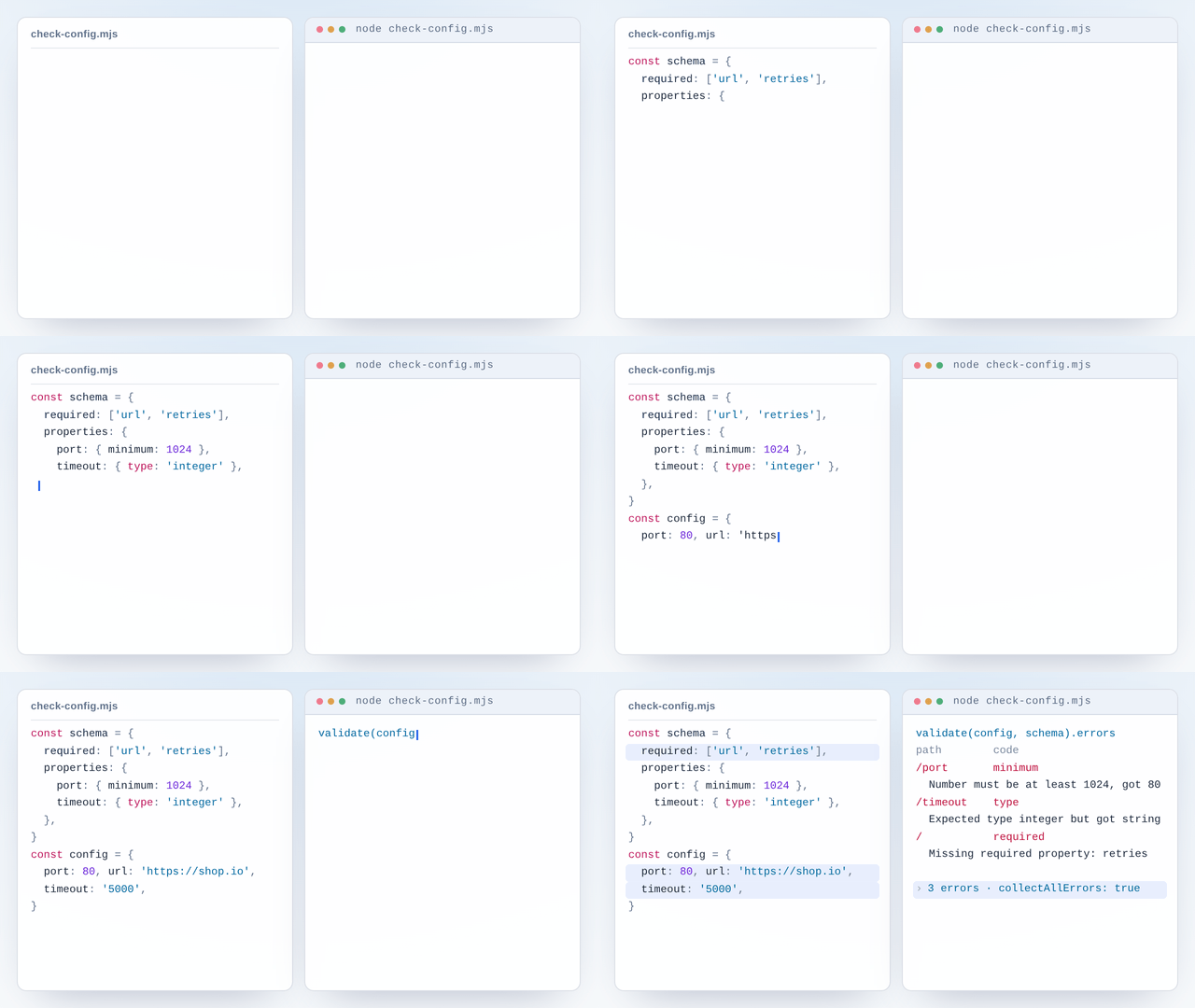
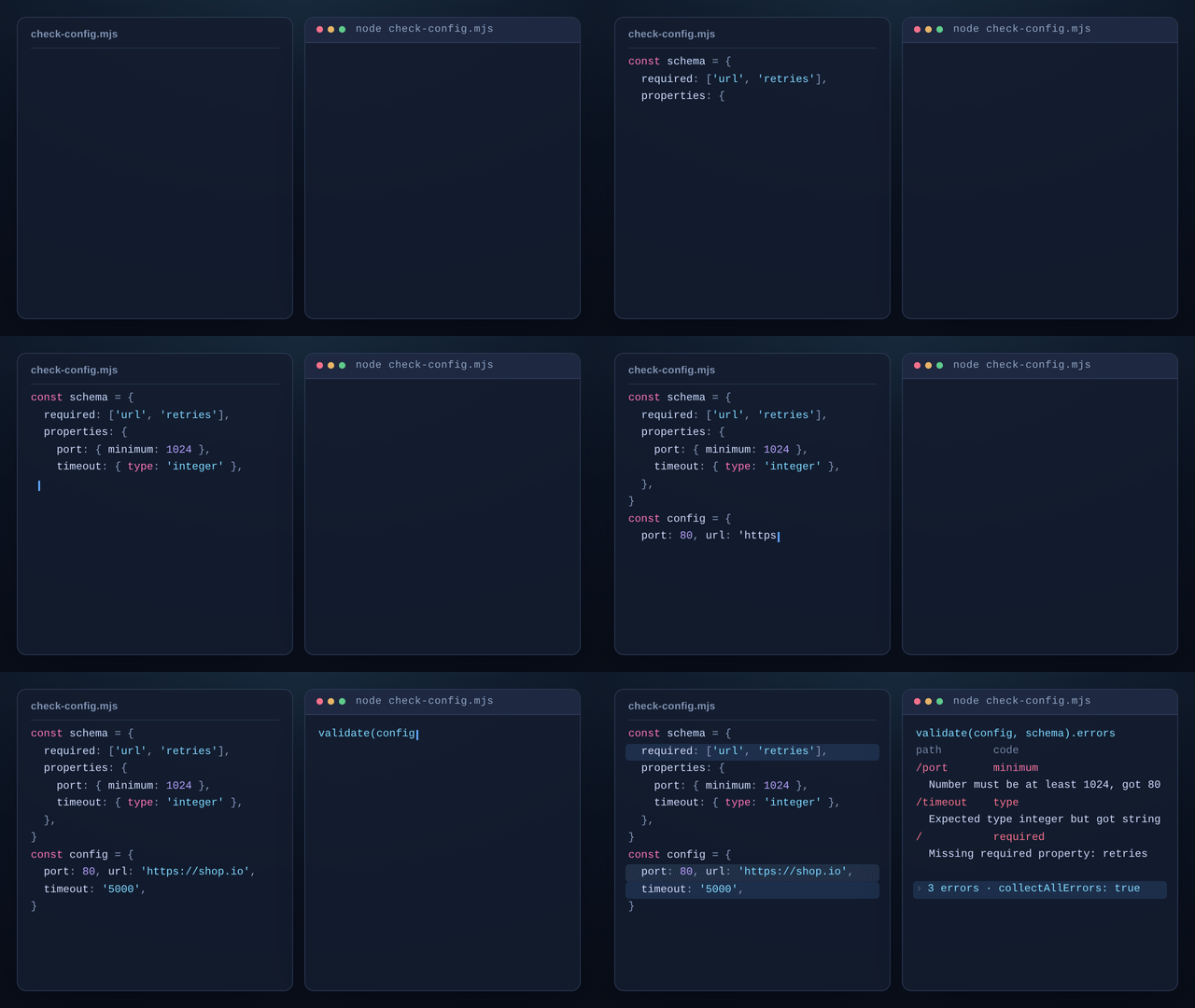
Validation is where the shape matters. validate(instance, schema, options?) returns a ValidationResult: a valid flag and a flat array of errors. Flat, because the walk carries an immutable context down through each property and array index, forking a child that knows the JSON Pointer for that position, while every keyword that fails appends to one shared list instead of throwing.
So a single call over a broken object comes back with every violation at once, each carrying the pointer that found it (/port, /items/2, or / when the failure is a missing key that no pointer can address) and the keyword code that raised it (minimum, pattern, type, required). Collecting everything is the default; collectAllErrors: false stops at the first. When one schema is used repeatedly, createValidator closes the schema and its options over a one-argument function, so callers pass only data.
Two things bound that walk, and both of them keep it offline. $ref resolves inside the document only: the root schema's definitions are indexed up front and any other #/... pointer is walked against the root, so a schema that refers back to itself validates arbitrarily deep recursive data with no network or filesystem access (a $ref that resolves to nothing is skipped, and one that loops without consuming data is reported). And with safePatterns on, every pattern and patternProperties regex goes to checkPatternSafety, or to a checker of your own, before RegExp is ever constructed: a user-supplied pattern can then come back as an ordinary validation error instead of being executed.
Generation is the smaller half. toJsonSchema(value, options?) returns a Schema describing the sample, and GenerateOptions decides how far that sample is trusted: whether an array's items are merged across every element, taken from the first, or assumed uniform, whether the observed keys become required, and whether additionalProperties: false is stamped on.
Every option, error field and type is in the full API reference.
Security: ReDoS Protection
JSON Schema's pattern and patternProperties keywords accept arbitrary regex patterns. Malicious or poorly-crafted patterns can cause ReDoS (Regular Expression Denial of Service) attacks with exponential backtracking.
Built-in Heuristics
Enable built-in ReDoS detection with safePatterns: true:
import { validate } from '@hyperfrontend/json-utils'

const schema = { type: 'string', pattern: '(a+)+' } // Known ReDoS pattern

const result = validate('aaa', schema, { safePatterns: true })
// result.valid = false
// result.errors[0].message = 'Unsafe regex pattern: Nested quantifiers detected...'
The built-in checker detects common dangerous patterns:
- Nested quantifiers:
(a+)+,(a*)*,([a-z]+)+ - Overlapping alternations:
(a|a)+ - Multiple unbounded wildcards:
.*.* - Extremely large quantifier bounds:
a{1,100000}
Custom Checker (Recommended for Production)
For comprehensive protection, provide a custom checker using safe-regex2:
import { validate, type PatternSafetyChecker } from '@hyperfrontend/json-utils'
import safeRegex from 'safe-regex2'

const checker: PatternSafetyChecker = (pattern) => ({
  safe: safeRegex(pattern),
  reason: 'Pattern may cause catastrophic backtracking',
})

validate(data, schema, { safePatterns: checker })
Exported Utilities
import { checkPatternSafety } from '@hyperfrontend/json-utils'

// Use built-in heuristics directly
const result = checkPatternSafety('(a+)+')
// { safe: false, reason: 'Nested quantifiers detected...' }
Supported Keywords
| Category | Keywords |
|---|---|
| Type | type |
| Object | properties, required, additionalProperties, patternProperties, minProperties, maxProperties, dependencies |
| Array | items, additionalItems, minItems, maxItems, uniqueItems |
| String | minLength, maxLength, pattern, format |
| Number | minimum, maximum, exclusiveMinimum, exclusiveMaximum, multipleOf |
| Composition | allOf, anyOf, oneOf, not |
| Reference | $ref, definitions |
| Enum | enum |
| Format | email, uri, uri-reference, date-time, date, time, hostname, ipv4, ipv6, uuid, regex, json-pointer |
Compatibility
Runs on
- Node.js>=18.0.0supported
- Browserssupported
- Web Workerssupported
Ships as
- ESMTree-shakeable
- CJSNode and older bundlers
- IIFEHyperfrontendJsonUtils
- UMDHyperfrontendJsonUtils
CDN Usage
<!-- unpkg -->
<script src="https://unpkg.com/@hyperfrontend/json-utils"></script>

<!-- jsDelivr -->
<script src="https://cdn.jsdelivr.net/npm/@hyperfrontend/json-utils"></script>

<script>
  const { validate, toJsonSchema } = HyperfrontendJsonUtils
</script>
Global variable: HyperfrontendJsonUtils
Dependencies
None: zero external dependencies.
Architecture Highlights§
$ref resolves against the schema's own definitions, so a schema that refers back to itself validates recursive data without looping. Validation accumulates errors instead of stopping at the first failure, so one validate call reports every violation in the data, each with its path, message, and code.
API Reference§
ƒFunctions
This is a best-effort implementation that catches obvious cases:
- Nested quantifiers: (a+)+, (a), (a+), etc.
- Overlapping alternations with repetition: (a|a)+
- Quantified groups followed by overlapping content: (.+)x
Parameters
| Name | Type | Description |
|---|---|---|
§pattern | string | The regex pattern string to check |
Returns
PatternSafetyResultExample
Checking pattern safety
checkPatternSafety('^[a-z]+$')  // => { safe: true }
checkPatternSafety('(a+)+')     // => { safe: false, reason: 'Nested quantifiers...' }
checkPatternSafety('.*.*') // => { safe: false, reason: 'Multiple unbounded wildcards...' }createValidator(
Parameters
| Name | Type | Description |
|---|---|---|
§schema | Schema | JSON Schema to validate against |
§options? | ValidateOptions | Validation options |
Returns
(Example
Creating reusable validator
const schema = {
  type: 'object',
  properties: {
    name: { type: 'string' },
    age: { type: 'integer', minimum: 0 }
  },
  required: ['name']
}

const validateUser = createValidator(schema)
const result = validateUser({ name: 'Alice', age: 30 })
console.log(result.valid) // trueParameters
| Name | Type | Description |
|---|---|---|
§value | unknown | The value to determine the type of |
Returns
JsonTypeExample
Detecting JSON types
getJsonType('hello')    // => 'string'
getJsonType(42)         // => 'integer'
getJsonType(3.14)       // => 'number'
getJsonType(true)       // => 'boolean'
getJsonType(null)       // => 'null'
getJsonType([1, 2, 3])  // => 'array'
getJsonType({ key: 1 }) // => 'object'Used for enum validation and uniqueItems validation.
Returns
booleanExample
Comparing values for equality
isEqual({ name: 'Alice' }, { name: 'Alice' }) // => true
isEqual([1, 2, 3], [1, 2, 3])                 // => true
isEqual({ a: 1 }, { a: 2 })                   // => false
isEqual([1, 2], [2, 1]) // => false (order matters)Parameters
| Name | Type | Description |
|---|---|---|
§value | unknown | The value to generate a schema from |
§options? | GenerateOptions | Generation options |
Returns
SchemaExample
Generating schema from data
const data = {
  name: 'Alice',
  age: 30,
  tags: ['developer', 'typescript']
}

const schema = toJsonSchema(data)
// {
//   type: 'object',
//   properties: {
//     name: { type: 'string' },
//     age: { type: 'integer' },
//     tags: { type: 'array', items: { type: 'string' } }
//   },
//   required: ['name', 'age', 'tags']
// }Parameters
| Name | Type | Description |
|---|---|---|
§instance | unknown | The value to validate |
§schema | Schema | The JSON Schema to validate against |
§options? | ValidateOptions | Validation options |
Returns
ValidationResultExample
Basic validation
const schema = { type: 'string', minLength: 1 }
const result = validate('hello', schema)
console.log(result.valid) // true◈Interfaces
Properties
Properties
Properties
Properties
safePatterns?:boolean | PatternSafetyCheckerWhether to check patterns for ReDoS vulnerabilities (default: false). When true, uses built-in heuristics to detect common dangerous patterns. When a function is provided, uses that function for safety checking. Built-in heuristics catch obvious cases like nested quantifiers. For comprehensive protection, provide a custom checker using safe-regex2.
Properties
Properties
◆Types
type JsonType = "string" | "number" | "integer" | "boolean" | "array" | "object" | "null"type PatternSafetyChecker = (Example
import safeRegex from 'safe-regex2'

const checker: PatternSafetyChecker = (pattern) => ({
  safe: safeRegex(pattern),
  reason: 'Pattern may cause catastrophic backtracking'
})

validate(data, schema, { patternSafetyChecker: checker })Related reading§
- How-to
How to validate a config file at startup
A wrong value in a config file does not fail where it is written, it fails hours later somewhere unrelated, and fixing one mistake only reveals the next one.
- Getting started
Getting Started
Set HyperFrontend up and embed a first feature.
- Architecture
Architecture Guide
How the packages fit together.