

@hyperfrontend/
Modular DOM utilities for dynamic styling, gesture detection, element lifecycle, and color manipulation.
What is @hyperfrontend/ui-utils?
Sometimes a framework is not on the table. You are writing an embed that drops into someone else's page, a debug overlay, a script tag, a canvas experiment: something where React would be more runtime than the thing it wraps. So you are back to document.createElement and appendChild, a <style> tag you have to remember to remove, and a ResizeObserver you have to remember to disconnect. This package is that pile of chores, written once and tested.
The parts worth the install:
createElementgives you the node plus attach, detach, show, and hide, with an opacity transition when you pass a duration.addStylesheetinjects real CSS and hands back the function that removes it, so your rules leave when your widget does.syncElementDimensionspins an overlay to an element you do not control and keeps it there through resizes.getElementAsyncpolls for a node that has not rendered yet and returns a cancel function.createGestureListenercovers Escape and pinch-out with one cleanup.setupAudiowaits for the click or touch that browsers require before anAudioContextwill start.
Anything that attaches something gives you back the function that detaches it.
At a glance:
import { createElement, syncElementDimensions } from '@hyperfrontend/ui-utils/element'
import { addStylesheet } from '@hyperfrontend/ui-utils/style'

const [, removeStyles] = addStylesheet(
  {
    '.hf-hint': { position: 'fixed', opacity: '0', outline: '2px solid #f0f' },
  },
  'hf-hint'
)

const hint = createElement('div', { className: 'hf-hint' })
hint.attachTo(document.body)
hint.show(150) // opacity transition over 150ms

// follow a node you do not own, through every resize
const stopTracking = syncElementDimensions('#third-party-widget', hint.ref)

// teardown leaves the page as you found it
stopTracking()
hint.detachFromParent()
removeStyles()
Key Features
Modular secondary entry points
for importing one corner of the package at a time
attach, detach, show, hide, and a live
ref, all on the objectcreateElementreturnsinject rules from a CSS string or a style map, label them, and get the remover back
chainable
id,class,attribute,nth,childOf, and pseudo-class methods with validationhex and RGB in both directions, with alpha, plus scaled variations of a base color
Escape key and pinch-out behind one listener with one cleanup
ResizeObserverand dimension syncing that stop when you call what they returnedvia user agent parsing
resolves an
AudioContextafter the click or touch browsers insist on
Why Use @hyperfrontend/ui-utils?
A framework is not always an option
Embeds on someone else's page, browser extensions, tooling panels, canvas demos, snippets that ship as one script tag: places where you cannot mount a component tree, or would rather not pay for one. These are plain functions over plain DOM nodes, so they run under any framework or none, and they do not care what rendered the page around them.
The cleanup is the point
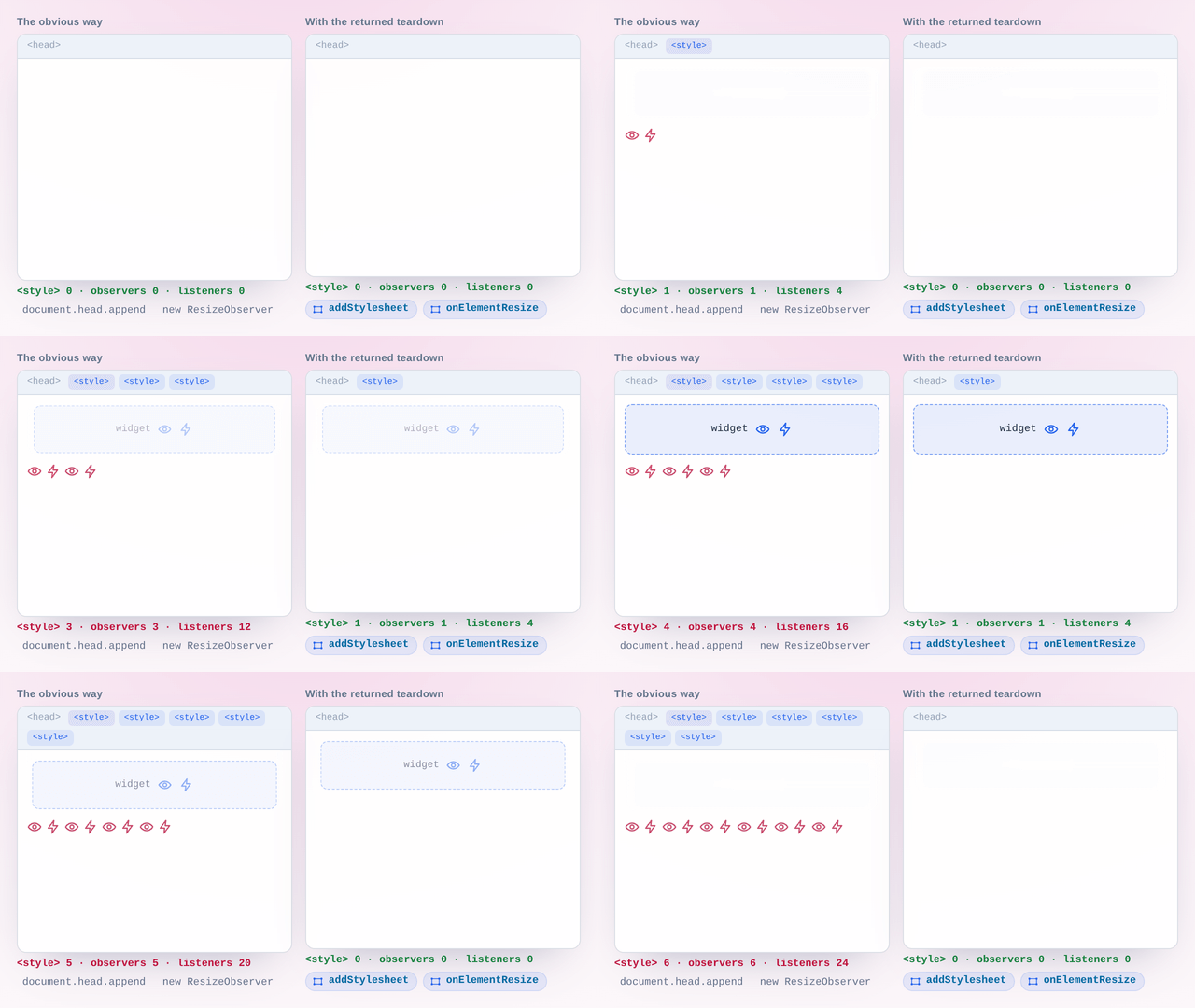
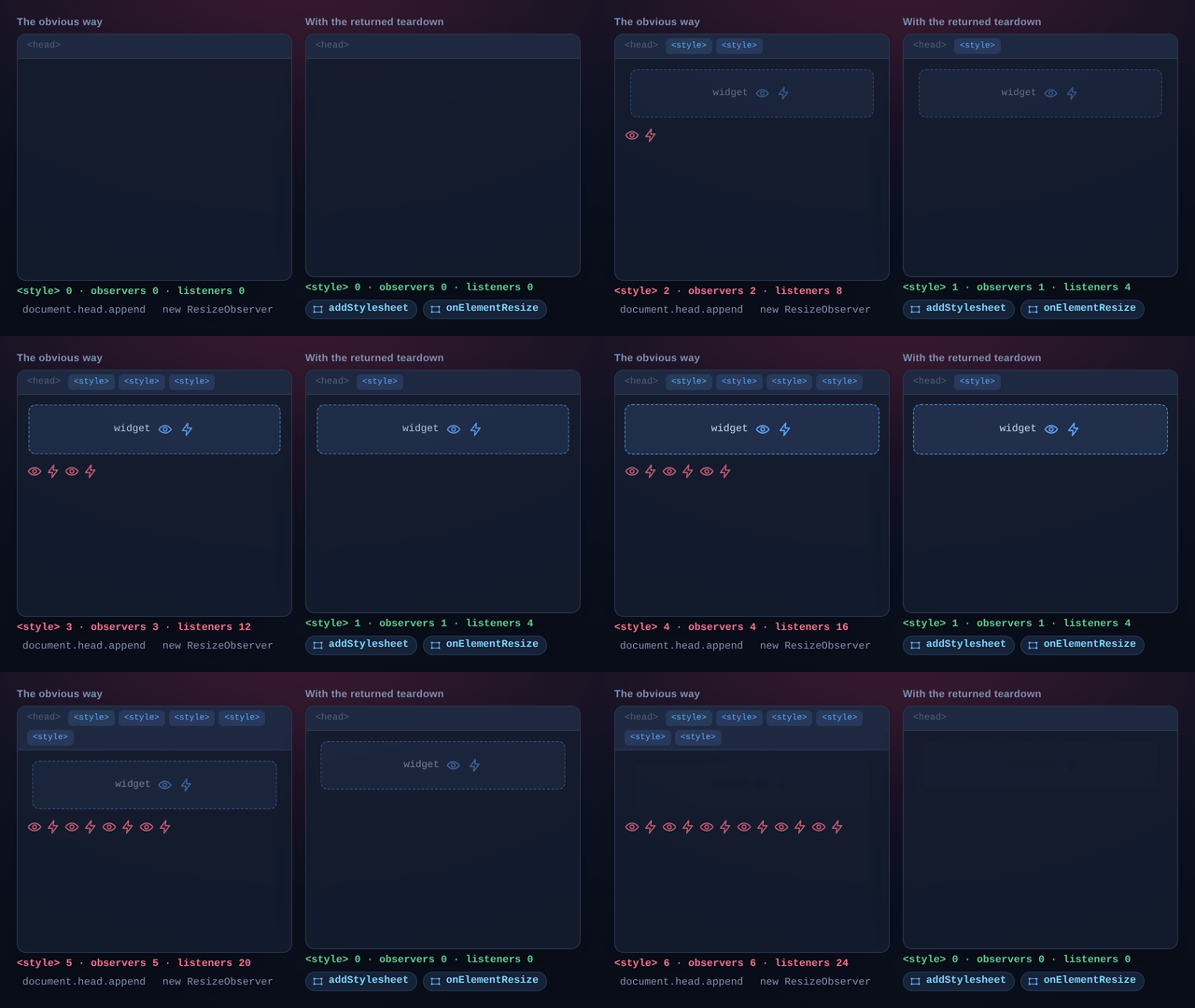
Overlay code leaks in predictable ways: a stylesheet that outlives the widget it styled, an observer nobody disconnected, a poll still running long after the element showed up. Every function here that attaches something returns the thing that removes it, so teardown is a short list of calls you already have instead of a hunt through the document.
Following elements you do not control
syncElementDimensions takes a source and a target, copies width, height, top, left, and position from one to the other, and repeats that on every resize of the source. Both arguments accept a selector, so the source can be a node that has not rendered yet: getElementAsync polls for it every 100ms and gives up after 10 seconds by default, and the cleanup function cancels the poll if you gave up first.
Import one corner, not the package
Every capability is its own entry point, so import { hexToRgb } from '@hyperfrontend/ui-utils/color' pulls in the color conversions and nothing else. That matters when the whole budget for an embed is a few kilobytes.
Installation
npm install @hyperfrontend/ui-utilsQuick Start
// Element creation with lifecycle methods
import { createElement } from '@hyperfrontend/ui-utils/element'

const modal = createElement('div', {
  className: 'modal',
  inlineStyle: { position: 'fixed', zIndex: '1000' },
})

modal.attachTo(document.body)
modal.show(300) // Fade in over 300ms
modal.hide(300) // Fade out over 300ms
modal.detachFromParent() // Clean removal

// Type-safe CSS selector building
import { CssSelector } from '@hyperfrontend/ui-utils/selector'

const selector = new CssSelector('div').class('card').attribute('data-status', 'active').hover().toString() // 'div.card[data-status="active"]:hover'

// Color manipulation
import { getColorVariation, hexToRgb, rgbToHex } from '@hyperfrontend/ui-utils/color'

const dimmedBlue = getColorVariation('#0066cc', 128) // 'rgba(0,51,102,0.5019607843137255)'
const rgb = hexToRgb('#ff5500') // { r: 255, g: 85, b: 0 }
const hex = rgbToHex(255, 85, 0) // '#ff5500'

// Gesture detection with cleanup
import { createGestureListener } from '@hyperfrontend/ui-utils/event'

const cleanup = createGestureListener(() => console.log('Escape or pinch detected'))
// Later: cleanup() to remove listeners
API Overview
One rule organises the whole surface: anything that attaches something hands back the function that detaches it. addStylesheet returns a tuple of the <style> element it injected and the function that removes it; onElementResize and createGestureListener return that remover on its own, one call closing all four listeners in the gesture case. Teardown is a list of functions you are already holding rather than a hunt through the document, which is what the counters above are counting.
The second shape to know is what createElement hands back: not the node, but an object around it carrying attachTo, detachFromParent, addChild, removeChild, show, hide, a visible flag, and ref, the live element for anything the wrapper does not do. show and hide take an optional duration in milliseconds and transition opacity over it. The tag shorthands (div, button, canvas and twenty-one others) are the same function with the tag already chosen.
Targets are elements or selector strings, interchangeably, and that is what lets syncElementDimensions pin an overlay to a third-party node before that node exists: underneath, getElementAsync polls every 100ms, gives up after 10 seconds, and the cleanup it returns cancels the poll if you gave up first.
Ten secondary entry points sit beside the root one, and they exist for weight rather than filing: importing from @hyperfrontend/ui-utils/color costs the color conversions and nothing else, which is what lets any of this into an embed with a few kilobytes to spend. Two are worth naming because their names give nothing away: /time is a promise delay and a UTC timestamp formatter, and /misc is one function, simpleHash, which turns a string into six characters (simpleHash('hello world') returns 'to5x38').
Every export, option and type is in the API reference, listed under the entry point it belongs to.
Compatibility
Runs on
- Node.js>=18.0.0partially supported
- Browserssupported
- Web Workerssupported
Some utilities require browser APIs; check individual exports.
Ships as
- ESMTree-shakeable
- CJSNode and older bundlers
- IIFEHyperfrontendUIUtils
- UMDHyperfrontendUIUtils
CDN Usage
<!-- unpkg -->
<script src="https://unpkg.com/@hyperfrontend/ui-utils"></script>

<!-- jsDelivr -->
<script src="https://cdn.jsdelivr.net/npm/@hyperfrontend/ui-utils"></script>

<script>
  const { createElement, hexToRgb, rgbToHex } = HyperfrontendUIUtils
</script>
Global variable: HyperfrontendUIUtils
Architecture Highlights§
Each capability sits behind its own secondary entry point (/element, /style, /selector, /color, /event, /audio, /mobile, /time, /misc, /component), so importing one never drags in the rest. Everything is built on plain browser APIs (ResizeObserver, touch events, Web Audio) with no third-party dependencies.
API Reference§
Module Structure
11 modules · 154 total exports
UI utilities for audio, color, components, elements, events, selectors, and styling.
ƒ Functions
A label is only taken while its stylesheet is still in the document. If that element was removed by other means, the label is released and the new stylesheet takes it.
Parameters
Returns
[Examples
CSS string
const [styleElement, removeStyles] = addStylesheet(`
  .modal { display: flex; align-items: center; }
  .modal-overlay { background: rgba(0, 0, 0, 0.5); }
`, 'modal-styles')

// Remove when done
removeStyles()
StyleMap object
const [styleElement, removeStyles] = addStylesheet({
  '.button': { backgroundColor: '#3498db', padding: '10px 20px' },
  '.button:hover': { backgroundColor: '#2980b9' },
})Parameters
| Name | Type | Description |
|---|---|---|
§config? | ElementConfig | Optional inline styles and class names to apply to the element |
Returns
ElementMethods<Example
Creating anchor element
const link = anchor({ className: 'nav-link' })
link.ref.href = '/home'Parameters
| Name | Type | Description |
|---|---|---|
§config? | ElementConfig | Optional inline styles and class names to apply to the element |
Returns
ElementMethods<Example
Creating article element
const post = article({ className: 'blog-post' })
post.ref // => HTMLElementParameters
| Name | Type | Description |
|---|---|---|
§config? | ElementConfig | Optional inline styles and class names to apply to the element |
Returns
ElementMethods<Example
Creating aside element
const sidebar = aside({ className: 'sidebar' })
sidebar.ref // => HTMLElementParameters
| Name | Type | Description |
|---|---|---|
§config? | ElementConfig | Optional inline styles and class names to apply to the element |
Returns
ElementMethods<Example
Creating button element
const submitBtn = button({ className: 'btn-primary' })
submitBtn.ref.textContent = 'Submit'Parameters
| Name | Type | Description |
|---|---|---|
§config? | ElementConfig | Optional inline styles and class names to apply to the element |
Returns
ElementMethods<Example
Creating canvas element
const drawing = canvas({ className: 'stage' })
drawing.ref.width = 800Parameters
Example
Simulating click at coordinates
// Test that a click outside a modal closes it
document.addEventListener('mousedown', (event) => {
  if (!modalElement.contains(event.target as Node)) {
    closeModal()
  }
})

clickAtPosition(0, 0) // Simulate click at top-left corner
expect(modalElement).not.toBeVisible()component<
Parameters
Returns
(Example
Creating styled component
const createButton = (label: string) => createElement('button', { className: 'btn' })
const buttonStyles = () => addStylesheet({ '.btn': { padding: '8px 16px' } }, 'btn-styles')

const Button = component(createButton, buttonStyles)

// First call applies styles and creates button
const btn1 = Button('Submit')

// Subsequent calls return same instance (styles only applied once)
const btn2 = Button('Cancel')
// btn1 === btn2createApplyStyle(
Parameters
Returns
(Example
Applying single style rule
const applyTooltipStyle = createApplyStyle('.tooltip', {
  position: 'absolute',
  backgroundColor: '#333',
  color: '#fff',
  padding: '4px 8px',
  borderRadius: '4px'
})

// Style is injected into document on first call
applyTooltipStyle()

// Subsequent calls are no-ops (style already applied)
applyTooltipStyle()Returns
(Example
Applying multiple style rules
const applyModalStyles = createApplyStyles({
  '.modal-overlay': {
    position: 'fixed',
    inset: '0',
    backgroundColor: 'rgba(0, 0, 0, 0.5)'
  },
  '.modal-content': {
    backgroundColor: '#fff',
    borderRadius: '8px',
    padding: '24px'
  }
})

// All rules injected on first call
applyModalStyles()Parameters
| Name | Type | Description |
|---|---|---|
§tagName | unknown | The HTML tag name to create |
§config? | ElementConfig | Optional configuration for the element including styles and class names |
Returns
ElementMethods<Example
Creating element with configuration
const card = createElement('div', {
  className: 'card',
  classNames: ['shadow', 'rounded'],
  inlineStyle: { padding: '16px', margin: '8px' }
})

const title = createElement('h2')
title.ref.textContent = 'Card Title'

card.addChild(title)
card.attachTo(document.body)
card.show(300) // Fade in over 300msParameters
Returns
(Example
Detecting gestures for overlay
const closeOverlay = () => {
  overlay.style.display = 'none'
}

// Listen for Escape key or pinch-out gesture
const cleanup = createGestureListener(closeOverlay)

// Remove listeners when overlay is destroyed
cleanup()Returns
stringExample
Converting style object to CSS
const styles = {
  backgroundColor: '#f0f0f0',
  fontSize: '14px',
  marginTop: '8px'
}

cssObjectToString(styles)
// => 'background-color: #f0f0f0; font-size: 14px; margin-top: 8px; 'This function takes a CSS selector and either a string or a CSSStyleDeclaration object representing the styles to be applied. It validates the selector and converts the CSS object to a string if needed. The function then constructs and returns a valid CSS rule as a string.
Parameters
| Name | Type | Description |
|---|---|---|
§selector | string | The CSS selector to which the styles will be applied |
§css | string | Partial< | The styles to apply, either as a string or CSSStyleDeclaration object |
Returns
stringExamples
With style object
cssRule('.button', { padding: '8px 16px', borderRadius: '4px' })
// => '.button{padding: 8px 16px; border-radius: 4px}'
With CSS string
cssRule('.button:hover', 'background-color: #007bff; color: white')
// => '.button:hover{background-color: #007bff; color: white}'Returns
stringExample
Creating CSS rules from object
const styles = {
  '.card': { padding: '16px', boxShadow: '0 2px 4px rgba(0,0,0,0.1)' },
  '.card-title': { fontSize: '18px', fontWeight: 'bold' }
}

cssRules(styles)
// => '.card{padding: 16px; box-shadow: 0 2px 4px rgba(0,0,0,0.1)}\n.card-title{font-size: 18px; font-weight: bold}'Parameters
| Name | Type | Description |
|---|---|---|
§config? | ElementConfig | Optional inline styles and class names to apply to the element |
Returns
ElementMethods<Example
Creating div element
const container = div({ className: 'container' })
container.ref.id = 'main'Parameters
Returns
stringExample
Generating color variations
// Generate a lighter shade for hover states
const primaryColor = '#3b82f6'
const hoverColor = getColorVariation(primaryColor, 200)
// => 'rgba(46, 102, 192, 0.78)'

// Generate a darker shade for active states
const activeColor = getColorVariation(primaryColor, 100)
// => 'rgba(23, 51, 96, 0.39)'getElementAsync(
Parameters
| Name | Type | Description |
|---|---|---|
§elementRefOrString | ElementRefOrString | Either an HTMLElement reference or a CSS selector string |
§options? | GetElementAsyncOptions | Configuration options including duration, interval, and callbacks |
Returns
(Example
Waiting for dynamic element
const cancel = getElementAsync('#dynamic-content', {
  duration: 5000,
  interval: 100,
  onSuccess: (element) => {
    console.log('Element found:', element)
  },
  onFail: () => {
    console.log('Element not found within timeout')
  },
})

// Cancel polling if no longer needed
cancel()Parameters
| Name | Type | Description |
|---|---|---|
§level | number | The heading level (1-6) |
§config? | ElementConfig | Optional inline styles and class names to apply to the element |
Returns
ElementMethods<Example
Creating heading element
const title = header(1, { className: 'page-title' })
title.ref.textContent = 'Page Title'Parameters
Returns
RgbExamples
6-digit hex
hexToRgb('#ff5733')
// => { r: 255, g: 87, b: 51 }
3-digit shorthand
hexToRgb('#f00')
// => { r: 255, g: 0, b: 0 }
With opacity override
hexToRgb('#3498db', 0.5)
// => { r: 52, g: 152, b: 219, a: 0.5 }Parameters
| Name | Type | Description |
|---|---|---|
§config? | ElementConfig | Optional inline styles and class names to apply to the element |
Returns
ElementMethods<Example
Creating image element
const avatar = img({ className: 'avatar' })
avatar.ref.src = '/avatar.png'Parameters
| Name | Type | Description |
|---|---|---|
§config? | ElementConfig | Optional inline styles and class names to apply to the element |
Returns
ElementMethods<Example
Creating input element
const email = input({ className: 'field' })
email.ref.type = 'email'Returns
booleanExample
Detecting mobile device
if (isMobileDevice()) {
  showMobileLayout()
} else {
  showDesktopLayout()
}Parameters
| Name | Type | Description |
|---|---|---|
§selector | string | The CSS selector string to validate |
Returns
booleanExample
Validating CSS selectors
isValidCssSelector('.my-class')
// => true

isValidCssSelector('#header nav > ul')
// => true

isValidCssSelector('[invalid')
// => falseParameters
| Name | Type | Description |
|---|---|---|
§config? | ElementConfig | Optional inline styles and class names to apply to the element |
Returns
ElementMethods<Example
Creating label element
const emailLabel = label({ className: 'field-label' })
emailLabel.ref.htmlFor = 'email'Parameters
| Name | Type | Description |
|---|---|---|
§config? | ElementConfig | Optional inline styles and class names to apply to the element |
Returns
ElementMethods<Example
Creating list item element
const item = listItem({ className: 'nav-item' })
item.ref.textContent = 'First item'Parameters
| Name | Type | Description |
|---|---|---|
§element | HTMLElement | The element to observe for resize events |
§callback | ElementResizeCallback | The function to call when the element is resized |
Returns
(Example
Observing element resize
const container = document.getElementById('resizable-panel')
const stopObserving = onElementResize(container, (rect) => {
  console.log(`New size: ${rect.width}x${rect.height}`)
})

// Stop observing when done
stopObserving()Parameters
| Name | Type | Description |
|---|---|---|
§config? | ElementConfig | Optional inline styles and class names to apply to the element |
Returns
ElementMethods<Example
Creating ordered list element
const steps = orderedList({ className: 'instructions' })
steps.ref // => HTMLOListElementParameters
| Name | Type | Description |
|---|---|---|
§config? | ElementConfig | Optional inline styles and class names to apply to the element |
Returns
ElementMethods<Example
Creating paragraph element
const text = paragraph({ className: 'lede' })
text.ref.textContent = 'Hello, world!'Parameters
| Name | Type | Description |
|---|---|---|
§timeMS | number | The delay in milliseconds |
Returns
Promise<Example
Implementing retry with backoff
async function fetchWithRetry(url: string, maxRetries: number) {
  for (let attempt = 0; attempt < maxRetries; attempt++) {
    try {
      return await fetch(url)
    } catch {
      await pause(1000 * Math.pow(2, attempt)) // Exponential backoff
    }
  }
}Parameters
| Name | Type | Description |
|---|---|---|
§ref | string | HTMLStyleElement | The label or the HTMLStyleElement of the stylesheet to be removed. |
Examples
By label
addStylesheet('.theme { color: red; }', 'theme-styles')
removeStylesheet('theme-styles')
By element reference
const [styleElement] = addStylesheet('.custom { margin: 0; }')
removeStylesheet(styleElement)Parameters
| Name | Type | Description |
|---|---|---|
§rgbString | string | The RGB string (e.g., "rgb(255, 0, 0)" or "rgba(255, 0, 0, 0.5)") |
Returns
stringExamples
RGB string
rgbStringToHex('rgb(255, 87, 51)')
// => '#ff5733'
RGBA string with alpha
rgbStringToHex('rgba(52, 152, 219, 0.5)')
// => '#3498db80'Parameters
Returns
stringExamples
Basic RGB
rgbToHex(255, 87, 51)
// => '#ff5733'
With alpha channel
rgbToHex(52, 152, 219, 0.5)
// => '#3498db80'Returns
stringExamples
Without alpha
rgbToString({ r: 255, g: 87, b: 51 })
// => 'rgb(255,87,51)'
With alpha
rgbToString({ r: 52, g: 152, b: 219, a: 0.5 })
// => 'rgba(52,152,219,0.5)'Parameters
| Name | Type | Description |
|---|---|---|
§config? | ElementConfig | Optional inline styles and class names to apply to the element |
Returns
ElementMethods<Example
Creating section element
const about = section({ className: 'page-section' })
about.ref.id = 'about'Returns
CssSelectorExample
Creating empty selector
const selector = select().class('active').id('panel')
selector.toString() // => '.active#panel'Returns
CssSelectorExample
Selecting all elements
const selector = selectAllElements().class('visible')
selector.toString() // => '*.visible'Parameters
| Name | Type | Description |
|---|---|---|
§selector | string | The initial CSS selector string |
Returns
CssSelectorExample
Creating selector from string
const selector = selectBy('article').class('featured')
selector.toString() // => 'article.featured'Parameters
Returns
CssSelectorExample
Selecting by attribute
selectByAttribute('disabled').toString() // => '[disabled]'
selectByAttribute('data-role', 'button').toString() // => '[data-role="button"]'Parameters
| Name | Type | Description |
|---|---|---|
§className | string | The class name to select |
Returns
CssSelectorExample
Selecting by class
const selector = selectByClass('highlighted')
selector.toString() // => '.highlighted'Parameters
| Name | Type | Description |
|---|---|---|
§tagName | unknown | The HTML tag name to select |
Returns
CssSelectorExample
Selecting by element tag
const selector = selectByElement('button').class('primary')
selector.toString() // => 'button.primary'Parameters
| Name | Type | Description |
|---|---|---|
§id | string | The ID to select |
Returns
CssSelectorExample
Selecting by ID
const selector = selectById('main-content')
selector.toString() // => '#main-content'Parameters
| Name | Type | Description |
|---|---|---|
§selector | ElementRefOrString | Either an HTMLElement reference or a CSS selector string for the target element |
Returns
Promise<Example
Setting up AudioContext on user interaction
const playButton = document.getElementById('play-button')
const audioContext = await setupAudio(playButton)

// Audio context is now ready after user clicked the button
const oscillator = audioContext.createOscillator()
oscillator.connect(audioContext.destination)
oscillator.start()Parameters
| Name | Type | Description |
|---|---|---|
§input | string | The string to hash |
Returns
stringExample
Generating simple hash
simpleHash('user@example.com')
// => 'a1b2c3'

simpleHash('hello world')
// => 'd4e5f6'Parameters
| Name | Type | Description |
|---|---|---|
§config? | ElementConfig | Optional inline styles and class names to apply to the element |
Returns
ElementMethods<Example
Creating span element
const badge = span({ className: 'badge' })
badge.ref.textContent = 'New'syncElementDimensions<
Parameters
| Name | Type | Description |
|---|---|---|
§sourceElementRefOrString | ElementRefOrString< | The source element to copy dimensions from (element or selector) |
§targetElementRefOrString | ElementRefOrString< | The target element to apply dimensions to (element or selector) |
§options? | GetElementAsyncOptions | Optional configuration for element retrieval and callbacks. onSuccess fires once, after both elements are found and the first sync has been applied, and receives the target element. onFail fires if either lookup times out. |
Returns
(Example
Syncing overlay to video dimensions
// Sync an overlay to match a video player's dimensions
const stopSync = syncElementDimensions('#video-player', '#overlay', {
  onSuccess: (overlay) => overlay.classList.add('ready'),
})

// Stop syncing when component unmounts
stopSync()Parameters
| Name | Type | Description |
|---|---|---|
§config? | ElementConfig | Optional inline styles and class names to apply to the element |
Returns
ElementMethods<Example
Creating table body element
const body = tableBody({ className: 'data-rows' })
body.ref // => HTMLTableSectionElementParameters
| Name | Type | Description |
|---|---|---|
§config? | ElementConfig | Optional inline styles and class names to apply to the element |
Returns
ElementMethods<Example
Creating table cell element
const cell = tableCell({ className: 'name-cell' })
cell.ref.textContent = 'John Doe'Parameters
| Name | Type | Description |
|---|---|---|
§config? | ElementConfig | Optional inline styles and class names to apply to the element |
Returns
ElementMethods<Example
Creating table head element
const head = tableHead({ className: 'sticky-header' })
head.ref // => HTMLTableSectionElementParameters
| Name | Type | Description |
|---|---|---|
§config? | ElementConfig | Optional inline styles and class names to apply to the element |
Returns
ElementMethods<Example
Creating table element
const grid = tableHeader({ className: 'data-table' })
grid.ref // => HTMLTableElementParameters
| Name | Type | Description |
|---|---|---|
§config? | ElementConfig | Optional inline styles and class names to apply to the element |
Returns
ElementMethods<Example
Creating table header cell
const nameHeader = tableHeaderCell({ className: 'col-name' })
nameHeader.ref.textContent = 'Name'Parameters
| Name | Type | Description |
|---|---|---|
§config? | ElementConfig | Optional inline styles and class names to apply to the element |
Returns
ElementMethods<Example
Creating table row element
const row = tableRow({ className: 'data-row' })
row.ref // => HTMLTableRowElementParameters
| Name | Type | Description |
|---|---|---|
§timestamp | number | The Unix timestamp in milliseconds |
Returns
stringExample
Formatting timestamp
timestampToDateTime(1704067200000)
// => 'Mon, 01/01/2024, 00:00:00 UTC' (varies by locale)Parameters
| Name | Type | Description |
|---|---|---|
§config? | ElementConfig | Optional inline styles and class names to apply to the element |
Returns
ElementMethods<Example
Creating unordered list element
const menu = unorderedList({ className: 'nav-menu' })
menu.ref // => HTMLUListElementParameters
| Name | Type | Description |
|---|---|---|
§attribute | string | The attribute name to validate |
Example
Validating attribute selector
validateAttributeSelector('data-testid') // passes
validateAttributeSelector('attr=value') // throws ErrorParameters
| Name | Type | Description |
|---|---|---|
§className | string | The class name to validate |
Example
Validating class selector
validateClassSelector('btn-primary') // passes
validateClassSelector('1invalid') // throws ErrorParameters
Example
Validating CSS name format
validateCssName('my-class', 'className') // passes
validateCssName('123invalid', 'className') // throws ErrorParameters
| Name | Type | Description |
|---|---|---|
§id | string | The ID to validate |
Example
Validating ID selector
validateIdSelector('main-header') // passes
validateIdSelector('') // throws ErrorParameters
Example
Validating string arguments
validateStringArgument('valid', 'name') // passes
validateStringArgument('', 'name') // throws Error
validateStringArgument(' ', 'name') // throws Error (whitespace only)◇ Classes
Constructor
new CssSelector(*. The base is taken as written, neither validated nor escaped, so it may already be a complete selector that the builder methods then extend.
Parameters
| Name | Type | Description |
|---|---|---|
§selector | string | The initial selector text |
Methods
readonly active(Returns
CssSelectorreadonly attribute(Backslashes and double quotes in the value are escaped, so any value produces a selector the DOM accepts. An empty string matches an empty attribute rather than mere presence.
Returns
CssSelectorreadonly childOf(Parameters
| Name | Type | Description |
|---|---|---|
§parentSelector | CssSelector | The selector that will be the direct parent of this selector |
Returns
CssSelectorreadonly class(Parameters
| Name | Type | Description |
|---|---|---|
§className | string | The class name to append |
Returns
CssSelectorreadonly first(Returns
CssSelectorreadonly focus(Returns
CssSelectorreadonly followingSiblings(Parameters
| Name | Type | Description |
|---|---|---|
§siblingSelector | CssSelector | The selector for following sibling elements |
Returns
CssSelectorreadonly hover(Returns
CssSelectorreadonly id(Parameters
| Name | Type | Description |
|---|---|---|
§id | string | The ID to append |
Returns
CssSelectorreadonly last(Returns
CssSelectorreadonly nextSibling(Parameters
| Name | Type | Description |
|---|---|---|
§siblingSelector | CssSelector | The selector for the next sibling element |
Returns
CssSelectorreadonly nth(Parameters
| Name | Type | Description |
|---|---|---|
§n | number | The child index (1-based) |
Returns
CssSelectorreadonly parentOf(Parameters
| Name | Type | Description |
|---|---|---|
§childSelector | CssSelector | The selector that will be a descendant of this selector |
Returns
CssSelectorreadonly pseudo(Parameters
| Name | Type | Description |
|---|---|---|
§pseudo | string | The pseudo-class or pseudo-element (with or without leading colon) |
Returns
CssSelectorreadonly toString(Returns
stringExample
Building CSS selector with fluent API
const selector = new CssSelector('div')
  .class('container')
  .id('main')
selector.toString() // => 'div.container#main'◈ Interfaces
Properties
Properties
◆ Types
type Callback = (type CreateFn = (type ElementRefOrString = T | stringtype ElementResizeCallback = (type HtmlTagName = unknowntype OnSuccess = (type Style = Partial<type StyleFn = (type TMouseEvent = MouseEvent & ClickPageCoordinatesAudio context initialization utilities.
ƒ Functions
Parameters
| Name | Type | Description |
|---|---|---|
§selector | ElementRefOrString | Either an HTMLElement reference or a CSS selector string for the target element |
Returns
Promise<Example
Setting up AudioContext on user interaction
const playButton = document.getElementById('play-button')
const audioContext = await setupAudio(playButton)

// Audio context is now ready after user clicked the button
const oscillator = audioContext.createOscillator()
oscillator.connect(audioContext.destination)
oscillator.start()Color manipulation utilities for RGB/hex conversions and color variations.
ƒ Functions
Parameters
Returns
stringExample
Generating color variations
// Generate a lighter shade for hover states
const primaryColor = '#3b82f6'
const hoverColor = getColorVariation(primaryColor, 200)
// => 'rgba(46, 102, 192, 0.78)'

// Generate a darker shade for active states
const activeColor = getColorVariation(primaryColor, 100)
// => 'rgba(23, 51, 96, 0.39)'Parameters
Returns
RgbExamples
6-digit hex
hexToRgb('#ff5733')
// => { r: 255, g: 87, b: 51 }
3-digit shorthand
hexToRgb('#f00')
// => { r: 255, g: 0, b: 0 }
With opacity override
hexToRgb('#3498db', 0.5)
// => { r: 52, g: 152, b: 219, a: 0.5 }Parameters
| Name | Type | Description |
|---|---|---|
§rgbString | string | The RGB string (e.g., "rgb(255, 0, 0)" or "rgba(255, 0, 0, 0.5)") |
Returns
stringExamples
RGB string
rgbStringToHex('rgb(255, 87, 51)')
// => '#ff5733'
RGBA string with alpha
rgbStringToHex('rgba(52, 152, 219, 0.5)')
// => '#3498db80'Parameters
Returns
stringExamples
Basic RGB
rgbToHex(255, 87, 51)
// => '#ff5733'
With alpha channel
rgbToHex(52, 152, 219, 0.5)
// => '#3498db80'Returns
stringExamples
Without alpha
rgbToString({ r: 255, g: 87, b: 51 })
// => 'rgb(255,87,51)'
With alpha
rgbToString({ r: 52, g: 152, b: 219, a: 0.5 })
// => 'rgba(52,152,219,0.5)'Styled DOM component factory with style and create functions.
ƒ Functions
component<
Parameters
Returns
(Example
Creating styled component
const createButton = (label: string) => createElement('button', { className: 'btn' })
const buttonStyles = () => addStylesheet({ '.btn': { padding: '8px 16px' } }, 'btn-styles')

const Button = component(createButton, buttonStyles)

// First call applies styles and creates button
const btn1 = Button('Submit')

// Subsequent calls return same instance (styles only applied once)
const btn2 = Button('Cancel')
// btn1 === btn2◆ Types
type CreateFn = (type StyleFn = (DOM element creation, retrieval, and dimension synchronization utilities.
ƒ Functions
Parameters
| Name | Type | Description |
|---|---|---|
§config? | ElementConfig | Optional inline styles and class names to apply to the element |
Returns
ElementMethods<Example
Creating anchor element
const link = anchor({ className: 'nav-link' })
link.ref.href = '/home'Parameters
| Name | Type | Description |
|---|---|---|
§config? | ElementConfig | Optional inline styles and class names to apply to the element |
Returns
ElementMethods<Example
Creating article element
const post = article({ className: 'blog-post' })
post.ref // => HTMLElementParameters
| Name | Type | Description |
|---|---|---|
§config? | ElementConfig | Optional inline styles and class names to apply to the element |
Returns
ElementMethods<Example
Creating aside element
const sidebar = aside({ className: 'sidebar' })
sidebar.ref // => HTMLElementParameters
| Name | Type | Description |
|---|---|---|
§config? | ElementConfig | Optional inline styles and class names to apply to the element |
Returns
ElementMethods<Example
Creating button element
const submitBtn = button({ className: 'btn-primary' })
submitBtn.ref.textContent = 'Submit'Parameters
| Name | Type | Description |
|---|---|---|
§config? | ElementConfig | Optional inline styles and class names to apply to the element |
Returns
ElementMethods<Example
Creating canvas element
const drawing = canvas({ className: 'stage' })
drawing.ref.width = 800Parameters
| Name | Type | Description |
|---|---|---|
§tagName | unknown | The HTML tag name to create |
§config? | ElementConfig | Optional configuration for the element including styles and class names |
Returns
ElementMethods<Example
Creating element with configuration
const card = createElement('div', {
  className: 'card',
  classNames: ['shadow', 'rounded'],
  inlineStyle: { padding: '16px', margin: '8px' }
})

const title = createElement('h2')
title.ref.textContent = 'Card Title'

card.addChild(title)
card.attachTo(document.body)
card.show(300) // Fade in over 300msParameters
| Name | Type | Description |
|---|---|---|
§config? | ElementConfig | Optional inline styles and class names to apply to the element |
Returns
ElementMethods<Example
Creating div element
const container = div({ className: 'container' })
container.ref.id = 'main'getElementAsync(
Parameters
| Name | Type | Description |
|---|---|---|
§elementRefOrString | ElementRefOrString | Either an HTMLElement reference or a CSS selector string |
§options? | GetElementAsyncOptions | Configuration options including duration, interval, and callbacks |
Returns
(Example
Waiting for dynamic element
const cancel = getElementAsync('#dynamic-content', {
  duration: 5000,
  interval: 100,
  onSuccess: (element) => {
    console.log('Element found:', element)
  },
  onFail: () => {
    console.log('Element not found within timeout')
  },
})

// Cancel polling if no longer needed
cancel()Parameters
| Name | Type | Description |
|---|---|---|
§level | number | The heading level (1-6) |
§config? | ElementConfig | Optional inline styles and class names to apply to the element |
Returns
ElementMethods<Example
Creating heading element
const title = header(1, { className: 'page-title' })
title.ref.textContent = 'Page Title'Parameters
| Name | Type | Description |
|---|---|---|
§config? | ElementConfig | Optional inline styles and class names to apply to the element |
Returns
ElementMethods<Example
Creating image element
const avatar = img({ className: 'avatar' })
avatar.ref.src = '/avatar.png'Parameters
| Name | Type | Description |
|---|---|---|
§config? | ElementConfig | Optional inline styles and class names to apply to the element |
Returns
ElementMethods<Example
Creating input element
const email = input({ className: 'field' })
email.ref.type = 'email'Parameters
| Name | Type | Description |
|---|---|---|
§config? | ElementConfig | Optional inline styles and class names to apply to the element |
Returns
ElementMethods<Example
Creating label element
const emailLabel = label({ className: 'field-label' })
emailLabel.ref.htmlFor = 'email'Parameters
| Name | Type | Description |
|---|---|---|
§config? | ElementConfig | Optional inline styles and class names to apply to the element |
Returns
ElementMethods<Example
Creating list item element
const item = listItem({ className: 'nav-item' })
item.ref.textContent = 'First item'Parameters
| Name | Type | Description |
|---|---|---|
§element | HTMLElement | The element to observe for resize events |
§callback | ElementResizeCallback | The function to call when the element is resized |
Returns
(Example
Observing element resize
const container = document.getElementById('resizable-panel')
const stopObserving = onElementResize(container, (rect) => {
  console.log(`New size: ${rect.width}x${rect.height}`)
})

// Stop observing when done
stopObserving()Parameters
| Name | Type | Description |
|---|---|---|
§config? | ElementConfig | Optional inline styles and class names to apply to the element |
Returns
ElementMethods<Example
Creating ordered list element
const steps = orderedList({ className: 'instructions' })
steps.ref // => HTMLOListElementParameters
| Name | Type | Description |
|---|---|---|
§config? | ElementConfig | Optional inline styles and class names to apply to the element |
Returns
ElementMethods<Example
Creating paragraph element
const text = paragraph({ className: 'lede' })
text.ref.textContent = 'Hello, world!'Parameters
| Name | Type | Description |
|---|---|---|
§config? | ElementConfig | Optional inline styles and class names to apply to the element |
Returns
ElementMethods<Example
Creating section element
const about = section({ className: 'page-section' })
about.ref.id = 'about'Parameters
| Name | Type | Description |
|---|---|---|
§config? | ElementConfig | Optional inline styles and class names to apply to the element |
Returns
ElementMethods<Example
Creating span element
const badge = span({ className: 'badge' })
badge.ref.textContent = 'New'syncElementDimensions<
Parameters
| Name | Type | Description |
|---|---|---|
§sourceElementRefOrString | ElementRefOrString< | The source element to copy dimensions from (element or selector) |
§targetElementRefOrString | ElementRefOrString< | The target element to apply dimensions to (element or selector) |
§options? | GetElementAsyncOptions | Optional configuration for element retrieval and callbacks. onSuccess fires once, after both elements are found and the first sync has been applied, and receives the target element. onFail fires if either lookup times out. |
Returns
(Example
Syncing overlay to video dimensions
// Sync an overlay to match a video player's dimensions
const stopSync = syncElementDimensions('#video-player', '#overlay', {
  onSuccess: (overlay) => overlay.classList.add('ready'),
})

// Stop syncing when component unmounts
stopSync()Parameters
| Name | Type | Description |
|---|---|---|
§config? | ElementConfig | Optional inline styles and class names to apply to the element |
Returns
ElementMethods<Example
Creating table body element
const body = tableBody({ className: 'data-rows' })
body.ref // => HTMLTableSectionElementParameters
| Name | Type | Description |
|---|---|---|
§config? | ElementConfig | Optional inline styles and class names to apply to the element |
Returns
ElementMethods<Example
Creating table cell element
const cell = tableCell({ className: 'name-cell' })
cell.ref.textContent = 'John Doe'Parameters
| Name | Type | Description |
|---|---|---|
§config? | ElementConfig | Optional inline styles and class names to apply to the element |
Returns
ElementMethods<Example
Creating table head element
const head = tableHead({ className: 'sticky-header' })
head.ref // => HTMLTableSectionElementParameters
| Name | Type | Description |
|---|---|---|
§config? | ElementConfig | Optional inline styles and class names to apply to the element |
Returns
ElementMethods<Example
Creating table element
const grid = tableHeader({ className: 'data-table' })
grid.ref // => HTMLTableElementParameters
| Name | Type | Description |
|---|---|---|
§config? | ElementConfig | Optional inline styles and class names to apply to the element |
Returns
ElementMethods<Example
Creating table header cell
const nameHeader = tableHeaderCell({ className: 'col-name' })
nameHeader.ref.textContent = 'Name'Parameters
| Name | Type | Description |
|---|---|---|
§config? | ElementConfig | Optional inline styles and class names to apply to the element |
Returns
ElementMethods<Example
Creating table row element
const row = tableRow({ className: 'data-row' })
row.ref // => HTMLTableRowElementParameters
| Name | Type | Description |
|---|---|---|
§config? | ElementConfig | Optional inline styles and class names to apply to the element |
Returns
ElementMethods<Example
Creating unordered list element
const menu = unorderedList({ className: 'nav-menu' })
menu.ref // => HTMLUListElement◈ Interfaces
Properties
◆ Types
type ElementRefOrString = T | stringtype ElementResizeCallback = (type HtmlTagName = unknowntype OnSuccess = (Synthetic mouse events and gesture listener utilities.
ƒ Functions
Parameters
Example
Simulating click at coordinates
// Test that a click outside a modal closes it
document.addEventListener('mousedown', (event) => {
  if (!modalElement.contains(event.target as Node)) {
    closeModal()
  }
})

clickAtPosition(0, 0) // Simulate click at top-left corner
expect(modalElement).not.toBeVisible()Parameters
Returns
(Example
Detecting gestures for overlay
const closeOverlay = () => {
  overlay.style.display = 'none'
}

// Listen for Escape key or pinch-out gesture
const cleanup = createGestureListener(closeOverlay)

// Remove listeners when overlay is destroyed
cleanup()◆ Types
type Callback = (type TMouseEvent = MouseEvent & ClickPageCoordinatesMiscellaneous UI utilities including simple string hashing.
ƒ Functions
Parameters
| Name | Type | Description |
|---|---|---|
§input | string | The string to hash |
Returns
stringExample
Generating simple hash
simpleHash('user@example.com')
// => 'a1b2c3'

simpleHash('hello world')
// => 'd4e5f6'Mobile device detection utilities.
ƒ Functions
Returns
booleanExample
Detecting mobile device
if (isMobileDevice()) {
  showMobileLayout()
} else {
  showDesktopLayout()
}CSS selector builder and validation utilities.
ƒ Functions
Parameters
| Name | Type | Description |
|---|---|---|
§selector | string | The CSS selector string to validate |
Returns
booleanExample
Validating CSS selectors
isValidCssSelector('.my-class')
// => true

isValidCssSelector('#header nav > ul')
// => true

isValidCssSelector('[invalid')
// => falseReturns
CssSelectorExample
Creating empty selector
const selector = select().class('active').id('panel')
selector.toString() // => '.active#panel'Returns
CssSelectorExample
Selecting all elements
const selector = selectAllElements().class('visible')
selector.toString() // => '*.visible'Parameters
| Name | Type | Description |
|---|---|---|
§selector | string | The initial CSS selector string |
Returns
CssSelectorExample
Creating selector from string
const selector = selectBy('article').class('featured')
selector.toString() // => 'article.featured'Parameters
Returns
CssSelectorExample
Selecting by attribute
selectByAttribute('disabled').toString() // => '[disabled]'
selectByAttribute('data-role', 'button').toString() // => '[data-role="button"]'Parameters
| Name | Type | Description |
|---|---|---|
§className | string | The class name to select |
Returns
CssSelectorExample
Selecting by class
const selector = selectByClass('highlighted')
selector.toString() // => '.highlighted'Parameters
| Name | Type | Description |
|---|---|---|
§tagName | unknown | The HTML tag name to select |
Returns
CssSelectorExample
Selecting by element tag
const selector = selectByElement('button').class('primary')
selector.toString() // => 'button.primary'Parameters
| Name | Type | Description |
|---|---|---|
§id | string | The ID to select |
Returns
CssSelectorExample
Selecting by ID
const selector = selectById('main-content')
selector.toString() // => '#main-content'Parameters
| Name | Type | Description |
|---|---|---|
§attribute | string | The attribute name to validate |
Example
Validating attribute selector
validateAttributeSelector('data-testid') // passes
validateAttributeSelector('attr=value') // throws ErrorParameters
| Name | Type | Description |
|---|---|---|
§className | string | The class name to validate |
Example
Validating class selector
validateClassSelector('btn-primary') // passes
validateClassSelector('1invalid') // throws ErrorParameters
Example
Validating CSS name format
validateCssName('my-class', 'className') // passes
validateCssName('123invalid', 'className') // throws ErrorParameters
| Name | Type | Description |
|---|---|---|
§id | string | The ID to validate |
Example
Validating ID selector
validateIdSelector('main-header') // passes
validateIdSelector('') // throws ErrorParameters
Example
Validating string arguments
validateStringArgument('valid', 'name') // passes
validateStringArgument('', 'name') // throws Error
validateStringArgument(' ', 'name') // throws Error (whitespace only)◇ Classes
Constructor
new CssSelector(*. The base is taken as written, neither validated nor escaped, so it may already be a complete selector that the builder methods then extend.
Parameters
| Name | Type | Description |
|---|---|---|
§selector | string | The initial selector text |
Methods
readonly active(Returns
CssSelectorreadonly attribute(Backslashes and double quotes in the value are escaped, so any value produces a selector the DOM accepts. An empty string matches an empty attribute rather than mere presence.
Returns
CssSelectorreadonly childOf(Parameters
| Name | Type | Description |
|---|---|---|
§parentSelector | CssSelector | The selector that will be the direct parent of this selector |
Returns
CssSelectorreadonly class(Parameters
| Name | Type | Description |
|---|---|---|
§className | string | The class name to append |
Returns
CssSelectorreadonly first(Returns
CssSelectorreadonly focus(Returns
CssSelectorreadonly followingSiblings(Parameters
| Name | Type | Description |
|---|---|---|
§siblingSelector | CssSelector | The selector for following sibling elements |
Returns
CssSelectorreadonly hover(Returns
CssSelectorreadonly id(Parameters
| Name | Type | Description |
|---|---|---|
§id | string | The ID to append |
Returns
CssSelectorreadonly last(Returns
CssSelectorreadonly nextSibling(Parameters
| Name | Type | Description |
|---|---|---|
§siblingSelector | CssSelector | The selector for the next sibling element |
Returns
CssSelectorreadonly nth(Parameters
| Name | Type | Description |
|---|---|---|
§n | number | The child index (1-based) |
Returns
CssSelectorreadonly parentOf(Parameters
| Name | Type | Description |
|---|---|---|
§childSelector | CssSelector | The selector that will be a descendant of this selector |
Returns
CssSelectorreadonly pseudo(Parameters
| Name | Type | Description |
|---|---|---|
§pseudo | string | The pseudo-class or pseudo-element (with or without leading colon) |
Returns
CssSelectorreadonly toString(Returns
stringExample
Building CSS selector with fluent API
const selector = new CssSelector('div')
  .class('container')
  .id('main')
selector.toString() // => 'div.container#main'Dynamic styling utilities for CSS rules and stylesheet management.
ƒ Functions
A label is only taken while its stylesheet is still in the document. If that element was removed by other means, the label is released and the new stylesheet takes it.
Parameters
Returns
[Examples
CSS string
const [styleElement, removeStyles] = addStylesheet(`
  .modal { display: flex; align-items: center; }
  .modal-overlay { background: rgba(0, 0, 0, 0.5); }
`, 'modal-styles')

// Remove when done
removeStyles()
StyleMap object
const [styleElement, removeStyles] = addStylesheet({
  '.button': { backgroundColor: '#3498db', padding: '10px 20px' },
  '.button:hover': { backgroundColor: '#2980b9' },
})createApplyStyle(
Parameters
Returns
(Example
Applying single style rule
const applyTooltipStyle = createApplyStyle('.tooltip', {
  position: 'absolute',
  backgroundColor: '#333',
  color: '#fff',
  padding: '4px 8px',
  borderRadius: '4px'
})

// Style is injected into document on first call
applyTooltipStyle()

// Subsequent calls are no-ops (style already applied)
applyTooltipStyle()Returns
(Example
Applying multiple style rules
const applyModalStyles = createApplyStyles({
  '.modal-overlay': {
    position: 'fixed',
    inset: '0',
    backgroundColor: 'rgba(0, 0, 0, 0.5)'
  },
  '.modal-content': {
    backgroundColor: '#fff',
    borderRadius: '8px',
    padding: '24px'
  }
})

// All rules injected on first call
applyModalStyles()Returns
stringExample
Converting style object to CSS
const styles = {
  backgroundColor: '#f0f0f0',
  fontSize: '14px',
  marginTop: '8px'
}

cssObjectToString(styles)
// => 'background-color: #f0f0f0; font-size: 14px; margin-top: 8px; 'This function takes a CSS selector and either a string or a CSSStyleDeclaration object representing the styles to be applied. It validates the selector and converts the CSS object to a string if needed. The function then constructs and returns a valid CSS rule as a string.
Parameters
| Name | Type | Description |
|---|---|---|
§selector | string | The CSS selector to which the styles will be applied |
§css | string | Partial< | The styles to apply, either as a string or CSSStyleDeclaration object |
Returns
stringExamples
With style object
cssRule('.button', { padding: '8px 16px', borderRadius: '4px' })
// => '.button{padding: 8px 16px; border-radius: 4px}'
With CSS string
cssRule('.button:hover', 'background-color: #007bff; color: white')
// => '.button:hover{background-color: #007bff; color: white}'Returns
stringExample
Creating CSS rules from object
const styles = {
  '.card': { padding: '16px', boxShadow: '0 2px 4px rgba(0,0,0,0.1)' },
  '.card-title': { fontSize: '18px', fontWeight: 'bold' }
}

cssRules(styles)
// => '.card{padding: 16px; box-shadow: 0 2px 4px rgba(0,0,0,0.1)}\n.card-title{font-size: 18px; font-weight: bold}'Parameters
| Name | Type | Description |
|---|---|---|
§ref | string | HTMLStyleElement | The label or the HTMLStyleElement of the stylesheet to be removed. |
Examples
By label
addStylesheet('.theme { color: red; }', 'theme-styles')
removeStylesheet('theme-styles')
By element reference
const [styleElement] = addStylesheet('.custom { margin: 0; }')
removeStylesheet(styleElement)◈ Interfaces
◆ Types
type Style = Partial<Animation-frame based pause and timestamp formatting utilities.
ƒ Functions
Parameters
| Name | Type | Description |
|---|---|---|
§timeMS | number | The delay in milliseconds |
Returns
Promise<Example
Implementing retry with backoff
async function fetchWithRetry(url: string, maxRetries: number) {
  for (let attempt = 0; attempt < maxRetries; attempt++) {
    try {
      return await fetch(url)
    } catch {
      await pause(1000 * Math.pow(2, attempt)) // Exponential backoff
    }
  }
}Parameters
| Name | Type | Description |
|---|---|---|
§timestamp | number | The Unix timestamp in milliseconds |
Returns
stringExample
Formatting timestamp
timestampToDateTime(1704067200000)
// => 'Mon, 01/01/2024, 00:00:00 UTC' (varies by locale)Related reading§
- How-to
How to style a widget you inject into someone else's page
My widget ships as one script into markup I do not own, and the style tag it injects has no owner: mounting twice leaves two copies, and unmounting leaves the rules behind.
- Getting started
Getting Started
Set HyperFrontend up and embed a first feature.
- Architecture
Architecture Guide
How the packages fit together.