

@hyperfrontend/
Isomorphic string encoding utilities with unified APIs for browser and Node.js environments.
What is @hyperfrontend/string-utils?
@hyperfrontend/string-utils provides a consistent, cross-platform API for encoding operations that typically differ between browser and Node.js environments. The library specializes in UTF-8 and base64 conversions, offering identical function signatures across platforms while optimizing each implementation for its native environment.
Rather than wrapping platform differences behind abstraction layers, the library exposes platform-specific entry points (/browser and /node) that deliver optimal performance by leveraging TextEncoder/atob/btoa in browsers and Buffer in Node.js. This design eliminates runtime environment detection overhead while ensuring tree-shaking efficiency.
Key Features
Unified cross-platform API
Identical function signatures for browser and Node.js with platform-optimized implementations
Zero dependencies
Self-contained encoding operations with no external dependencies
Built-in handling of URL-safe encoding with configurable padding removal
Seamless transforms between UTF-8 strings, Uint8Arrays, ArrayBuffers, and base64
Security-hardened
ReDoS-resistant implementations without regex-based string operations
TypeScript native
Full type safety with comprehensive JSDoc documentation
Import only browser or Node.js implementations for optimal bundle sizes
Why Use @hyperfrontend/string-utils?
1. Eliminates Cross-Platform Encoding Complexity
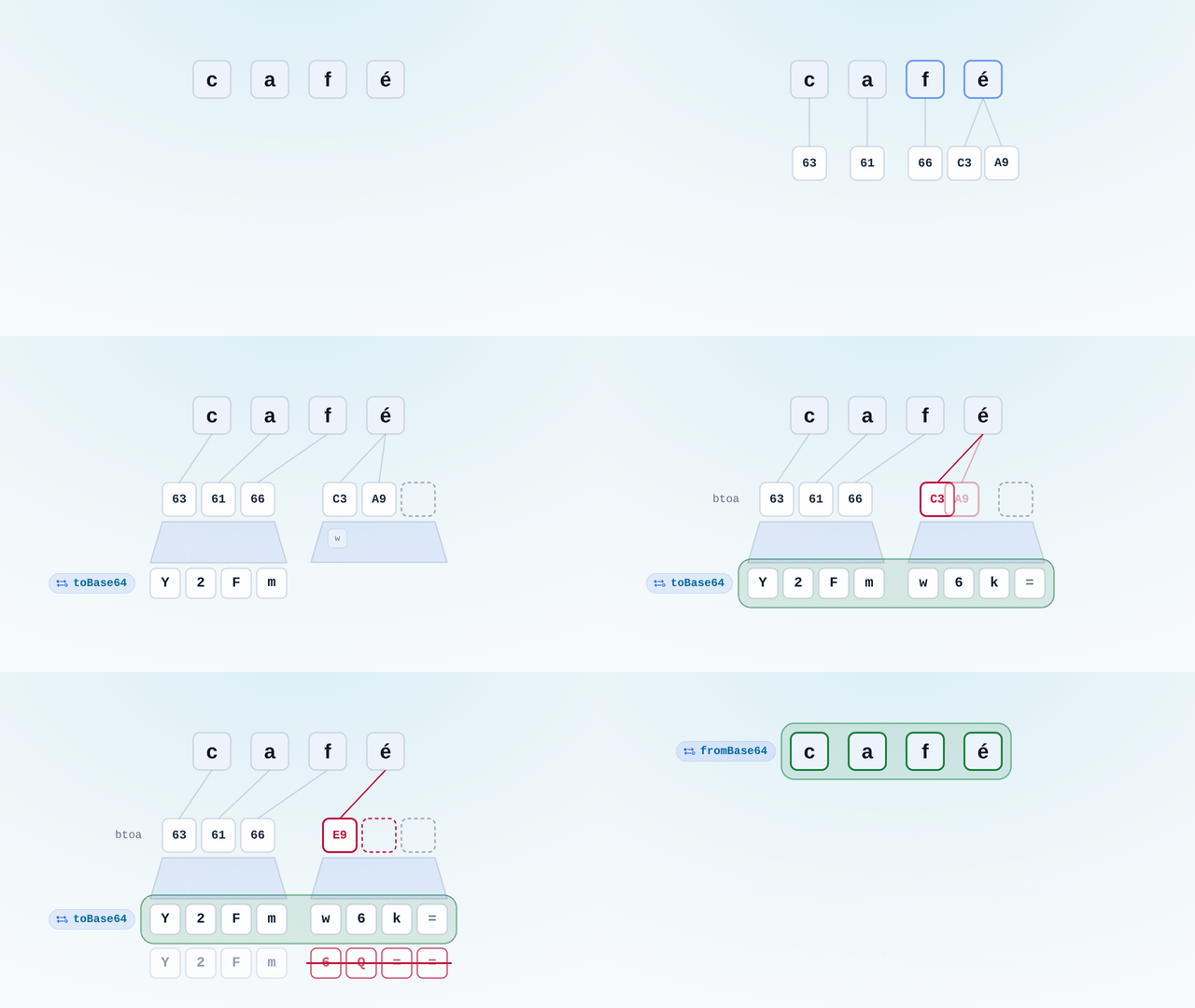
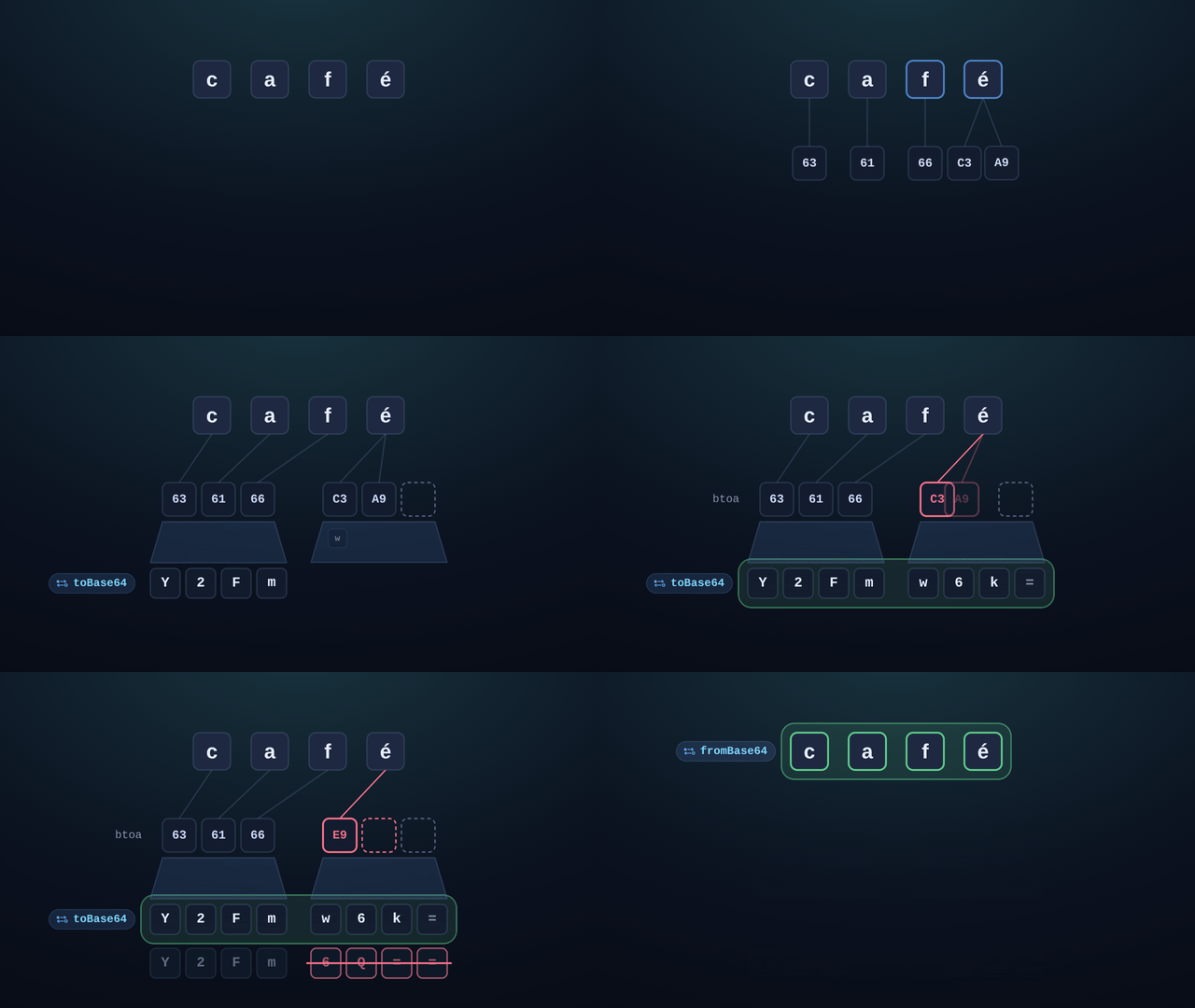
String encoding operations differ significantly between browsers and Node.js. Browser APIs like btoa() don't handle UTF-8 correctly, and Node.js lacks native base64-to-Uint8Array converters. This library provides consistent APIs that "just work" across platforms while handling edge cases like multi-byte UTF-8 characters and binary string conversions.
Example pain point solved: btoa('こんにちは') throws in browsers because it expects Latin-1 encoding, but toBase64('こんにちは') correctly handles UTF-8 encoding in both environments.
2. Required Foundation for @hyperfrontend/cryptography
All cryptographic operations in @hyperfrontend/cryptography depend on these encoding utilities for converting between text strings and binary data. The library provides the UTF-8 ↔ Uint8Array conversions essential for encryption/decryption workflows, ensuring consistent encoding behavior across Web Crypto API (browser) and Node.js crypto implementations.
3. URL-Safe Base64 Without Manual Character Replacement
Many APIs (JWTs, URL query parameters, cloud storage identifiers) require URL-safe base64 encoding where + becomes - and / becomes _, with padding characters optionally removed. This library handles these transformations automatically with simple boolean flags, eliminating error-prone manual string replacements.
4. Security-Conscious Implementation
String manipulation with regular expressions can expose applications to ReDoS (Regular Expression Denial of Service) attacks. This library explicitly avoids regex operations for padding removal and character replacements, using loop-based approaches that guarantee linear time complexity regardless of input patterns.
5. Optimal Tree-Shaking Through Modular Exports
By exposing separate /browser and /node entry points rather than auto-detecting environments at runtime, the library enables bundlers to eliminate unused code automatically. Frontend builds only include browser implementations, and backend builds only include Node.js implementations: no dead code, no runtime checks.
Installation
npm install @hyperfrontend/string-utilsQuick Start
Browser usage:
import { toBase64, fromBase64, utf8StringToUint8Array } from '@hyperfrontend/string-utils/browser'

// Standard base64 encoding
const encoded = toBase64('Hello, World!')
console.log(encoded) // 'SGVsbG8sIFdvcmxkIQ=='

// URL-safe base64 without padding
const urlSafe = toBase64('Hello, World!', true, false)
console.log(urlSafe) // 'SGVsbG8sIFdvcmxkIQ' (no padding)

// Decoding (handles both standard and URL-safe)
const decoded = fromBase64(urlSafe)
console.log(decoded) // 'Hello, World!'

// UTF-8 to binary for crypto operations
const bytes = utf8StringToUint8Array('こんにちは')
console.log(bytes) // Uint8Array[227, 129, 147, ...]
Node.js usage:
import { toBase64, fromBase64, utf8StringToUint8Array } from '@hyperfrontend/string-utils/node'

// Identical API, optimized Node.js implementation
const encoded = toBase64('Hello, World!')
const bytes = utf8StringToUint8Array('こんにちは')
API Overview
One API surface, two ways in. @hyperfrontend/string-utils/browser and @hyperfrontend/string-utils/node export the same seven functions under the same names, with
the same signatures, producing byte-identical output; which one you import is a question about where your code runs, not about what you need. The split is there so that
TextEncoder/btoa stays on one side and Buffer on the other: a bundler ships exactly one implementation and nothing has to sniff the environment at runtime. The
identifiers below link to the browser entry point, and the node page documents the same seven.
Two of them cover most uses. toBase64 takes a UTF-8 string and returns base64;
fromBase64 takes base64 back to a string, accepting standard and URL-safe spellings
without being told which. The options live on the encoding side, as toBase64(text, urlSafe = false, keepPadding = false): urlSafe maps + to - and / to _, and
keepPadding is read only inside that branch, so standard base64 always keeps its =. This pair is why the package exists at all: btoa is a Latin-1 API and toBase64
encodes UTF-8 first, so 'café' round-trips instead of returning Y2Fm6Q==.
The other five are for when the payload is bytes rather than text. utf8StringToUint8Array
and uint8ArrayToUtf8String are the text-to-bytes pair that @hyperfrontend/cryptography is built on;
uint8ArrayToBase64 and
base64ToUint8Array are the same base64 hop with a Uint8Array on the near
side, the encoder taking the same two flags; and arrayBufferToUtf8String decodes
what a fetch response or a FileReader hands you. All of them are plain synchronous calls: a value in, a value out, no options object and no state.
Every signature, parameter and default is in the API reference for browser and for node.
Compatibility
Runs on
- Node.js>=18.0.0supported
- Browserssupported
- Web Workerssupported
Ships as
- ESMTree-shakeable
- CJSNode and older bundlers
- IIFEHyperfrontendStringUtils
- UMDHyperfrontendStringUtils
CDN Usage
<!-- unpkg -->
<script src="https://unpkg.com/@hyperfrontend/string-utils"></script>

<!-- jsDelivr -->
<script src="https://cdn.jsdelivr.net/npm/@hyperfrontend/string-utils"></script>

<script>
  const { utf8StringToUint8Array, uint8ArrayToBase64 } = HyperfrontendStringUtils
</script>
Global variable: HyperfrontendStringUtils
Dependencies
None: zero external dependencies.
API Reference§
Module Structure
2 modules · 14 total exports
Browser-side string encoding utilities for base64 and UTF-8 conversions.
ƒ Functions
Parameters
| Name | Type | Description |
|---|---|---|
§uint8Array | ArrayBuffer | The ArrayBuffer to convert |
Returns
stringExample
Converting ArrayBuffer to string
const encoder = new TextEncoder()
const buffer = encoder.encode('Hello, World!').buffer
const decoded = arrayBufferToUtf8String(buffer)
// => 'Hello, World!'Parameters
| Name | Type | Description |
|---|---|---|
§base64 | string | The base64 encoded string to convert |
Returns
Uint8ArrayExamples
Standard base64
const bytes = base64ToUint8Array('SGVsbG8=')
// => Uint8Array([72, 101, 108, 108, 111]) // 'Hello'
URL-safe base64 (without padding)
const bytes = base64ToUint8Array('SGVsbG8')
// => Uint8Array([72, 101, 108, 108, 111]) // 'Hello'Parameters
| Name | Type | Description |
|---|---|---|
§base64 | string | The base64 encoded string to decode |
Returns
stringExamples
Standard base64
const message = fromBase64('SGVsbG8sIFdvcmxkIQ==')
// => 'Hello, World!'
URL-safe base64
const token = fromBase64('eyJ1c2VySWQiOjEyM30')
// => '{"userId":123}'Parameters
Returns
stringExamples
Standard base64
const encoded = toBase64('Hello, World!')
// => 'SGVsbG8sIFdvcmxkIQ=='
URL-safe without padding (for URLs/tokens)
const token = toBase64('{"userId":123}', true, false)
// => 'eyJ1c2VySWQiOjEyM30'Parameters
| Name | Type | Description |
|---|---|---|
§bytes | Uint8Array | The Uint8Array to encode |
§urlSafe | boolean | Whether to use URL-safe base64 encoding (replaces + and / with - and _)(default: false) |
§keepPadding | boolean | Whether to keep padding characters (=) in the output(default: false) |
Returns
stringExamples
Standard base64
const bytes = new Uint8Array([72, 101, 108, 108, 111])
const encoded = uint8ArrayToBase64(bytes)
// => 'SGVsbG8='
URL-safe without padding
const bytes = new Uint8Array([72, 101, 108, 108, 111])
const token = uint8ArrayToBase64(bytes, true, false)
// => 'SGVsbG8'Parameters
| Name | Type | Description |
|---|---|---|
§uint8Array | Uint8Array | The Uint8Array to convert |
Returns
stringExample
Converting Uint8Array to string
const bytes = new Uint8Array([72, 101, 108, 108, 111])
const text = uint8ArrayToUtf8String(bytes)
// => 'Hello'Parameters
| Name | Type | Description |
|---|---|---|
§text | string | The UTF-8 string to convert |
Returns
Uint8ArrayExample
Encoding string to bytes (browser)
const bytes = utf8StringToUint8Array('Hello')
// => Uint8Array([72, 101, 108, 108, 111])Node.js-side string encoding utilities for base64 and UTF-8 conversions.
ƒ Functions
Parameters
| Name | Type | Description |
|---|---|---|
§uint8Array | ArrayBuffer | The ArrayBuffer to convert |
Returns
stringExample
Converting ArrayBuffer to string
const encoder = new TextEncoder()
const buffer = encoder.encode('Hello, World!').buffer
const decoded = arrayBufferToUtf8String(buffer)
// => 'Hello, World!'Parameters
| Name | Type | Description |
|---|---|---|
§base64 | string | The base64 encoded string to convert |
Returns
Uint8ArrayExamples
Standard base64
const bytes = base64ToUint8Array('SGVsbG8=')
// => Uint8Array([72, 101, 108, 108, 111]) // 'Hello'
URL-safe base64 (without padding)
const bytes = base64ToUint8Array('SGVsbG8')
// => Uint8Array([72, 101, 108, 108, 111]) // 'Hello'Parameters
| Name | Type | Description |
|---|---|---|
§text | string | The base64 encoded string to decode |
Returns
stringExamples
Standard base64
const message = fromBase64('SGVsbG8sIFdvcmxkIQ==')
// => 'Hello, World!'
URL-safe base64
const token = fromBase64('eyJ1c2VySWQiOjEyM30')
// => '{"userId":123}'Parameters
Returns
stringExamples
Standard base64
const encoded = toBase64('Hello, World!')
// => 'SGVsbG8sIFdvcmxkIQ=='
URL-safe without padding (for URLs/tokens)
const token = toBase64('{"userId":123}', true, false)
// => 'eyJ1c2VySWQiOjEyM30'Parameters
| Name | Type | Description |
|---|---|---|
§bytes | Uint8Array | The Uint8Array to encode |
§urlSafe | boolean | Whether to use URL-safe base64 encoding (replaces + and / with - and _)(default: false) |
§keepPadding | boolean | Whether to keep padding characters (=) in the output(default: false) |
Returns
stringExamples
Standard base64
const bytes = new Uint8Array([72, 101, 108, 108, 111])
const encoded = uint8ArrayToBase64(bytes)
// => 'SGVsbG8='
URL-safe without padding
const bytes = new Uint8Array([72, 101, 108, 108, 111])
const token = uint8ArrayToBase64(bytes, true, false)
// => 'SGVsbG8'Parameters
| Name | Type | Description |
|---|---|---|
§uint8Array | Uint8Array | The Uint8Array to convert |
Returns
stringExample
Converting Uint8Array to string
const bytes = new Uint8Array([72, 101, 108, 108, 111])
const text = uint8ArrayToUtf8String(bytes)
// => 'Hello'Parameters
| Name | Type | Description |
|---|---|---|
§text | string | The UTF-8 string to convert |
Returns
Uint8ArrayExample
Encoding string to bytes (Node.js)
const bytes = utf8StringToUint8Array('Hello')
// => Uint8Array([72, 101, 108, 108, 111])Related reading§
- How-to
How to base64 text that survives Unicode and URLs
btoa either throws on emoji or quietly mangles accented text, and the base64 it does produce comes back percent-escaped when it travels in a query parameter.
- How-to
How to encrypt and decrypt a string with a password
I need to store an API key, a token, or a note encrypted under a password, and I do not want to hand-roll key derivation, salts, and initialisation vectors around the Web Crypto API.
- Package
@hyperfrontend/cryptography
Used by @hyperfrontend/cryptography for UTF-8/binary conversions
- Getting started
Getting Started
Set HyperFrontend up and embed a first feature.
- Architecture
Architecture Guide
How the packages fit together.