

@hyperfrontend/
Functional time utilities for async operations, intervals, and time normalization.
What is @hyperfrontend/time-utils?
@hyperfrontend/time-utils provides composable, testable utilities for working with time-based operations in JavaScript. The library focuses on enhancing the control and flexibility of standard timing APIs (setTimeout, setInterval) while adding specialized utilities for async workflows and time window calculations.
Unlike the native timing APIs which offer limited lifecycle control, this library wraps them in functional interfaces that support pausing, resuming, resetting, and subscription management. All utilities return immutable objects with frozen APIs, preventing accidental mutation while maintaining predictable behavior.
Key Features
Pause, resume, and reset
setTimeoutoperations with tracked remaining timeObservable interval loops supporting multiple callbacks with unified start/stop control
Async/await compatible
sleep()utility for sequential code flowsBucket timestamps into fixed intervals (e.g., 5-minute windows for aggregation)
Functional cleanup
All repeating operations return cleanup functions for straightforward teardown
Immutable APIs
All returned objects are frozen, preventing accidental state modifications
Zero dependencies
Self-contained timing utilities with no external dependencies
TypeScript native
Full type definitions with comprehensive JSDoc documentation
Why Use @hyperfrontend/time-utils?
1. Pause/Resume Capabilities Native APIs Lack
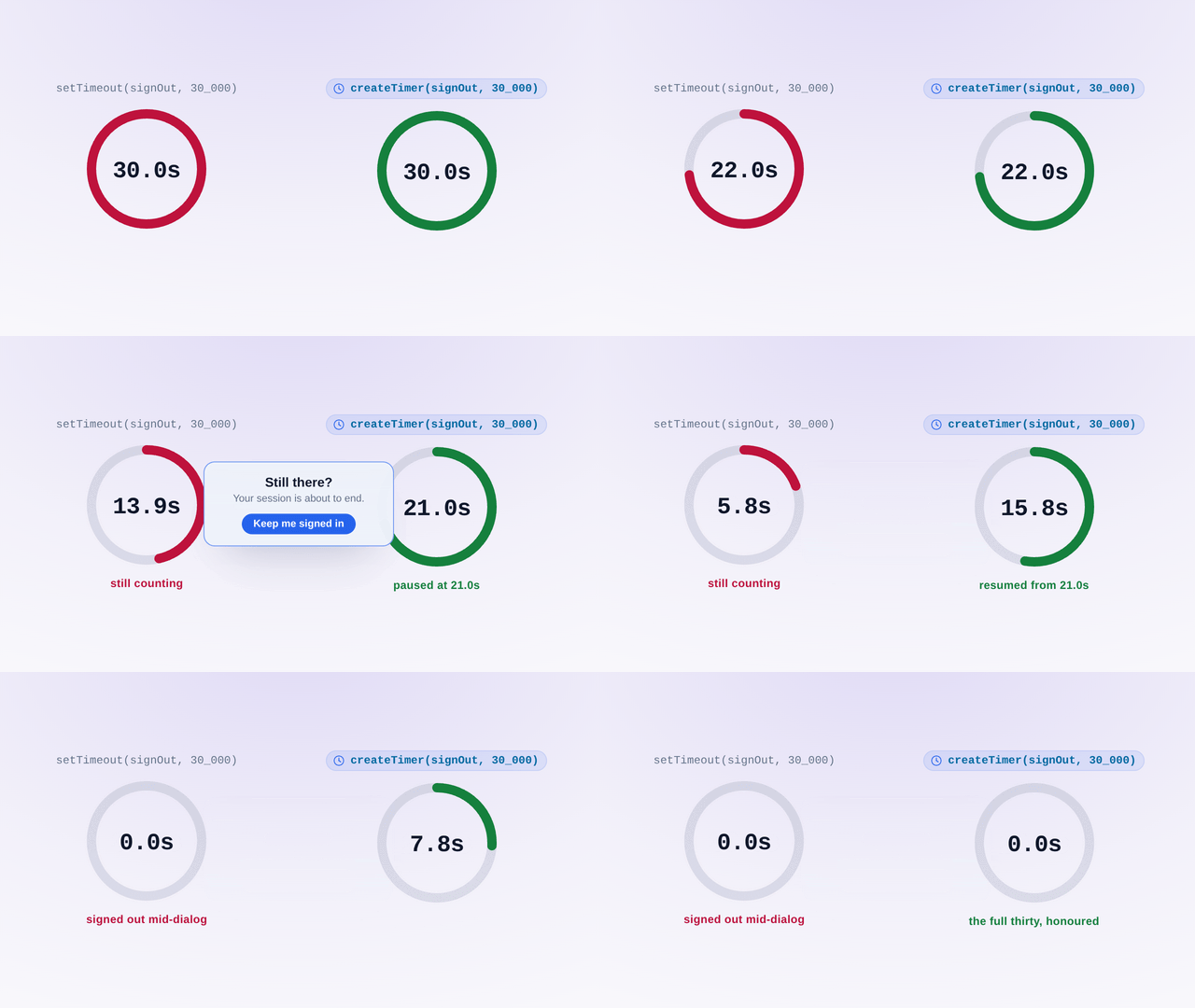
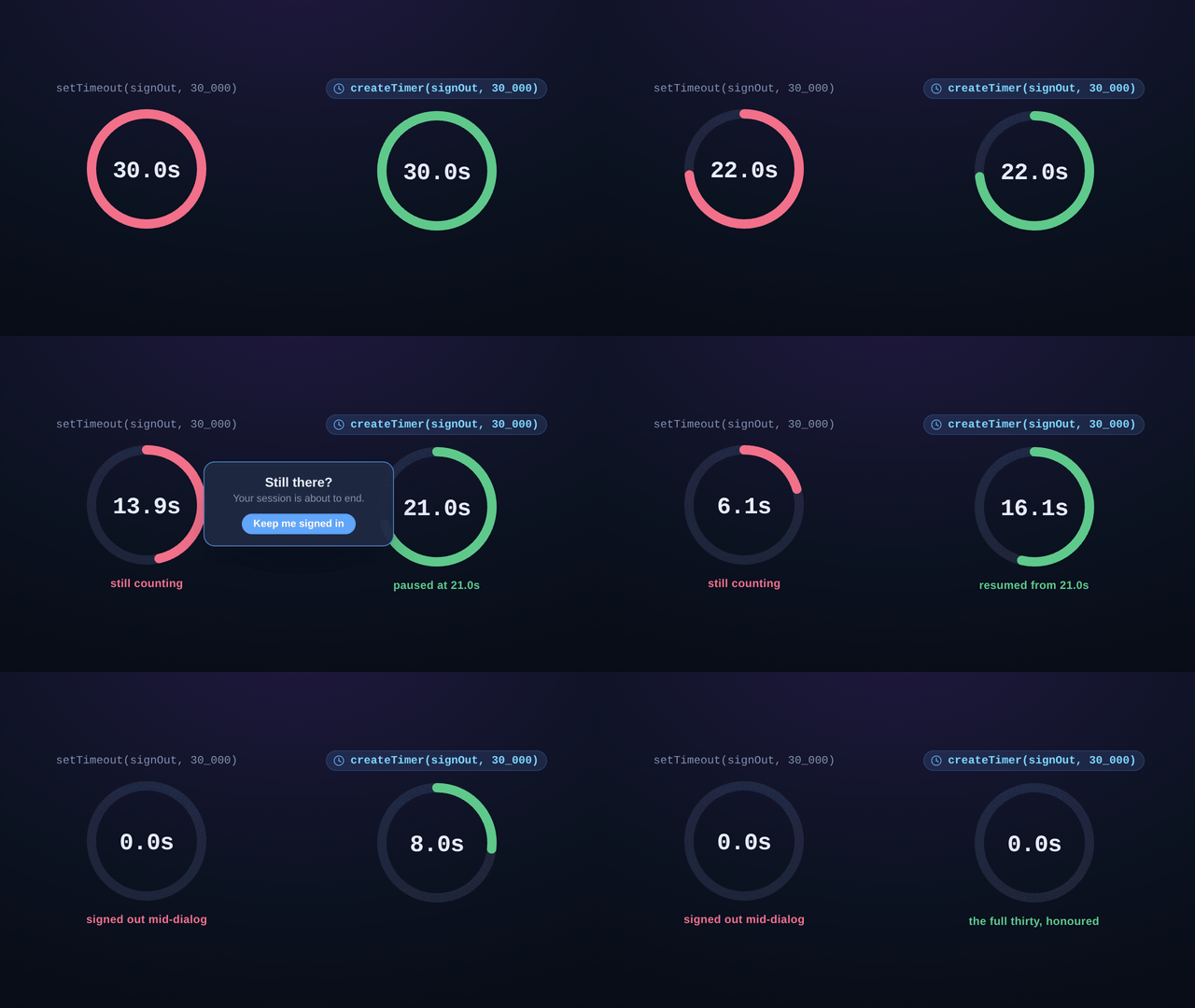
JavaScript's setTimeout and setInterval cannot be paused: once started, they either complete or get cancelled. This creates problems for features like user-initiated pauses in games, animations during background tabs, or request throttling. createTimer() tracks elapsed time internally, enabling pause/resume without restarting from the beginning or losing progress.
Example: A countdown timer in a game needs to pause when the user switches tabs. With setTimeout, you'd need to calculate remaining time manually and create a new timeout. With createTimer, just call timer.pause().
2. Multi-Subscriber Interval Management
Native setInterval requires creating separate intervals for each callback that needs to run at the same frequency, leading to drift and coordination issues. createClock() lets multiple callbacks subscribe to a single interval loop, ensuring they all fire synchronously at exact intervals. Perfect for real-time dashboards, clocks, or animation frames.
Example: A dashboard with 5 widgets updating every second would require 5 separate setInterval calls, potentially drifting apart. A single clock can notify all widgets simultaneously from one interval.
3. Async/Await Integration for Sequential Delays
Writing readable sequential code with delays requires nested callbacks or promise chains with setTimeout. sleep() provides a clean async/await compatible delay utility that works naturally with modern async functions. This is essential for testing, retry logic, rate limiting, and animation sequences.
Example: Retry logic becomes await sleep(1000); retry() instead of setTimeout(() => retry(), 1000), maintaining the sequential flow of async functions.
4. Time Window Normalization for Aggregation
Real-time data aggregation often requires grouping events into time buckets (5-minute windows, hourly intervals, etc.). normalizeToBaseTimeWindow() rounds timestamps down to the nearest window boundary, simplifying time-series data grouping for metrics, logs, and analytics.
Example: Events at 10:03, 10:07, and 10:12 with a 5-minute window all normalize to 10:00, 10:05, and 10:10 respectively, creating clean bucket keys for aggregation.
5. Immutable, Testable Timing Abstractions
Testing code with setTimeout and setInterval typically requires jest timers or sinon fakes, adding complexity. These utilities use standard timing APIs internally but expose functional interfaces that are easier to mock and test. The frozen return objects prevent accidental mutations that could cause subtle timing bugs.
Installation
npm install @hyperfrontend/time-utilsQuick Start
Pauseable timer:
import { createTimer } from '@hyperfrontend/time-utils'

const timer = createTimer(() => console.log('Done!'), 5000)

timer.resume() // Start the 5-second countdown

// After 3 seconds, user pauses
timer.pause() // Pauses with 2 seconds remaining

// Later, resume from where we left off
timer.resume() // Continues with remaining 2 seconds

// Or reset with a new duration
timer.reset(10000) // Restart with 10 seconds
Multi-subscriber clock:
import { createClock } from '@hyperfrontend/time-utils'

// Create a clock that ticks every second
const clock = createClock(1000)

// Multiple subscribers can listen
clock.subscribe((time) => console.log('Widget 1:', time))
clock.subscribe((time) => console.log('Widget 2:', time))

clock.start() // Both widgets update every second

// Later, stop all updates
clock.stop()

// Unsubscribe specific callbacks
clock.unsubscribe(callback)
Async delays:
import { sleep } from '@hyperfrontend/time-utils'

async function retryWithDelay(fn, attempts = 3) {
  for (let i = 0; i < attempts; i++) {
    try {
      return await fn()
    } catch (error) {
      if (i < attempts - 1) {
        await sleep(1000 * Math.pow(2, i)) // Exponential backoff
      }
    }
  }
  throw new Error('All retries failed')
}
Time window normalization:
import { normalizeToBaseTimeWindow } from '@hyperfrontend/time-utils'

// Group metrics into 5-minute windows
const times = ['10:03:45', '10:07:22', '10:12:03']
const events = times.map((time) => new Date(`2024-01-17T${time}Z`))

const buckets = new Map()
events.forEach((timestamp) => {
  const bucket = normalizeToBaseTimeWindow(timestamp, 5)
  const key = bucket.toISOString()
  buckets.set(key, (buckets.get(key) || 0) + 1)
})

// Results: 10:07:22 floors to 10:05, not to 10:00, so the three events land in three separate buckets
// "2024-01-17T10:00:00Z" → 1 event
// "2024-01-17T10:05:00Z" → 1 event
// "2024-01-17T10:10:00Z" → 1 event
Simple interval with cleanup:
import { setIntervalCallback } from '@hyperfrontend/time-utils'

// Returns a cleanup function
const cleanup = setIntervalCallback(() => {
  console.log('Polling...')
}, 5000)

// Later, stop polling
cleanup()
API Overview
Five functions, one gap they all fill: setTimeout and setInterval schedule work but give you nothing to steer it with afterwards. Two of the five are where you
start. createTimer is a timeout you can interrupt: pausing banks whatever was
left of the delay instead of discarding it, so resuming runs out that remainder rather than serving the full delay again, and reset(newDelay?) is the one call
that does start over. createClock solves the opposite problem, fanning a single
interval out to any number of subscribers, so ten widgets on a one-second cadence share one tick and one Date rather than drifting apart on ten intervals of
their own.
Both hand back a frozen object rather than a numeric handle you are expected to hold onto and clear. A Timer
is pause, resume and reset; a Clock is start, stop, subscribe, unsubscribe
and a read-only interval. One detail worth knowing before your first call: a timer is created idle, so nothing is scheduled until you resume() it once.
The remaining three are single-purpose and take no object at all. sleep is a delay you can
await in sequence. setIntervalCallback is a repeating interval for the case
where teardown is all you want back, returning the cleanup function directly. And
normalizeToBaseTimeWindow floors a Date to a window boundary and
returns a new Date, which is how independent callers derive the same bucket key from clocks that never agreed to the millisecond.
Every signature, option and return type is in the API reference.
Compatibility
Runs on
- Node.js>=18.0.0supported
- Browserssupported
- Web Workerssupported
Ships as
- ESMTree-shakeable
- CJSNode and older bundlers
- IIFEHyperfrontendTimeUtils
- UMDHyperfrontendTimeUtils
CDN Usage
<!-- unpkg -->
<script src="https://unpkg.com/@hyperfrontend/time-utils"></script>

<!-- jsDelivr -->
<script src="https://cdn.jsdelivr.net/npm/@hyperfrontend/time-utils"></script>

<script>
  const { createResumableInterval, sleep } = HyperfrontendTimeUtils
</script>
Global variable: HyperfrontendTimeUtils
Dependencies
None: zero external dependencies.
API Reference§
ƒFunctions
Allows you to start or stop the interval loop, much like a stop watch. Allows you to unsubscribe callback functions.
Parameters
| Name | Type | Description |
|---|---|---|
§interval | number | Time in milliseconds between each callback invocation (default: 1000ms)(default: 1000) |
Returns
ClockExample
Creating interval clock
const clock = createClock(1000)

const updateDisplay = (currentTime: Date) => {
  console.log(currentTime.toISOString())
}

clock.subscribe(updateDisplay)
clock.start()

// Later: stop receiving updates
clock.stop()Parameters
Returns
TimerExample
Creating pausable timer
const timer = createTimer(() => {
  console.log('Session expired')
}, 30_000)

timer.resume() // Start the 30-second countdown

// User activity detected - pause the timer
timer.pause()

// User idle again - resume from where we left off
timer.resume()

// Reset to full 30 seconds on explicit action
timer.reset()Parameters
Returns
DateExample
Normalizing to 15-minute buckets
// Round timestamps to 15-minute intervals for analytics bucketing
const eventTime = new Date('2024-03-15T14:23:45Z')
const bucketTime = normalizeToBaseTimeWindow(eventTime, 15)
// => 2024-03-15T14:15:00.000ZParameters
Returns
(Example
Setting interval with cleanup
const stopPolling = setIntervalCallback(() => {
  fetchLatestData()
}, 5000)

// Later: clean up when component unmounts
stopPolling()Parameters
| Name | Type | Description |
|---|---|---|
§milliseconds | number | The duration to sleep in milliseconds |
Returns
Promise<Example
Implementing retry backoff
async function retryWithBackoff(attempt: number) {
  const backoffMs = Math.min(1000 * 2 ** attempt, 30_000)
  await sleep(backoffMs)
  return fetchResource()
}◈Interfaces
Properties
Properties
Related reading§
- How-to
How to pause and resume a countdown
My idle timeout has to stop while a dialog is open and continue from where it stopped, and every version I write with setTimeout drifts or restarts by accident.
- Package
@hyperfrontend/cryptography
Used by @hyperfrontend/cryptography for time-window password generation
- Getting started
Getting Started
Set HyperFrontend up and embed a first feature.
- Architecture
Architecture Guide
How the packages fit together.